
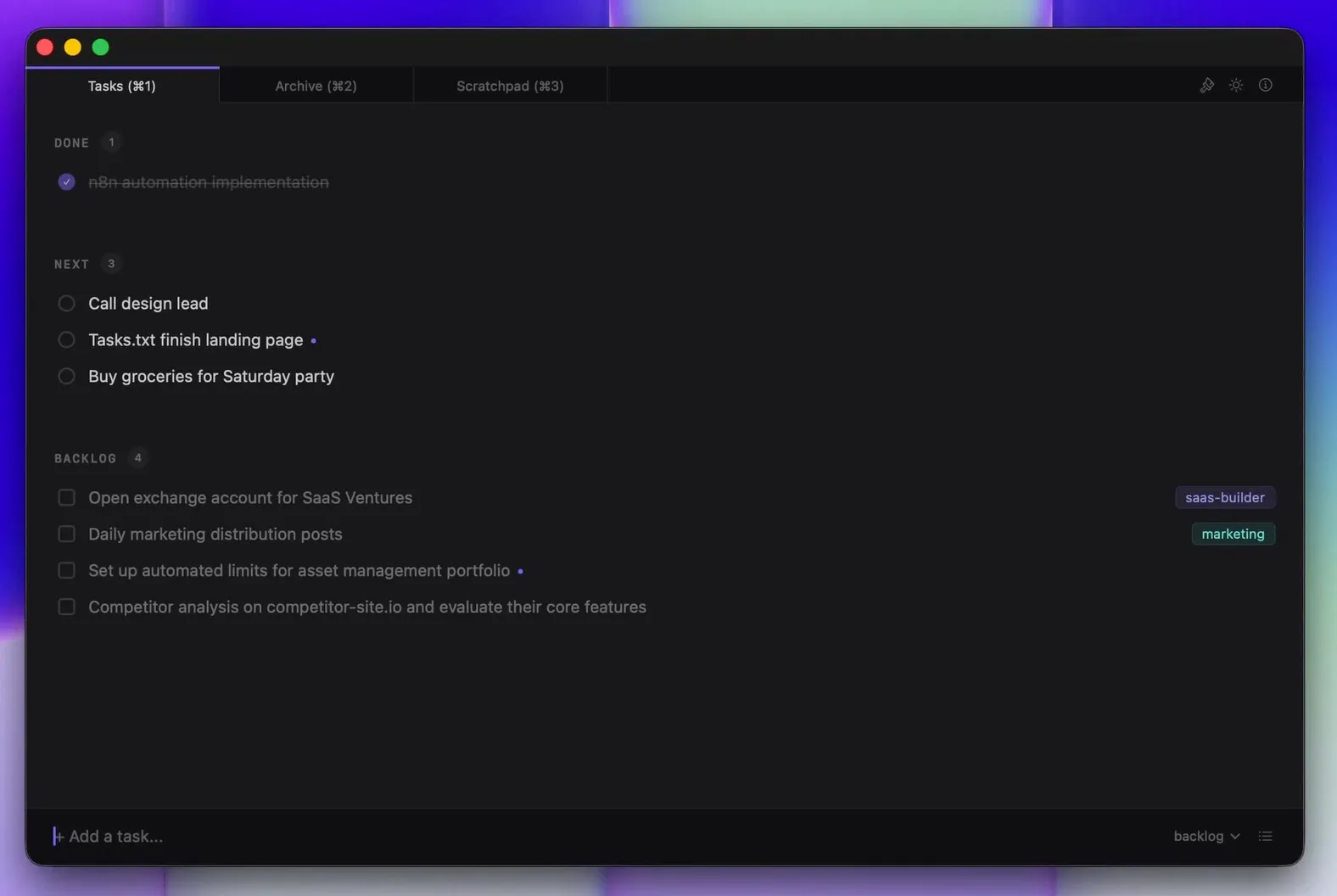
Product Introduction
- Definition: Tasks.txt is a native macOS desktop application, specifically a keyboard-driven plain text task manager. It functions as a productivity layer over a standard
.txtfile that adheres to the open todo.txt format. - Core Value Proposition: It exists to provide the speed, simplicity, and data ownership of managing tasks in a text editor, but with the dedicated user experience and automation of a native app. It eliminates the manual file operations and formatting required when using a general-purpose text editor like Sublime Text for task management.
Main Features
- Native macOS Performance: Built entirely in Swift with no Electron or web-wrapper runtime, the app launches instantly, scrolls at 120fps, and processes keystrokes with zero perceptible lag. This technical foundation ensures a fluid, responsive experience that matches the speed of opening a text file.
- Keyboard-Centric Workflow: Every core action is mapped to a keyboard shortcut for efficiency. Navigation (↑/↓), toggling completion (⌘↩), moving tasks between sections (⌘↑/⌘↓), sending to backlog (⌘⇧↓), searching (⌘F), and switching views (⌘1/2/3) are all performed without touching the mouse, minimizing context switching.
- Plain Text File Ownership: All data is stored in a human-readable
tasks.txtfile located in~/Documents/tasks-txt/. The app uses the standardized todo.txt format, meaning tasks are one-per-line withxfor completion,+projecttags,due:dates, and custom attributes likeupcoming:true. This file can be directly opened, edited, searched withgrep, and version-controlled with Git outside the app. - Integrated Scratchpad: A dedicated notes space accessible via ⌘3, stored as a separate
scratch.txtfile in the same directory. This feature captures non-task items like ideas, meeting notes, or reference information, preventing the need for a separate text editor window and keeping related work contextually close. - Automatic Daily Task Archiving: Completed tasks (marked with
xand adone:date) remain visible in a "Done" section for the rest of the day. Overnight, the system automatically archives them to a historical file, clearing the active list for a fresh start each morning while preserving a complete audit trail.
Problems Solved
- Pain Point: The friction and context loss of switching between a dedicated task manager and a text editor or terminal for quick edits, searches, or version control. It also solves the lag and bloated feel of complex, cloud-dependent productivity applications.
- Target Audience: The primary user personas are software developers, technical writers, system administrators, and knowledge workers who are already comfortable with plain text workflows, command-line tools, and value data portability. It specifically targets those who have tried apps like Things, OmniFocus, or Notion but reverted to using a
.txtfile for its simplicity. - Use Cases: Essential for individuals who maintain a daily "Today" list at the top of a text file, use
greporagto filter tasks from the terminal, track work within a Git repository, or need a frictionless system that works offline with absolute data privacy. It is also ideal for pairing with automation scripts that parse or generate the todo.txt file.
Unique Advantages
- Differentiation: Unlike Things or OmniFocus which use proprietary, binary databases, Tasks.txt uses an open, human-readable text file. Unlike Electron-based apps (like many modern note-taking apps), it is a lightweight native binary. Unlike using a text editor alone, it adds automated sorting, filtering, and keyboard-driven manipulation without altering the fundamental file format.
- Key Innovation: The app's core innovation is its role as a "zero-friction compiler" for the todo.txt format. It does not replace the file but provides a optimized, interactive view and manipulation layer for it. The automatic grouping of tasks into "Done," "Upcoming" (via
upcoming:true), and "Backlog" based on plain text attributes, without corrupting the source file, is a specific technical approach that bridges manual text and managed apps.
Frequently Asked Questions (FAQ)
- How does Tasks.txt handle syncing across multiple Macs?
Tasks.txt has no built-in cloud sync. Syncing is achieved by placing the
~/Documents/tasks-txt/folder within a cloud-synced directory (like iCloud Drive, Dropbox, or OneDrive) or a Git repository. The app will read from and write to the file in that synced location, allowing any plain-text-compatible sync service to manage data transfer. - Can I use Tasks.txt with an existing todo.txt file from another app?
Yes, absolutely. Tasks.txt is fully compatible with the standard todo.txt format. You can point the app to an existing
todo.txtfile, or simply move your existing file to~/Documents/tasks-txt/tasks.txt. All your tasks, projects, contexts, and metadata will be recognized and organized within the app's interface. - Is Tasks.txt really free with no catch or data collection? Yes. The app is free on the Mac App Store with no subscriptions, in-app purchases, or feature limitations. Its privacy policy explicitly states it collects no telemetry, analytics, or personal data. All data resides in local text files, and there are no servers involved in the application's operation.
- What happens if the Tasks.txt app stops working or is discontinued?
Your data remains completely accessible and usable. Since all tasks are stored in a standard
tasks.txtfile and notes inscratch.txt, you can immediately open, edit, and manage them using any text editor (TextEdit, VS Code, Sublime Text) or command-line tool. There is no vendor lock-in or data migration required. - How does the "Upcoming" filter work compared to a due date?
The "Upcoming" view filters tasks that have the attribute
upcoming:trueadded to their line in the text file. This is a flexible, user-defined flag distinct from a formaldue:date. It's designed for tasks you want to surface to the top of your list without assigning a specific deadline, offering a simpler, more informal way to prioritize.


