
Productivity Tools
2959 best Productivity tools and apps, curated and ranked by community upvotes on ProductCool. Updated daily as new Productivity products launch.

20% off PhraseVault 3.0 on phrasevault.app this hunt—auto-applied, no code. Lock one sensitive phrase at a time with a PIN, while everyday snippets expand across Windows and macOS. Source-available: inspect and verify the code.

Thread is an AI journal and second brain for capturing thoughts, ideas, notes, and voice recordings. It automatically connects related memories, finds patterns in your thinking, and turns scattered ideas into meaningful threads. Capture anything in seconds, rediscover what matters, and turn your thoughts into actionable ideas with a private AI-powered memory system.

Project Feed is a workspace for game developers, design teams and agencies. Share updates, plan tasks, edit docs and work on canvases together. Review images, video, audio, PDFs, 3D models, Rive files and sprite sheets. Turn feedback into tasks that link back to the review. Clients can approve selected updates or request changes in a portal. Includes chat, time tracking and analytics. Pro adds integrations and full API, CLI and MCP access. Free for up to 3 editors.

Stop wasting 3 days scheduling a 30 minute group meeting or starting over every time someone cancels. Like a real executive assistant, Toki will email attendees, negotiate a time that works for everyone, follow up if needed, and send out invites. Toki will also help protect your time, architect your schedule, remember your preferences, and help you prioritize your most important tasks and urgent deadlines. And instead of paying tens of thousands, it's now free.

PeakHour 6 is a real-time network monitor for your Mac. Its on-device AI Advisor grades your connection from A+ to F and explains it in plain English. Plus Wi-Fi Intelligence, ISP and router details, speed tests and outage alerts. No account needed.

Jottoo turns meetings and notes into organised, deadline-tracked tasks — automatically. Record, upload, or type — no bot joins your call, nothing to install. Ask Jottoo anything about a past meeting and get the answer instantly. One flat plan, $13.99/month

Turn your MacBook notch into a Dynamic Island for media, Apple Notes, on-device translation, calendar, files, clipboard and quick tools with Fide Island.

Expand is a spatial board for macOS. Place text, images, files, and shapes on an open canvas, then nest boards you can actually go into. Double-click the board to add something. Right-click to choose text, images, files, or shapes. The plus in the toolbar adds from the top of the window. Drag to arrange. Open a board to work inside it, then use the title-bar breadcrumbs to go back up.

Write a workshop as one plain Markdown file and run it live. Students join with a code - no accounts - and you see which step everyone is on: who's stuck, who's done, who needs help. Polls, quizzes, chat and a session report built in. Free, no credit card.

is.team is an infinite canvas where AI agents and your team plan, build, and ship together — visually. Drag kanban boards and notes onto a spatial workspace. AI agents join via MCP as real teammates — creating tasks, joining conversations, and shipping work alongside your team. Built-in voice rooms, real-time collaboration, GitHub/Slack/Calendar integrations. $16/mo flat for 15 people. Free to start, no credit card needed.

Most alarms are a sound you silence. Fifi is a call you answer. It rings through Silent mode and a Focus — built on iOS 26 AlarmKit, so the alarm needs no network. Your Lock Screen shows an incoming call with a face and a name. Answer, and one of ten characters reads you your day: last night's note, your forecast, your headlines. An ASMR whisper, a film-noir detective, a nature doc, a drill sergeant, a pantomime baroness, a fairy godmother. 39 ringtones. A backup call. A streak.

Feedback in WhatsApp. Versions in Drive. Approvals lost in email. The review process eats into the actual work. Proofrr is one workspace for creative projects, client feedback, and version control. ✓ Project management for design & video workflows ✓ Side-by-side draft comparison ✓ Annotations & threaded comments ✓ Shareable review links — no client login needed ✓ AI-assisted reviews to speed up feedback

Thoughts is a menubar app for your Mac which helps you keep notes quickly using text, images and voice. Add your favorite agent API key and it'll also help transcribe audio, context images to text and help do simple text-tranforms like capitalization, translations and spelling fixes. Think of it as a fun small multi-tool for your menubar.
Building a business with AI can quickly become a mess of chats, tools, ideas, and conflicting advice. siift turns that noise into a living map of your business, connecting strategy, evidence, decisions, and results in one place. From validation and build strategy to GTM and growth, our AI uses your evolving business context and proven processes to challenge assumptions, identify risks, and help you focus on what matters next.

jurniti is a private always-on box for your AI agent. Each agent gets its own Firecracker microVM with a KVM hardware boundary, the same primitive AWS uses for Lambda, not a shared Docker container. Bring your own model keys. They stay inside the guest. Pay, and the box is live in about three minutes: in-browser terminal, persistent disk, your subdomain. Claude Code, Codex, Hermes, OpenClaw, and other upstream agents. From $25/mo. 30-day money-back on the first purchase. No free trial.

PeekPaste is a native clipboard manager for Mac that stays out of your way until you need it. Push your pointer against the screen edge and your clipboard slides in. Find text, code, links, images, colors and files, search inside screenshots with on-device OCR, pin and organize clips, or open the full Library when you need more. Everything stays on your Mac - no accounts, analytics, telemetry or cloud clipboard service.

Tangerine is a Mac app for converting files simply with Shift-drag. Hold Option for advanced tools. Convert and compress images, videos, audio, PDFs, and archives, remove metadata, redact documents, and annotate photos. All locally, without uploading your files.
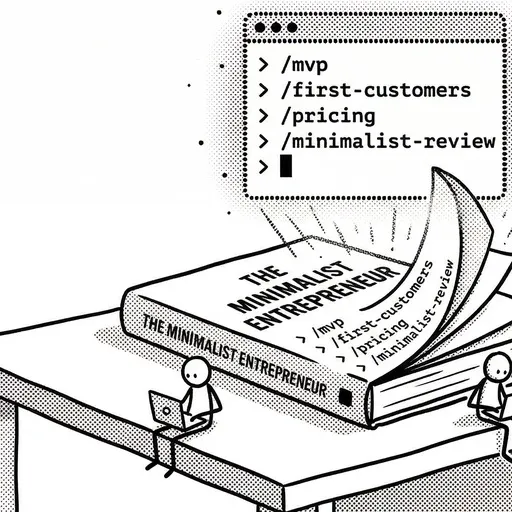
The Minimalist Entrepreneur as 10 open-source Claude Code skills by Sahil Lavingia. Install the plugin, then run slash commands like /validate-idea, /mvp, /pricing, and /minimalist-review to apply the book to your own business. Free and MIT-licensed on GitHub.

Voiskey starts from what you meant, not just what you said. Speak a rough thought and it comes back shaped for where it's going and who's reading it: casual with a friend, composed with a colleague, technical with an AI. It arrives 5x faster than typing, cleaned up and ready to send, while you still sound like you. Voiskey is now available on iOS, macOS, Android, and Windows, in over 100 languages. It's free to start. Join during launch and get a free month of Pro.
Bundl is a SaaS platform for creating and sharing bundled product and service offers.

Your bookmarks have more to give. Marqly 6.0 adds an AI Assistant that answers from your saves, an AI Organizer that proposes a cleaner library for you to review, and MCP to bring your saved research into Claude, ChatGPT, and Cursor. Keep articles, highlights, videos, and AI chats together. Available on the web, in your browser, and on iOS. Android is coming very soon. AI features are included in Pro.