
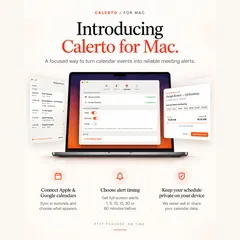
Product Introduction
- Definition: Calerto for Mac is a native macOS productivity application that functions as an intelligent meeting alarm system. It is a calendar management tool that integrates directly with Apple's AlarmKit framework and syncs with Apple Calendar and Google Calendar to transform passive calendar notifications into proactive, system-level audio and visual alerts.
- Core Value Proposition: Calerto exists to solve the problem of missed meetings caused by silent or easily dismissed calendar notifications. Its primary function is to ensure users are never late by converting calendar events into loud, persistent alarms with customizable preparation buffers, leveraging macOS and iOS system-level reliability for alerts that break through Do Not Disturb and Focus modes.
Main Features
- System-Level AlarmKit Integration: Calerto utilizes Apple's native AlarmKit API to schedule and trigger alarms. This technical approach ensures alarms are treated as first-class system alerts, not standard app notifications. They sound even when the Mac is in Do Not Disturb mode, silent mode, or the app is not actively running, providing guaranteed delivery that standard push notifications cannot.
- Customizable Prep Time & One-Tap Arming: For each calendar event, users can set a specific buffer period (1, 5, 10, 15, 30, or 60 minutes, or any custom duration) before the meeting start time. The alarm is then scheduled based on this prep time. Arming an alarm requires a single swipe or tap on the event within the app, streamlining the workflow from seeing an invite to being reminded.
- Dual-Calendar Sync with Privacy-First Architecture: The app synchronizes with both Apple Calendar (via native Calendar access) and Google Calendar (via OAuth). A key technical specification is its on-device data processing; calendar event data is read locally to set alarms but is never transmitted to external servers, modified, sold, or shared, ensuring complete schedule privacy.
- Pro Auto-Alarm & Intelligent Pausing: The Pro subscription tier enables "Auto-Alarm," which automatically arms alarms for every meeting in the user's calendar for the upcoming seven days. Users can pause any individual alarm without deleting it; the app's logic reschedules it via AlarmKit, preserving the user's prep time settings for future recurrences of that event.
- Meeting Join Integration & Live Activities: Calerto parses calendar event descriptions and locations to detect video conference links (Zoom, Google Meet, Microsoft Teams, Webex). A "Join" button activates within the app five minutes before the meeting start time. On supported macOS and iOS versions, it uses Live Activities to display a persistent, glanceable countdown to the next meeting directly on the Lock Screen or Dynamic Island.
Problems Solved
- Pain Point: The inefficacy of standard calendar notifications, which are often silent, visually subtle, and easy to swipe away or miss entirely, leading to tardiness and missed meetings.
- Target Audience: Remote workers and digital nomads managing back-to-back video calls across time zones; sales professionals and consultants with critical client meetings; students with structured class and study group schedules; and any knowledge worker whose productivity is impacted by calendar management overhead.
- Use Cases: A user has a Zoom call starting at 3:00 PM. They set a 10-minute prep time alarm in Calerto. At 2:50 PM, a loud, system-level alarm sounds, breaking through their Focus mode. The Live Activity shows the meeting title. They tap the "Join" button in Calerto at 2:55 PM, launching Zoom directly, ensuring they are punctual and prepared.
Unique Advantages
- Differentiation: Unlike generic reminder apps or calendar apps with basic notifications, Calerto is purpose-built for meeting punctuality using system-level alarm protocols (AlarmKit) for unmissable alerts. Compared to setting manual phone alarms for each meeting, it automates the process by reading the calendar directly and allows for intelligent pausing and rescheduling without losing context.
- Key Innovation: The combination of privacy-first on-device calendar processing with the robustness of AlarmKit. This architecture delivers powerful, reliable automation (auto-scheduling alarms from calendar data) while maintaining a zero-data-collection privacy stance, a significant advantage in the productivity tool space where calendar data sensitivity is high.
Frequently Asked Questions (FAQ)
- Does Calerto work if my Mac is asleep or in Do Not Disturb mode? Yes. Because Calerto uses the macOS AlarmKit framework, its alarms are scheduled at the system level and will sound even if your Mac is asleep (it will wake) or if Do Not Disturb/Focus modes are active, ensuring you never miss a critical alert.
- Is my Google Calendar data secure with Calerto? Yes. Calerto employs a privacy-first architecture where all calendar data (from both Apple and Google Calendar) is processed locally on your device. The app only requests read-access to schedule alarms; it does not transmit, store on external servers, sell, or share your calendar event data.
- Can I set different prep times for different types of meetings? Yes. Calerto allows per-meeting customization of prep time. You can set a unique buffer (from 1 minute to 24 hours) for each individual calendar event when you arm the alarm, allowing for a 2-minute buffer for a quick internal call and a 30-minute buffer for a client presentation requiring preparation.
- What happens to my alarms for recurring meetings? Calerto recognizes recurring calendar events (daily, weekly, etc.). When you arm an alarm for a recurring event, the app can set a corresponding recurring alarm. If you pause or snooze an instance, it intelligently manages the schedule without affecting future instances of that recurring meeting.
- What is the difference between the free and Pro (subscription) version of Calerto? The free version includes core features: AlarmKit alarms, customizable prep time per meeting, Apple Calendar sync, and basic pause functionality. The Pro tier unlocks advanced features including Google Calendar sync, the "Auto-Alarm" feature to automatically arm all meetings for the week, color-coding by calendar, and enhanced calendar search and filtering capabilities.


