
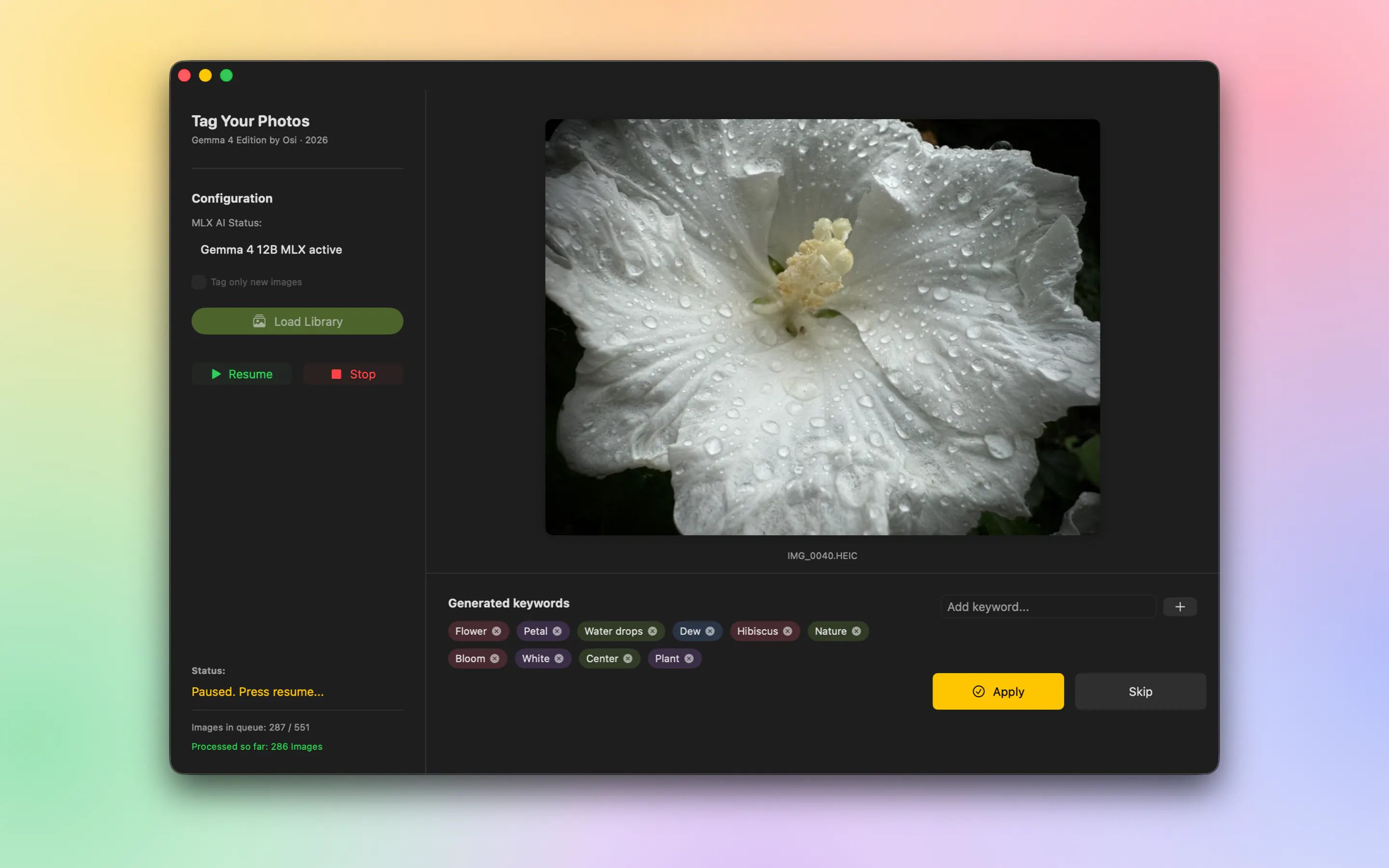
Product Introduction
- Definition: Tag Your Photos is a native macOS application for automated, on-device AI photo keywording and metadata management. It operates as a direct, privacy-focused enhancement tool for the native Apple Photos ecosystem.
- Core Value Proposition: It exists to solve the problem of unsearchable, untagged personal photo libraries by providing a fully private, automated keywording solution that embeds searchable keywords directly into the user's local Apple Photos library, leveraging on-device AI without any cloud dependency.
Main Features
- 100% On-Device AI Processing: The app performs all image analysis locally on the user's Mac using the Gemma 4 12B large language model, accelerated by Apple's MLX framework. This means no image data is ever uploaded to external servers, ensuring complete data privacy and security. The processing happens entirely within the system's memory and GPU resources.
- Direct Apple Photos Library Integration: Unlike standalone photo organizers, Tag Your Photos works directly on the user's existing Apple Photos library. It reads photos from and writes keyword metadata (IPTC keywords) directly back into the library database. This eliminates the need for manual export/import workflows and prevents the creation of duplicate files.
- Autopilot with Manual Review: The app features an automated queue system that processes the entire library. Users can activate an autopilot mode for hands-off processing. Crucially, it includes an interruptible review interface where users can manually approve, edit, or reject AI-generated keyword suggestions for individual photos before they are applied, maintaining user control over the final metadata.
- System-Wide Spotlight Search Integration: Keywords written into the photo library are indexed by macOS Spotlight. This makes photos searchable not only within the Apple Photos app but also directly from the macOS Finder search bar and the system-wide Spotlight search (Cmd+Space), significantly expanding accessibility.
- Persistent Metadata Embedding: The keywords are written as standard IPTC metadata within the image files themselves. When photos are exported from Apple Photos, these keywords travel with the file, making them immediately usable in professional photo management software like Adobe Lightroom or Capture One Pro, breaking free from Apple's proprietary, closed metadata system.
Problems Solved
- Pain Point: The "black box" nature of Apple Photos' built-in object recognition, which creates searchable but non-exportable and non-editable tags. Users cannot see, edit, or leverage these tags outside the Apple ecosystem, locking their organizational effort within a single app.
- Pain Point: Privacy concerns with cloud-based AI photo services that require uploading personal photo libraries to third-party servers for analysis, posing risks for sensitive or personal imagery.
- Target Audience: Privacy-conscious photographers, Mac power users with large personal photo libraries, hobbyists, and professionals who use Apple Photos as their primary hub but need portable metadata for cross-platform workflows. Specifically, users of Apple Silicon Macs (M1, M2, M3, M4 series) with at least 16GB of RAM.
- Use Cases: A user returning from a vacation with thousands of untagged photos can use Tag Your Photos to automatically generate keywords like "beach," "mountains," "family," and "sunset," making the entire collection instantly searchable. A photographer can keyword a decade-old archive locally, then export keyworded images to Lightroom for professional cataloging without starting from scratch.
Unique Advantages
- Differentiation vs. Cloud Services: Unlike online AI taggers (like Google Photos, Amazon Rekognition-based tools), Tag Your Photos guarantees zero data transfer off the device, offering a superior privacy proposition for users with sensitive photo collections.
- Differentiation vs. Apple Photos Native Features: It writes real, standard-compliant, user-editable keywords into the file metadata, whereas Apple's scene recognition is a proprietary, non-exportable system. This provides true data ownership and interoperability.
- Key Innovation: The integration of a powerful, locally-run LLM (Gemma 4 12B) via Apple's MLX framework for contextual understanding. This allows it to generate more nuanced and descriptive keywords (e.g., "vibrant street market at dusk") compared to simpler, on-device object detection models, while still maintaining full offline operation.
- Key Innovation: Seamless, bidirectional integration with the native Apple Photos app as a background service, automating the entire process from library access to metadata writing without requiring complex setup or file management from the user.
Frequently Asked Questions (FAQ)
- Does Tag Your Photos work on Intel Macs? No, Tag Your Photos requires an Apple Silicon Mac (M1, M2, M3, or M4 series) because its core AI functionality depends on the MLX framework, which is optimized for and requires the Neural Engine present in Apple's own silicon for efficient on-device machine learning acceleration.
- Are my photos ever sent to the cloud or an external server? No. Tag Your Photos is a 100% on-device application. All AI processing for photo analysis and keywording is performed locally on your Mac using the Gemma model and Apple's MLX. No image data is uploaded to the internet, ensuring complete privacy.
- Can I edit the keywords that the AI suggests? Yes. The app includes a manual review mode where you can approve, modify, or reject the AI-generated keyword suggestions for any photo before they are permanently written to your library. You maintain full editorial control over the final metadata.
- Will the keywords work if I export my photos to other software like Lightroom? Yes. The app writes standard IPTC keywords directly into the metadata of your image files within the Apple Photos library. When you export these photos (e.g., as JPEG or original files), the keywords are embedded and will be recognized by most professional photo management software, including Adobe Lightroom and Capture One Pro.
- Why does the app require macOS 26.5 or later? The application leverages the latest APIs and frameworks available in macOS 26, particularly for deep integration with the Photos library and system security. The MLX framework and underlying dependencies for running the Gemma model efficiently also require this modern OS version.


