
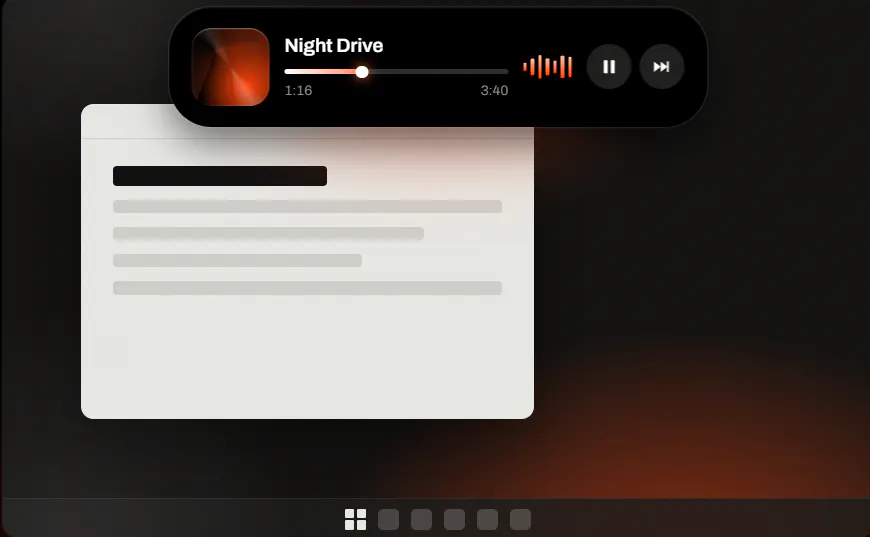
Product Introduction
- Definition: Notchzy is a Windows desktop utility application that implements a "Dynamic Island" interface, a persistent, interactive widget that resides at the top-center of the user's screen. Technically, it is a lightweight, always-on-top overlay that integrates with core Windows APIs for media control, system notifications, and power management.
- Core Value Proposition: Notchzy exists to centralize and streamline access to frequently used system functions and real-time information—like media playback, timers, and notifications—without requiring users to switch windows or interrupt their workflow. Its primary value is in reducing context-switching and "alt-tabbing" by providing a persistent, hover-activated control panel that is both non-intrusive and instantly accessible.
Main Features
- Universal Media Control: Notchzy integrates with the Windows Global System Media Transport Controls (GSMTC) API. This allows it to display and control playback for any application that registers with the system, including Spotify, web browsers (Chrome, Edge, Firefox) playing audio/video, and native media players. Users can play, pause, skip tracks, and see track metadata directly from the expanded island.
- Integrated Focus Timer & System Notifications: The application includes a built-in focus timer with Pomodoro technique support, managed within the island. Simultaneously, it captures and displays native Windows Action Center notifications (from apps like Slack, Outlook, Discord) within its interface, consolidating alerts into a single, glanceable location without forcing pop-ups.
- Context-Aware Visibility & Utility Tools: Notchzy employs window detection to automatically hide when any application enters full-screen mode (e.g., during gaming or video playback), ensuring zero screen interference. Its utility suite includes a clipboard history manager for recalling recently copied items and a "file tray" for quick drag-and-drop storage, both accessible from the island.
Problems Solved
- Pain Point: It addresses the fragmentation of system controls and information, which are typically scattered across the taskbar, system tray, and notification center. This fragmentation forces inefficient window management and disrupts user focus.
- Target Audience: The primary user personas are productivity-focused professionals (developers, writers, designers), students, and general PC users who multitask with music, communication apps, and time-sensitive tasks. It is particularly valuable for users with single or ultrawide monitors where taskbar space is at a premium.
- Use Cases: Essential scenarios include: controlling music during focused work without leaving the current window; monitoring a Pomodoro timer and incoming message notifications during a deep work session; quickly checking laptop battery charging status; and accessing recently copied text or files without disrupting application workflow.
Unique Advantages
Strengths & Limitations (Pros & Cons):
- Pros: Exceptionally lightweight with minimal CPU/RAM footprint; seamless system integration via official Windows APIs; non-intrusive, hover-based interaction model; automatic hiding in full-screen applications preserves immersion; strong privacy stance with all data processed locally.
- Cons: Functionality is dependent on Windows' underlying APIs (e.g., notification consistency can vary by app); currently lacks advanced customization or plugin ecosystem compared to some full-featured widget engines; requires Windows 10 version 2004 or later, excluding older systems.
Key Alternatives & Differentiation:
- Rainmeter: A highly customizable desktop customization platform. Differentiation: Rainmeter is a powerful but complex toolkit requiring user configuration. Notchzy is a zero-configuration, purpose-built product offering a specific, polished user experience out-of-the-box.
- Mac's Dynamic Island (via Hackintosh or VM): The original inspiration, native to Apple hardware. Differentiation: Notchzy brings a similar conceptual UX to the native Windows environment without requiring non-Windows hardware or software, and is optimized for Windows-specific APIs and user behaviors.
- Other Desktop Widgets (e.g., XWidget): Often focus on aesthetics and information display (clocks, weather). Differentiation: Notchzy is fundamentally interactive, centered on control (media, timer) and notification management, acting as a system utility rather than a passive dashboard.
Frequently Asked Questions (FAQ)
- Is Notchzy safe and does it collect my data? Notchzy is a safe, local-first application. It does not contain ads, analytics, or tracking code. All data—including media info, notification content, and clipboard history—is processed exclusively on your PC and never transmitted to external servers.
- How does Notchzy affect PC performance and gaming FPS? Notchzy is designed as a lightweight utility. It uses negligible system resources during normal operation. Crucially, it features automatic full-screen detection, causing it to completely hide itself during gaming or video playback, resulting in zero impact on frame rates (FPS) or immersion.
- Can I move the Notchzy island or customize its appearance? Based on its current design philosophy, the Notchzy island is fixed at the top-center of the screen to mimic the "notch" location and ensure consistent muscle memory. It offers dark/light themes and accent color options, but does not support arbitrary repositioning or deep skinning, prioritizing a uniform, predictable experience.
- Which music and messaging apps are compatible with Notchzy? For music, it works with any app that supports Windows system media controls (Spotify, Apple Music, YouTube/YouTube Music via browser, VLC, etc.). For notifications, it displays alerts from any application that uses the standard Windows Action Center notification system, which covers most modern apps like Microsoft Teams, WhatsApp, Discord, and email clients.
- What are the system requirements to run Notchzy? Notchzy requires a PC running a 64-bit version of Windows 10 (Build 2004 or later) or Windows 11. It does not require a dedicated GPU or significant storage space, making it compatible with most modern laptops and desktop computers.


