
User Experience Tools
283 best User Experience tools and apps, curated and ranked by community upvotes on ProductCool. Updated daily as new User Experience products launch.

Put what you’re building in front of real customers or synthetic users trained on them when you need an answer in minutes without leaving Claude, Cursor, or Jira. Nothing ships on a guess.

Juniors AI Concierge is AI-powered customer support for modern teams. Unify WhatsApp, Instagram, email and in-app chat in one workspace, automate repetitive requests with human handover, ask questions about your data in plain English, and track AI and human agent performance. Built on a Bring Your Own Infrastructure model: connect your database, Redis and AI provider keys, and we handle the AI orchestration. Smarter support, full control.

Hibi is a free, open-source desktop writing and note-taking app designed for individuals seeking more control over their document organization and creation. It is an alternative to apps like Obsidian and Joplin, combining standard knowledge management features with a flexible editing experience that surpasses markdown.

Lugh Xtudio is a video editor where AI agents edit with you on a real timeline. Give each channel a workspace with its own style, run several agents on one video or many, and create 3D, maps and custom effects by asking. Free on Mac, Windows and Linux (beta).

Inflight puts a feedback toolkit on your preview links and HTML prototypes. Reviewers comment directly on the live running app, with comments pinned to real elements, and feedback becomes next steps a coding agent can implement over MCP.

Add live widgets, quick actions, apps, folders, search, stats, weather, calendars, reminders, and more into a beautiful second Dock beside your original Mac Dock.

Give Neophyte any product URL and watch an AI agent onboard from scratch. It creates an identity, signs up, verifies its email, navigates setup, and attempts activation. Use the captured product flow and friction report to find drop-off risks, audit launches, test onboarding changes, research competitors, and improve experiences for humans and agents.

Gaze focus switching: look at a window and it becomes the active one. Per-eye wink clicks: left wink and right wink are separate actions. Face-gesture shortcuts: map gestures to the actions you use most. Notch island: a small live indicator in the notch area shows what Winq detected. No extra hardware: it works with your Mac’s built-in camera, with a short guided calibration. Private by design: all face tracking runs on your Mac, and no video leaves the device.
NewMinecraftServers helps players find their next Minecraft community and gives server owners tools to grow theirs. Discover Java and Bedrock servers, explore player statistics, and follow activity trends before choosing where to play. Owners can claim and promote their server listing, showcase their community, and access detailed analytics on player counts, uptime, peak activity, and busiest hours -- making it easier to understand their audience and attract new players.
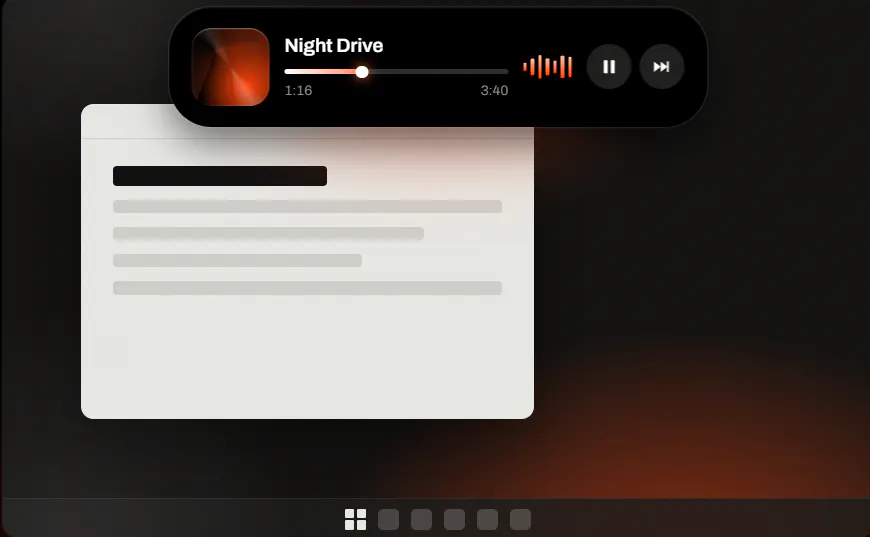
Notchzy is a dynamic island which is highly interactive and useful specifically for windows PC and unlike other alternatives in the market its a very lightweight app hardly using any extra power on your PC.

TractionWave evaluates ads and marketing visuals with AI attention prediction — a heatmap and ranked hotspots in seconds. Know it gets seen before the budget goes live.

Isle sits at the top of your screen. Closed, it's a small pill with a little face. It looks around, waves when you sign in, and hides in a game or a video. Hover or click and it opens. Music. Volume for each app. Clipboard. A timer, pomodoro, and today's calendar. Notes. Drop a file or a shortcut on it and open it later. Wi-Fi, brightness, night light. Battery, and a speed check. Stick it to the top or let it float. Change the color. If the face is too much, turn it off and keep the clock.

Figma's agent lives right on the Design canvas and works with your real components, variables and team files, not flat images. Generate layout directions, bulk-edit across screens, turn comments into changes and build prototypes from a prompt. Pull context from Notion, Slack, GitHub and Linear via MCP, build your own plugins and shaders, and save repeatable workflows as skills your team runs with "/". Stay in flow from idea to review.

Circle Panel is An End To End AI-native UX Research platform for Plan, Recruit, Analyze User research Studies
Whether you’re creating passes for a local fitness center, a small music venue, a global airline, or a national coffee chain, Pass Designer makes it easy to craft and preview passes that reflect your business.
FeelMyMac brings haptic textures to cursor movement and scrolling on Mac trackpads. Instead of feeling feedback only when you click, you can actually feel simulated surfaces as you move your cursor, with different materials and textures to choose from. You can enable haptics separately for cursor customize intensity, and add optional sound effects. FeelMyMac also includes keyboard sounds for an extra layer of feedback. How it works? Easy it's Taptic Engine just like an iPhone would!

minimi is personal intelligence that comes to you. We are building a world where before you've said a word, AI already understands you and frees you from the work of managing your own life, so you can spend that time actually living it. Right now, you can adopt AI cats 🐱 on minimi: 1. Cotton captures your personal context so you never explain yourself to AI again. 2. Melody uses this personal context and never lets you miss your commitments More cats 🐈 🐈⬛ to come soon...

Ringo is not just a chatbot. It proactively spots what needs to be done, suggests solutions, and automates your workflows. More than just a tool, Ringo is both a reliable teammate and an AX expert that naturally transforms how your entire organization works with AI.

M9R is the multiplayer layer for AI coding agents. Bring Claude Code, Codex, OpenCode, and other supported agents into one shared workspace. Let them communicate across providers, hand work off, and let teammates join the same work instead of juggling isolated tabs. Not another model. A better place where agents work together and talk to everyone in the space.

AEXGrid turns AI coding agents into a visual team. Bring Codex, Cursor, Kiro, OpenCode and more into one workspace, assign roles, and connect agents with collaboration links and reviewed handoffs. Ask managers to organize the work, follow task steps and file changes, dictate prompts, and access your desktop workspace remotely from your phone. Each agent keeps its own conversation while working toward a shared goal.

We allow users to sketch out their vision in 3D before generating, so instead of worrying about the little details you can focus on bringing your world to life.