
Product Introduction
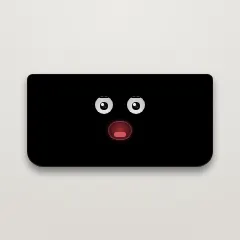
Definition: Notchling is a free, native Swift-based macOS utility application (versioned for macOS 13 Ventura and later) that installs an interactive, animated "creature" directly inside the hardware notch of modern MacBook Pro and MacBook Air models. It occupies the always-visible camera cutout area and functions as a multi-purpose ambient tool: a drag-and-drop file shelf, a system-aware status pet, a weather renderer, and an AI agent telemetry monitor for CLI tools such as Claude Code. The entire application is distributed as a 900 KB ZIP archive, supports both Apple Silicon and Intel architectures, and runs with zero network dependencies, meaning no account creation and no data leaving the local machine.
Core Value Proposition: Notchling converts the MacBook notch—historically a dead, unusable visual region—into a persistent, interactive productivity surface. Its core value proposition is ambient contextual utility: the notch stays visible at all times, so the app repurposes that visual space to host temporary file storage, glanceable weather, battery and hardware telemetry, and an always-on visual indicator of AI coding agent workflow status. Unlike conventional menu bar apps or floating widgets, Notchling does not rely on popup banners or notification center alerts; it communicates system state through the creature's animation states, integrating information into the peripheral awareness of the user while maintaining an unprecedented privacy posture and a sub-megabyte footprint.
Main Features
Drag-and-Drop File Shelf ("The Mouth"): Notchling serves as a persistent file shelf hosted in the notch. Users drag any file, URL link, plain-text selection, or the macOS screenshot floating thumbnail directly onto the creature. The app responds by animating the mouth open, "swallowing" the object, and holding it indefinitely until retrieval is requested. The implementation is built on macOS drag-and-drop pasteboard APIs (NSPasteboard / NSDraggingDestination), meaning the object is stored as a pasteboard item rather than duplicated on disk—no hidden storage bloat. Retrieval is one click, which drops the item back onto the desktop, the Finder, or the current active application. Additionally, right-clicking a held image exposes the "Chew" contextual menu, which triggers three on-device transformations: format conversion to JPEG or PNG, file-size reduction/compression, and OCR (Optical Character Recognition) to extract raw text from the image. These functions are processed locally via native macOS Vision and ImageIO frameworks; the app's documentation explicitly confirms that nothing leaves the Mac. This OCR and conversion bundle is notably positioned as a free alternative to feature sets that competing notch utilities charge $10–30 for.
Creature State Engine (Ambient Attention System): Notchling operates as an animated state machine connected to core macOS input and event APIs. It tracks cursor position across the display, so the creature's eyes visibly follow the mouse as it moves—simulating a sense of "watching" the user. When there is no input activity for a set idle duration, the app switches to a dozing/nap animation, giving visual confirmation of system inactivity. Users can also grab the creature by dragging it sideways; this physically reveals any occluded content sitting behind the notch region on the display. When released, it drifts back to its home position using an eased animation. From a UI/UX perspective, this turns a hardware-constrained, non-interactive screen gap into a movable, physics-aware element that no longer blocks draggable windows, menu bar items, or toolbar regions—a meaningful technical accommodation for full-screen work on 14-inch and 16-inch MacBook Pros.
System Telemetry Visualization (Battery, Camera, Keyboard, Storage): The app's aesthetic states are driven by real-time hardware and system events, acting as an ambient, non-interrupting notification channel:
- Battery: When AC power is connected, the creature's cheeks flush a warm color. When the battery level enters a low state, the creature yawns—functioning as a glanceable power warning without a notification center popup.
- Camera: When the FaceTime/continuity camera is active, the creature shuts its eyes, functioning as a lightweight privacy indicator of camera state.
- Keyboard State: Enabling Caps Lock triggers a distinct visual response.
- Network/Storage: Offline status and low disk space ("stuffed disk") also produce distinct animation cues.
This architecture avoids the disruption of notification banners and sound alerts, delivering system status exclusively through peripheral visual feedback. The implementation is event-driven via macOS notification center daemons (NSWorkspace, IOKit power APIs, camera-state APIs), ensuring no continuous polling overhead—a crucial design decision given the app's sub-1 MB and low-CPU design goals.
Embedded Weather Rendering Engine: The notch area can display real-time atmospheric conditions through lightweight, procedurally generated visual states: a breathing sun for clear daytime, a cratered moon for clear night weather, rain with particle-splash animation that crashes onto the notch's lower lip, and forked lightning for storm cells. The rendering is performed via Apple's Core Animation and Core Graphics particle/vector APIs, which keeps memory footprint minimal and performance fluid. Users toggle weather variants—or collapse the effect entirely to a "bare notch" state—from a right-click context menu. This feature gives MacBook users a persistent weather signal without opening a separate application, a menu bar dropdown, or Launchpad widget, making it particularly useful during full-screen work sessions where the menu bar is hidden.
AI Agent Terminal Monitoring (Claude Code Integration): One of the most technically distinctive features is Notchling's integration with Claude Code, Anthropic's terminal-based AI coding agent. While a Claude Code session is executing a task in the terminal, Notchling displays an "ember pulse" animation—a visible, breathing glow that signals active processing. When the agent becomes "stuck" waiting for user input, approval, or a decision, the creature shifts to a "glance down" state. Clicking the creature at that moment immediately focuses the corresponding terminal window. This effectively transforms the hardware notch into a persistent CI/CD-style status LED for AI-driven development, allowing developers to run long autonomous agent tasks in the background without repeatedly alt-tabbing to check terminal output. The implementation relies on AppleScript/NSAppleScript terminal-session detection and PTY/tty event polling, mapping Claude Code's internal wait-for-input state to the visual state machine.
Problems Solved
Pain Point – Dead Screen Real Estate: The modern MacBook notch crops the macOS menu bar, creating a broken horizontal strip that reduces usable UI space. Notchling reclaims that visually compromised region, turning it into an always-visible anchor point for tools, files, and information. This addresses "notch space optimization" for users who feel the camera cutout wastes premium display real estate.
Pain Point – Ephemeral File and Clipboard Clutter: Desktop clutter from floating screenshot thumbnails, dragged-out file snippets, and temporary links is a common macOS workflow problem. Notchling's file-shelf mechanism gives these transient objects a single, persistent, visually identifiable home in one constant location—the notch—reducing desktop icon accumulation and the cognitive overhead of managing multiple Finder windows during file transfers.
Pain Point – Interruption Fatigue from System Alerts: Battery warnings, low-storage notifications, and camera-active banners contribute to notification fatigue and workflow interruption. Notchling converts these alerts into silent, peripheral visual cues (yawning, flushed cheeks, shut eyes) that inform without demanding attention, addressing the "notification overload" problem for focus-oriented users.
Pain Point – AI Agent Background Blindness: Developers running Claude Code or other AI coding agents in the terminal lack an ambient channel to know when the agent is working versus waiting for human input. Without Notchling, they must manually check terminal windows. The app solves the "agent state visibility" problem, functioning as an external status lamp for asynchronous CLI processes.
Pain Point – Paid Feature Lock-in for Notch Utilities: Many competing macOS notch apps are paid or freemium, charging $10–30 for OCR, image conversion, and file-shelf functionality. Notchling packages these premium-tier features into a free, under-a-megabyte download with no account wall, no subscription model, and no cloud dependency.
Target Audience:
- AI-First Software Developers who run Claude Code, Codex, or similar terminal-native agents and need a persistent visual monitor of asynchronous task status.
- MacBook Power Users / Productivity Enthusiasts who routinely multitask with multiple desktops and want to use the notch as a functional surface rather than a cosmetic obstruction.
- Designers, Marketers, and Content Creators who work with screenshots, need immediate OCR extraction, and frequently convert image formats (JPEG/PNG) inside visual workflows.
- Privacy-Conscious Professionals (journalists, legal teams, researchers) who avoid cloud-synced clipboards or telemetry-reporting utilities; Notchling's "nothing leaves your Mac" guarantee aligns with high-security usage.
- Full-Screen Workers (writers, video editors, presenters) who hide the menu bar and need glanceable weather, battery, and system state without breaking immersion.
- Desktop-Pet / UI-Tinkerer Enthusiasts who appreciate animated, personality-driven application design within system-adjacent UI space.
Use Cases:
- Research Screenshot OCR: A user captures several web pages via the macOS screenshot floating thumbnail, drags the thumbnails into Notchling, right-clicks → Chew, and obtains selectable, quoted text without opening a separate OCR utility or uploading images to a web service.
- Autonomous Code Agent Supervision: A developer pipes a large batch refactor through Claude Code in a hidden terminal. They monitor the notch for the ember pulse; when the pulse halts and the "glance down" appears, they click once to focus the terminal, approve the change, and return to a web browser without losing context.
- Long-Running Presentation Prep: An event organizer in a fullscreen presentation environment checks the notch weather rendering to determine whether rain conditions shifted, without breaking the fullscreen presentation or opening a browser.
- File Organization Between Windows: A creative asset manager drags a batch of reference files into the notch as a temporary holding area while closing and rearranging Finder windows; retrieving each item afterwards happens in a single click.
- Low-Battery Silent Awareness: A field journalist working with a camera active on a 14-inch MacBook Pro uses Notchling's flushes and yawns to know battery status and camera status from a peripheral glance, avoiding disruptive system popups during an interview session.
Unique Advantages
Differentiation: Notchling sits apart from the broader "notch utility" space (NotchDrop, NotchNook, and other menu-bar-resident tools) in several decisive ways:
- Embodied Agent Metaphor: Where other utilities display standard widget icons or file-transfer progress bars, Notchling presents an animated creature with a behavioral state machine—eye tracking, sleep, chewing, blushing, yawning. This transforms the experience from tool to environment, increasing delight and perceived depth.
- Parallel Vision and OCR Suite: The majority of notch tools focus solely on file handoff; Notchling bundles OCR, JPEG/PNG transcoding, and file-size compression as a native right-click workflow. This is an unusually deep feature set for a free sub-megabyte binary.
- Hardware Telemetry Integration: No competing app converges battery, camera state, Caps Lock, network status, and disk fullness into a single non-verbal, animation-based signaling channel. This gives Notchling a tactile, organic "system felt-sense" advantage over serialized menu-bar status icons.
- Claude Code Monitoring: The dedicated agent-status integration (ember pulse / glance-down / click-to-focus) is currently rare or non-existent in competing notch apps, making Notchling uniquely valuable for the growing population of developers using LLM-based terminal agents.
- Price-Feature Asymmetry: Notchling offers free OCR, image conversion, file holding, and agent monitoring, while comparable paid apps charge $10–30 for the same individual features.
Key Innovation: The central technical innovation is the fusion of an animated, anthropomorphic state machine with terminal-native AI agent telemetry. By mapping Claude Code's working/waiting states to the creature's visual behavior—and binding the click action to terminal focus—Notchling converts the hardware notch into a live external status display for asynchronous computational work. This is a novel abstraction: it turns a cosmetic screen cutout into an information radiator that does not require eye movement away from the primary work monitor. A secondary innovation is the "Chew" action—an OCR and image-processing suite embedded into the drag-and-drop pasteboard behavior, executed entirely through local Apple frameworks. This proves that a sub-megabyte application can deliver cloud-grade utility while simultaneously enforcing a zero-telemetry, no-account privacy model.
Frequently Asked Questions (FAQ)
Is Notchling really free on macOS, and does it require a subscription? Yes, Notchling is free forever, with no subscription tier, no trial lock, and no account registration. The official product page describes it as "Free. Native Swift, no account, nothing leaves your Mac." The app is offered as a 900 KB ZIP download and is compatible with macOS 13 or later on both Apple Silicon and Intel Mac models.
How do I install Notchling if macOS shows an "unidentified developer" or Gatekeeper warning? Because the app is not yet notarized by Apple, macOS will warn on first launch. The recommended flow is: unzip the archive, drag Notchling to /Applications, then right-click the app and select Open to bypass the single-time Gatekeeper prompt. Alternatively, the product page provides a terminal installation command:
curl -fsSL https://notchling.vercel.app/get.sh | bash. Since files fetched via curl are not assigned the quarantine attribute, this method avoids the Gatekeeper warning entirely. The page also provides the full SHA-256 hash (e56163bdb1609fb5b3fe49ee649442df7a84251dfc88355835d1e2259a874a7b) and invites users to read the 27-line install script before executing it.Does Notchling send files, screenshots, or OCR text to the cloud? No. Notchling's core privacy promise is that "nothing leaves your Mac." The file-shelf, image conversion, compression, and text extraction (OCR) operations are all performed locally via native macOS frameworks on the device itself. No account, no external service, and no telemetry are involved. This makes it a viable tool for high-security workflows.
How does Notchling's Claude Code monitoring work? When Claude Code runs in a terminal window, Notchling displays an "ember pulse" animation while the agent is actively working. When the agent reaches a state where it is blocked and waiting for user input, the creature shifts to a "glance down" behavior. Clicking the creature at that point brings the corresponding terminal window into focus, allowing the user to interact with the agent promptly. This effectively turns the MacBook notch into an ambient status lamp for CLI-based AI coding sessions.
Can Notchling hold any file type, or only images? The notch shelf accepts files, URL links, plain-text selections, and the floating screenshot thumbnails generated by macOS. The image-specific operations (JPEG/PNG conversion, size compression, OCR) are executed via the right-click "Chew" menu on held images specifically. Other file types are simply stored and retrievable through the pasteboard-based shelf without additional transformation.


