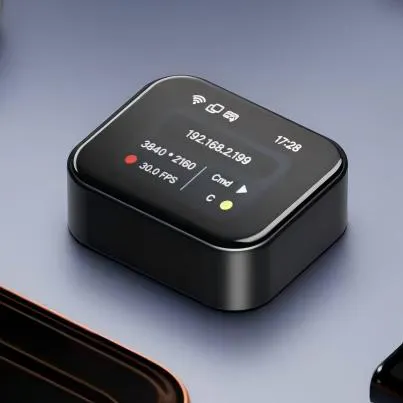
Product Introduction
- Definition: NanoKVM-Go is a compact, serverless, open-source IP-KVM (Keyboard, Video, Mouse) over IP hardware device. It is specifically engineered as an open Model Context Protocol (MCP) server, enabling AI agents to gain hardware-level screen visibility and input control over connected computers.
- Core Value Proposition: It exists to provide a low-cost, portable, and AI-native solution for remote server management, IT support, and automated hardware interaction. Its primary value lies in bridging the gap between AI software agents and physical computing hardware, allowing for automated diagnostics, provisioning, and control without a traditional software stack on the host.
Main Features
- Watch-Sized 4K KVM: The device is an ultra-compact hardware dongle that captures video output (up to 4K resolution) from a host computer's HDMI port and emulates USB HID (Human Interface Device) peripherals. It works by using a dedicated HDMI-to-CSI capture chip and a microcontroller to simulate keyboard and mouse signals, creating a virtual presence.
- Built-in Tailscale & WiFi 6: It integrates Tailscale, a zero-config VPN, directly into its firmware. This feature provides secure, encrypted remote access over the internet without requiring complex port forwarding or public IP addresses. The inclusion of WiFi 6 ensures low-latency, high-bandwidth wireless connectivity for the video stream and control signals.
- Open MCP Server: This is the core innovation. The device runs an open Model Context Protocol server, exposing a standardized API. This allows AI agents (like those built with frameworks such as Claude Code or Cline) to directly query the connected device's screen state and inject keyboard/mouse commands, enabling fully automated, vision-based interaction with BIOS, OS installers, or any other screen-based interface.
Problems Solved
- Pain Point: The high cost and complexity of traditional enterprise IP-KVM solutions for remote data center or lab management. It also solves the "last-mile" problem for AI automation, where software agents cannot interact with physical hardware setup screens, boot menus, or unresponsive operating systems.
- Target Audience: DevOps engineers, SREs (Site Reliability Engineers), lab administrators, embedded developers, and AI/ML engineers building agents that require interaction with bare-metal hardware or isolated test environments.
- Use Cases: Remote server headless management and troubleshooting, automated OS provisioning and imaging, remote IT support for branch offices, controlling test benches in hardware development labs, and enabling AI agents to perform complex, multi-step hardware setup tasks autonomously.
Unique Advantages
- Differentiation: Unlike software-based remote desktop tools (RDP, VNC) which require a functional OS and network stack on the host, NanoKVM-Go operates at the hardware level, providing access from the moment the host powers on. Compared to other IP-KVM devices, its deep integration with Tailscale and its role as an MCP server make it uniquely positioned for secure, automated workflows in modern DevOps and AI pipelines.
- Key Innovation: The conceptual shift from a "remote access tool for humans" to an "open sensor/actuator for AI agents." By implementing the MCP standard, it turns a physical KVM into a tool that can be programmatically discovered and controlled by AI, effectively giving AI agents "eyes and hands" for any connected computer.
Frequently Asked Questions (FAQ)
- What is the difference between NanoKVM-Go and software like VNC? NanoKVM-Go is a hardware device that captures video directly from the HDMI output and injects USB signals, allowing it to control a computer even if the operating system has crashed or hasn't booted. Software like VNC requires a running OS and network stack on the target machine.
- Do I need a public IP address or port forwarding to use NanoKVM-Go remotely? No. The built-in Tailscale VPN creates a secure mesh network between your devices. As long as the NanoKVM-Go and your management device have internet access, they can connect directly without any manual network configuration.
- Can NanoKVM-Go be used to automate server installations? Yes. This is a primary use case. An AI agent or script, via the MCP server interface, can watch the screen for installation prompts and automatically provide keyboard input to complete an OS installation unattended.
- What AI agents are compatible with the NanoKVM-Go MCP server? Any AI agent or development framework that supports the open Model Context Protocol can integrate with it. This includes agents built for Claude, as well as other platforms adopting the MCP standard for tool integration.
- How does the 4K video capture affect bandwidth and latency? The device supports multiple encoding formats (MJPEG, H.264, H.265). While 4K capture is possible, the stream is typically encoded and compressed before transmission. For optimal performance over WiFi or the internet, a lower resolution or higher compression setting is often used to balance visual quality with latency and bandwidth usage.