
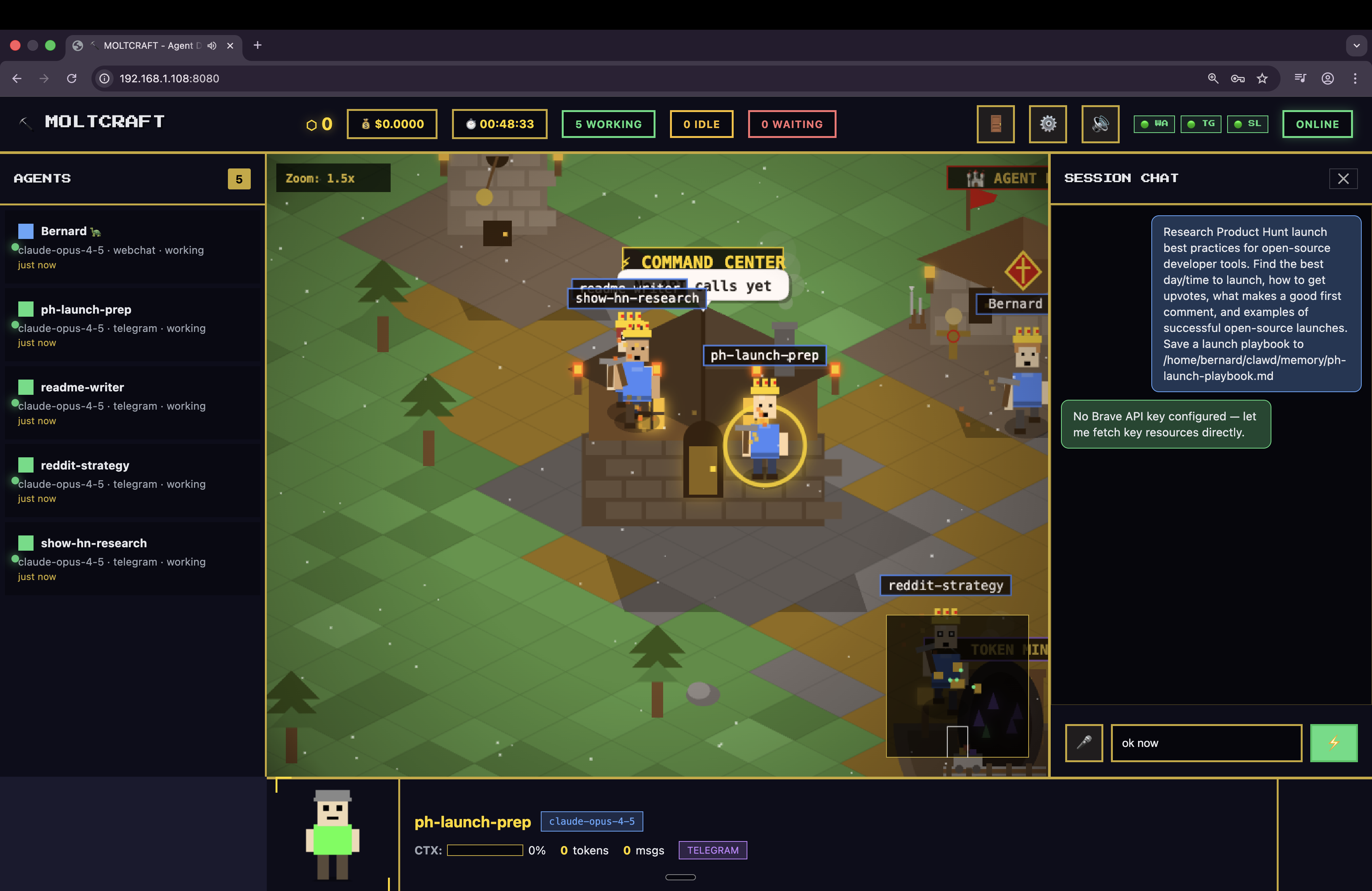
Product Introduction
- Definition: Moltcraft is an open-source isometric pixel dashboard designed specifically for monitoring Moltbot AI agents. Technically, it's a lightweight, client-side web application built purely with HTML, CSS, and vanilla JavaScript (~2MB), requiring zero npm dependencies or build steps.
- Core Value Proposition: Moltcraft exists to replace inefficient terminal log monitoring of AI agents with an immersive, real-time visual world. Its primary value is transforming abstract, text-based agent activity (like JSON logs and terminal outputs) into an interactive pixel-art simulation, enabling users to visually monitor AI agents at a glance and interact with them directly within the dashboard.
Main Features
- Living World Visualization: Agents are represented as pixel characters navigating an isometric world in real-time. This uses HTML5 Canvas and WebSockets for live updates, directly connecting to the Moltbot gateway API. Status, activity, and movement reflect actual agent operations, eliminating the need for log scraping.
- Multi-Agent Dashboard: Provides a single-pane view of all active Moltbot agents. Displays real-time agent status (active/idle/error), token usage metrics, active conversation threads, and skill execution visually, replacing the need to manage multiple terminal tabs or log files.
- Integrated Live Chat & Voice I/O: Users can click any agent pixel character to open a chat interface. Messages stream in real-time via the Moltbot chat API. Built-in Web Speech API integration enables hands-free voice input and text-to-speech output, allowing direct vocal interaction with agents.
- Interactive Infrastructure Buildings: Clickable isometric buildings represent backend components (e.g., cron jobs, API channels, skill modules). Clicking a building surfaces real-time operational data (e.g., cron schedules, channel message volume, skill success rates) via dynamic HTML overlays fetching data from Moltbot.
- Ultra-Lightweight & Dependency-Free: Engineered for minimal resource consumption (~2MB total). Uses vanilla JS DOM manipulation and CSS sprites for rendering, avoiding frameworks like React. Runs efficiently on low-power devices like Raspberry Pi. Deployment is instant via
npx. - Real-Time Data Streaming: All agent actions, conversations, and building data are streamed live using a persistent WebSocket connection to the user's Moltbot instance, ensuring sub-second latency for monitoring without page refreshes.
Problems Solved
- Pain Point: Inefficient AI Agent Monitoring. Traditional methods (terminal logs, JSON outputs, multiple tabs) are fragmented, non-visual, and context-switching heavy, making it hard to grasp overall system health or individual agent activity quickly.
- Target Audience:
- AI Developers & Researchers: Building or experimenting with multi-agent systems using Moltbot.
- DevOps Engineers: Monitoring production Moltbot deployments needing real-time visibility.
- Hobbyists & Tinkerers: Running personal AI assistants on Raspberry Pi or home servers.
- Technical Team Leads: Overseeing teams utilizing AI agents, requiring an at-a-glance status view.
- Use Cases:
- Real-time monitoring of a team of Moltbot agents handling customer support, data processing, or automation tasks.
- Debugging agent interactions by visually observing movement, conversations, and triggered skills.
- Hands-free interaction with agents via voice while performing other development tasks.
- Low-resource deployment of a monitoring dashboard on edge devices (Raspberry Pi, old laptops).
Unique Advantages
- Differentiation: Unlike traditional APM tools (focused on metrics/logs) or generic dashboards (Grafana, Kibana), Moltcraft offers a unique spatial visualization metaphor (isometric world + pixel agents) specifically for AI agent activity. It prioritizes human-readable context over raw data tables. Competitors lack integrated voice I/O and agent-to-pixel-character mapping.
- Key Innovation: The core innovation is the pixel-art simulation layer that translates abstract AI agent API data (status, messages, skills) into intuitive visual and interactive elements (character movement, building clicks, chat bubbles) within a cohesive game-like interface. The zero-dependency, sub-2MB architecture enabling Raspberry Pi use is a significant technical achievement.
Frequently Asked Questions (FAQ)
- What is Moltcraft used for? Moltcraft is an open-source visual dashboard for monitoring Moltbot AI agents in real-time. It replaces terminal logs by displaying agents as pixel characters in an interactive isometric world, showing status, conversations, token usage, and infrastructure health visually.
- Do I need Moltbot to use Moltcraft? Yes, Moltcraft is exclusively a dashboard for Moltbot. You must have a running Moltbot instance (your own server, Raspberry Pi, VPS) as Moltcraft connects to its API to visualize agent data. Install Moltbot first.
- How resource-intensive is Moltcraft? Moltcraft is extremely lightweight (~2MB), built with pure HTML/CSS/JS and zero npm dependencies. It's designed for low-power devices and runs efficiently on a Raspberry Pi or any modern web browser.
- Can I self-host Moltcraft? Absolutely. Moltcraft is MIT-licensed open-source software. You can fork the GitHub repository, run it locally via
npx, or host it on your own web server. Your data stays on your Moltbot instance. - Is there a cloud version of Moltcraft? A cloud-hosted version of Moltcraft is in development, offering a managed service with no local installation required. You can join the waitlist at moltcraft.xyz for early access.


