
Product Introduction
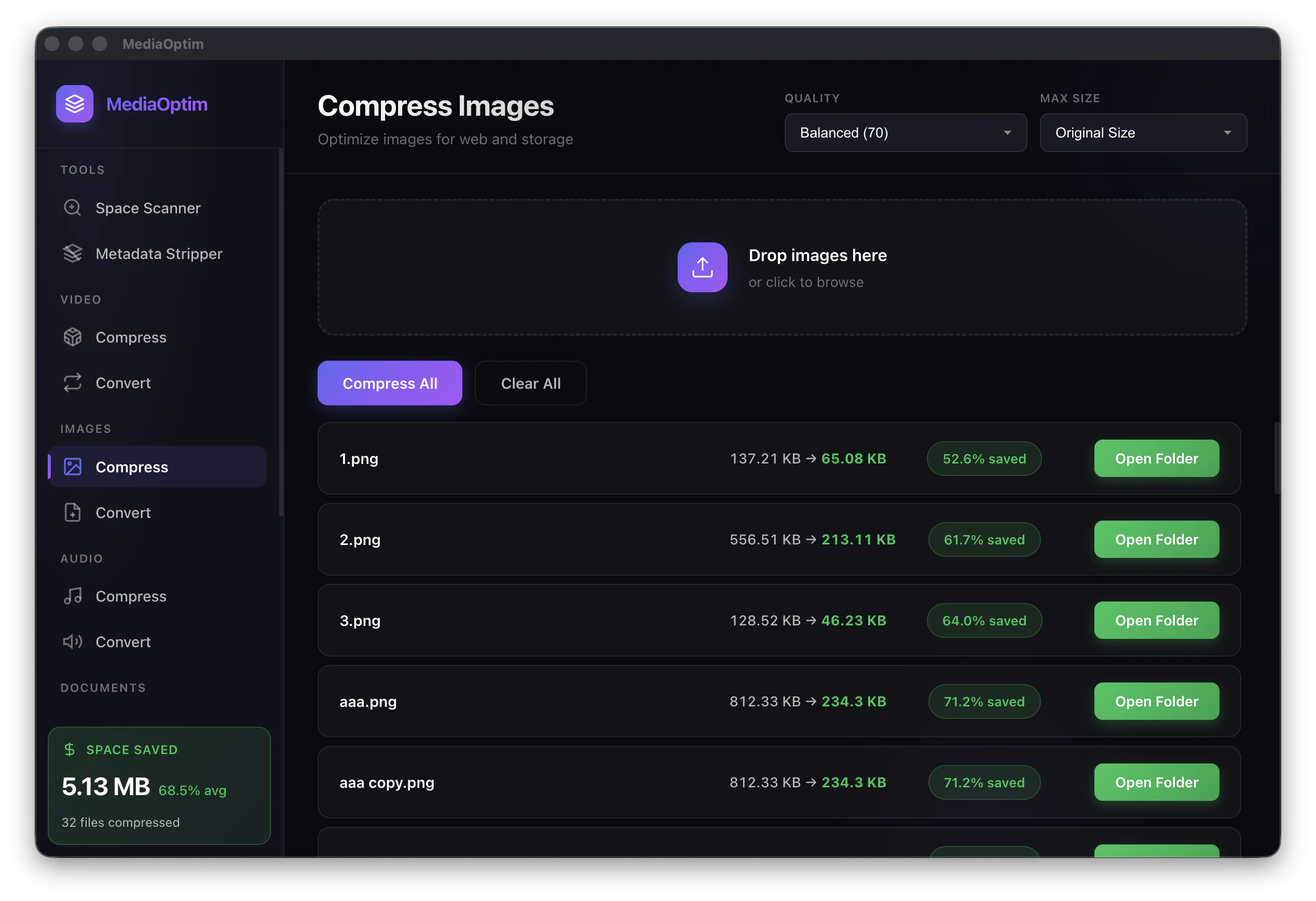
Definition: MediaOptim is a native macOS media optimization and compression utility designed to reduce the storage footprint of image, video, and audio files. Classified as a local file-processing tool, it utilizes native Apple frameworks to perform lossy and lossless compression directly on the user’s hardware. Unlike cloud-based SaaS alternatives, MediaOptim functions as a standalone application that requires no internet connection for its core operations, ensuring high-speed batch processing without data transmission.
Core Value Proposition: MediaOptim exists to solve the critical "Your disk is almost full" dilemma on macOS without forcing users to delete files or commit to recurring cloud storage subscriptions like iCloud or Google One. By reclaiming 40-70% of disk space through intelligent media downsizing, the software provides a permanent solution for storage management. It targets performance-conscious users who prioritize data privacy, local execution speed, and one-time licensing over perpetual monthly fees.
Main Features
1. Privacy-Centric Local Compression Engine: MediaOptim leverages native Apple frameworks (such as AVFoundation for video and Core Image for photos) to execute all optimization tasks locally on the Mac’s CPU and GPU. This architectural choice ensures that files never leave the device, eliminating the privacy risks associated with uploading sensitive personal media to remote servers. The tool is fully functional offline, providing instantaneous feedback and processing speeds that are not throttled by internet bandwidth.
2. Smart Space Scanner & Visual Auditor: The application includes a specialized "Space Scanner" module designed to identify "space hogs"—large media files and documents that consume disproportionate amounts of disk space. Users can filter results by file size (e.g., files larger than 10MB) and type. This feature automates the discovery phase of storage cleanup, allowing users to target high-impact files for compression with a single click, rather than manually navigating the file system.
3. Multi-Format Batch & Folder Processing: MediaOptim supports an extensive array of modern and legacy codecs, including HEIC, WebP, JPG, PNG, MP4, MOV, MP3, and FLAC. The software allows for recursive folder processing, where users can drag and drop entire directories into the interface. The engine intelligently parses the contents, applying specific quality targets—rather than arbitrary percentage scales—to ensure that visual and auditory fidelity remains indistinguishable from the original while achieving significant bit-rate reduction.
Problems Solved
1. Mac Storage Exhaustion & System Degradation: When a Mac’s SSD nears capacity, system performance often degrades due to limited swap space and file system overhead. MediaOptim addresses the "Mac Storage Full" and "Mac Running Slow" pain points by shrinking the existing media library. This allows users to perform macOS updates and run resource-intensive applications without the need for external drives or manual file deletion.
2. The "iCloud Subscription Trap": Many users feel forced into paying $3 to $10 per month for iCloud storage simply because their photo and video libraries have outgrown their local hardware. MediaOptim breaks this cycle by reducing the actual size of the files. For example, converting a 100GB library into 40GB allows it to fit back onto the local drive or a lower-tier cloud plan, providing a clear ROI (Return on Investment) within months of purchase.
3. Target Audience & Use Cases:
- iPhone Power Users: Individuals who capture 4K video and High Efficiency (HEIF) photos that quickly overwhelm Mac synchronization folders.
- Creative Professionals & Social Media Managers: Users needing to batch-resize or compress media for platforms like Instagram, TikTok, and YouTube without compromising professional quality.
- Privacy-Conscious Individuals: Users who refuse to upload personal memories to the cloud due to security concerns or data sovereignty preferences.
- Remote Workers: Professionals dealing with large PDF attachments or video recordings who need to optimize files for email or Slack transmission.
Unique Advantages
1. One-Time Purchase Model vs. SaaS: Unlike the majority of modern optimization tools that utilize a subscription-based revenue model, MediaOptim is offered as a one-time "lifetime" license. This aligns with the needs of users looking to reduce their long-term digital overhead, effectively paying for itself by eliminating the need for higher-tier cloud storage plans.
2. Native Optimization for Apple Silicon: Because MediaOptim is built specifically for macOS (supporting macOS 12 and later), it is optimized for M1, M2, and M3 chips. This results in significantly lower thermal output and faster processing times compared to cross-platform, web-based, or Electron-based compression utilities.
3. Perceptual Quality Mapping: Traditional compressors often use simple percentage sliders that can lead to "crushed" blacks or pixelation. MediaOptim uses quality targets that analyze the content of the file to determine the optimal compression ratio, ensuring that artifacts remain invisible to the naked eye even at 400% zoom, making the output suitable for both digital viewing and high-quality printing.
Frequently Asked Questions (FAQ)
1. Will using MediaOptim reduce the visual quality of my photos and videos? MediaOptim uses advanced perceptual compression algorithms designed to strip redundant data that the human eye cannot perceive. While technically a "lossy" process in terms of file size, the visual fidelity remains identical to the original at standard viewing distances. For most users, the 40-70% reduction in file size results in no discernable loss in clarity or color accuracy.
2. Is MediaOptim safer than online image and video compressors? Yes. Online compressors require you to upload your files to their servers, where they may be stored, analyzed, or leaked. MediaOptim processes every byte locally on your Mac's hardware. Your data never touches the internet, providing 100% privacy and security for personal or confidential professional files.
3. Can I recover my original files after they have been compressed? MediaOptim is designed to be non-destructive. Users have the option to preview the results before committing to the changes and can choose to save optimized versions as new files, keeping the originals intact. It is always recommended to maintain a primary backup (such as Time Machine) before performing batch operations on a primary media library.
4. How does MediaOptim compare to free tools like HandBrake or ImageOptim? While tools like HandBrake are powerful, they often have steep learning curves and complex settings. MediaOptim is designed for "drag-and-drop" simplicity, requiring no technical knowledge. Furthermore, MediaOptim combines video, image, and audio compression into a single interface with a specialized "Space Scanner" tool that those utility-specific apps lack.


