
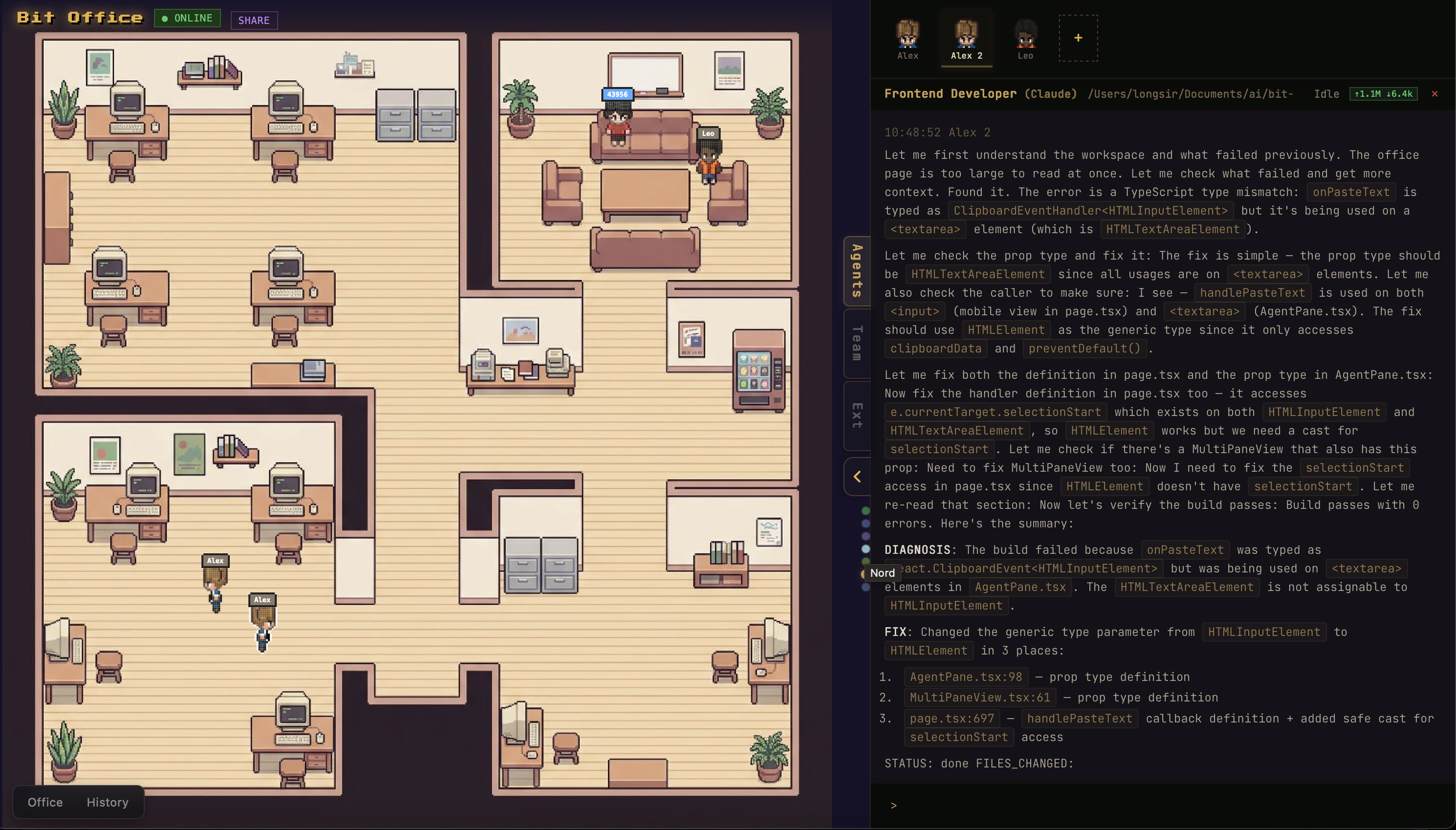
Product Introduction
Definition: Bit Office is an open-source, multi-agent collaboration platform and AI orchestration workspace. It functions as a specialized runtime environment and visual interface designed to manage autonomous AI agents throughout the software development lifecycle (SDLC). Technically, it is a full-stack application leveraging a Next.js frontend, a Node.js gateway daemon, and a Tauri-based desktop shell to coordinate diverse Large Language Models (LLMs) into a unified "AI team."
Core Value Proposition: Bit Office solves the "black box" problem of AI automation by providing a visible, controllable pixel-art workspace where users can monitor and influence multi-agent workflows in real-time. By integrating a persistent memory layer and a human-in-the-loop rating system, it enables AI agents to self-improve across projects, optimizing for creativity, technical quality, and user preferences. It is a premier tool for developers seeking to move beyond single-prompt interactions into complex, autonomous multi-model pipelines.
Main Features
Multi-Agent Team Orchestration: Bit Office employs a hierarchical management structure where a "Team Leader" agent coordinates specialized roles such as "Developer" and "Code Reviewer." This orchestration engine manages the transition between project phases—planning, implementation, and validation. The system uses Zod-validated event schemas to ensure type-safe communication between agents, ensuring that data passed from a planning model to a coding model remains consistent and actionable.
Visual Pixel-Art Workspace (PixiJS v8): Unlike traditional text-based CLI tools, Bit Office renders agent activity within a live pixel-art office environment powered by the PixiJS v8 engine. This provides a spatial representation of labor, where users can watch agents move, check their live status, and view real-time logs and progress visualizations. This visual layer makes autonomous workflows shareable and easier to debug, as users can see exactly which agent is "working" on a specific file or task.
Iterative Feedback & Persistent Memory: A critical technical feature is the post-project rating system. Users rate agent outputs across five dimensions: creativity, visual quality, interaction, completeness, and engagement. These ratings, along with review patterns and technology preferences, are stored as persistent memory. During the next "Design" phase, the Team Leader retrieves this historical data to avoid previous failures and double down on successful strategies, creating a self-improving autonomous loop.
Multi-Model Pipeline Integration: The platform supports the concurrent use of multiple AI backends, including Claude, Gemini, Codex, Aider, and OpenCode. This allows developers to assign specific models to tasks they are best suited for—for example, using Claude-3.5-Sonnet for complex logic and Gemini for rapid prototyping. The system automatically detects installed AI CLIs and routes tasks through a local gateway daemon.
Cross-Device Synchronization & Desktop Integration: Built with Tauri v2 (Rust-based) and supporting WebSockets, Ably, and Telegram integrations, Bit Office offers seamless cross-device control. Users can generate a pair code to monitor or manage an AI development session from a mobile device while the main workload runs on a desktop or server. The desktop app version bundles the gateway as a sidecar, allowing for a zero-config setup that minimizes to the system tray.
Problems Solved
Lack of Visibility in AI Workflows: Most AI agents operate in hidden terminal processes. Bit Office addresses the "transparency gap" by providing a live dashboard and visual office, allowing developers to see where an agent is stuck or where logic is deviating from the plan.
Disconnected AI Tools: Many developers use multiple AI tools (Aider for coding, ChatGPT for planning, etc.) in silos. Bit Office consolidates these into a single "Team Workflow," automating the hand-off between planning, execution, and review.
Target Audience:
- AI-Native Developers: Engineers building applications primarily through LLM assistance.
- Rapid Prototypers: Product managers or developers who need to move from an idea to a working preview in a single session.
- AI Researchers & Hobbyists: Users experimenting with multi-agent coordination and LLM performance comparisons.
- Tech Leads: Professionals looking for a way to demonstrate and monitor AI-driven development workflows to stakeholders.
- Use Cases:
- Feature Spikes: Quickly implementing a new feature in a sandbox environment with continuous preview feedback.
- Multi-Model Benchmarking: Running the same project through different model combinations to compare output quality and token costs.
- Collaborative AI Prototyping: Using the "Live Sharing" feature to let a team observe and provide feedback on an AI's coding process in real-time.
Unique Advantages
Spatial UI for Abstract Processes: By using a pixel-art office metaphor, Bit Office makes the abstract process of "AI thinking" tangible. This gamified interface significantly lowers the barrier for non-technical stakeholders to understand and interact with autonomous agents.
Agent Evolution (The Memory Loop): Most AI agents are "stateless" across different project sessions. Bit Office’s unique innovation is the systematic storage of human ratings as a dataset that agents query before starting new tasks. This ensures the AI team "grows" with the user’s specific coding standards and aesthetic preferences.
Token Cost Transparency: Real-time token usage tracking per agent and per team provides immediate financial visibility. This prevents "runaway" AI costs that can occur in autonomous loops, allowing users to optimize their model selection based on ROI.
Frequently Asked Questions (FAQ)
How do I install and run Bit Office? The easiest way to start is by running "npx bit-office" in your terminal. This command automatically starts the local gateway daemon, opens the pixel-art UI in your browser, and detects any installed AI CLIs like Claude or Aider. For a more permanent setup, you can download the Tauri-based desktop app for macOS.
Which AI models are compatible with Bit Office? Bit Office supports a wide range of LLMs through integrations with Claude, Codex, Gemini, Aider, and OpenCode. It is designed to be model-agnostic, allowing you to run different models for different roles within your AI team, provided you have the corresponding CLIs installed and configured.
Does Bit Office require a subscription or API keys? Bit Office is an open-source tool (MIT License). While the software itself is free, you will need your own API keys for the AI services you choose to use (e.g., Anthropic for Claude or Google for Gemini). It also supports optional integrations with Ably and Telegram for remote monitoring.
Can I customize the AI team's workflow? Yes. The workflow is divided into four distinct phases: Create (Intent), Design (Planning), Execute (Coding/Review), and Complete (Rating). Users can intervene at the "Design" phase to approve or modify the implementation plan and at the "Complete" phase to provide the feedback that shapes the agents' future memory.


