
Product Introduction
- Definition: Clipwise is a privacy-focused, client-side browser extension (specifically a Chrome Web Store extension) that functions as an intelligent web clipper for Notion. It extracts and saves the primary content of a web page directly into a user's specified Notion database as a formatted page.
- Core Value Proposition: It exists to solve the problem of incomplete and cumbersome web clipping. Unlike basic clippers that often capture navigation, ads, and sidebars, Clipwise uses a scoring algorithm to intelligently identify and save only the core article content, including code blocks, quotes, and images, while allowing users to pre-populate Notion database properties for immediate organization.
Main Features
- Intelligent Content Extraction: The extension employs a proprietary scoring system to analyze the Document Object Model (DOM) of a webpage. It identifies and isolates the main textual content, effectively stripping away peripheral elements like headers, footers, sidebars, cookie consent banners, and comment sections. This process ensures clean, readable articles are saved.
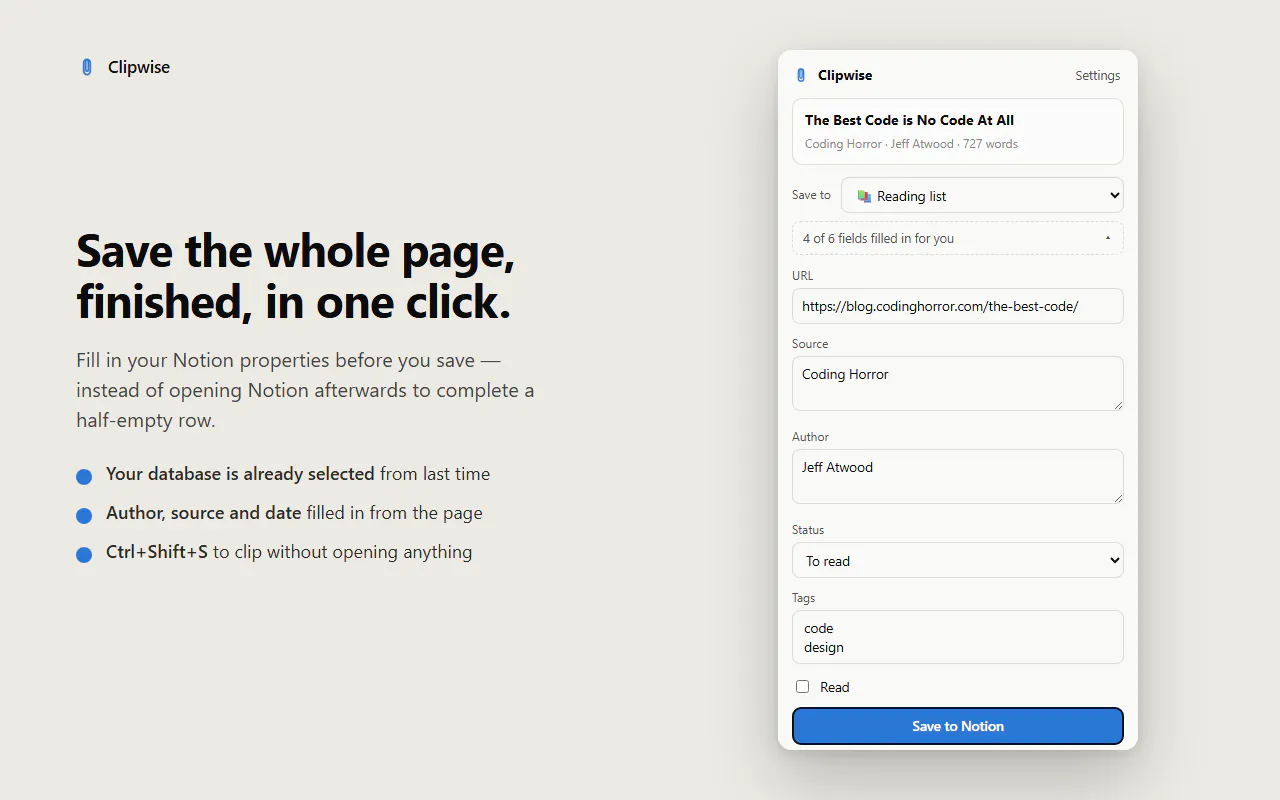
- Pre-Save Property Management: Before clipping, a popup interface allows users to fill in their Notion database properties (e.g., Status, Tags, Author, Source, Date). This data is sent with the page content, creating a fully populated database entry in a single action, eliminating the need for post-save manual data entry.
- Local-First & Memory Functionality: All operations occur client-side. The user's Notion integration secret is stored locally in the browser and is only transmitted directly to Notion's API. The extension remembers the last-used database and frequently entered property values, enabling one-click clipping for subsequent saves via a dedicated keyboard shortcut (Ctrl+Shift+S).
- Content Quality Warning: The extension includes a validation feature that alerts the user if the target webpage yields minimal or no extractable text. This proactive notification prevents the accidental saving of empty or near-empty pages to your Notion workspace.
Problems Solved
- Pain Point: Incomplete and messy web clipping. Traditional methods often save entire pages, including irrelevant UI elements, or fail to capture content within modern JavaScript web components, resulting in poor-quality, unorganized notes in Notion.
- Target Audience: The primary users are researchers, students, content curators, knowledge workers, and professionals who rely on Notion as a central knowledge base or research repository and need to save online articles cleanly and efficiently.
- Use Cases: A researcher compiling sources for a paper can clip articles with pre-set tags like "To Read" and "Source: Journal." A product manager can save competitor blog posts directly into a competitive analysis database with properties for "Company" and "Feature Mentioned." A developer can save API documentation, preserving code blocks accurately.
Unique Advantages
- Differentiation: Compared to other Notion web clippers, Clipwise distinguishes itself through its sophisticated content scoring engine (capturing more complete content, especially from JS-heavy sites), its focus on pre-save property population, and a strict local-first, no-account privacy model. Unlike cloud-based services, it does not route your data through a third-party server.
- Key Innovation: The core innovation is its client-side content scoring algorithm designed to penetrate modern web components. Combined with its persistent memory for user preferences (database and properties), it significantly reduces the friction in the clipping workflow, moving from a multi-step process to a near-instantaneous one.
Frequently Asked Questions (FAQ)
- How does Clipwise handle privacy and data security? Clipwise operates on a local-first principle. Your Notion API secret is stored only in your browser's local storage. All clipping processing happens on your computer, and data is sent directly from your browser to Notion's servers, with no intermediary servers, accounts, or data tracking.
- Can Clipwise save content from paywalled or login-required websites? No. Clipwise cannot bypass paywalls or login requirements. It can only access and process the HTML content that is publicly available to your browser session. If you cannot view the full article in your browser, Clipwise cannot extract it.
- How do I connect Clipwise to my Notion workspace? You must first create a Notion integration at
notion.so/my-integrations, copy the generated "Internal Integration Secret," and paste it into Clipwise's extension settings. Then, you need to share the specific Notion databases you want to clip into with that newly created integration. - What happens if Clipwise can't find good content on a page? The extension includes a warning system. If its algorithm determines the page contains very little extractable text, it will display a notification to the user before saving, allowing you to cancel the operation and avoid creating an empty note in your database.
- Is Clipwise a free tool? Based on the provided information from the Chrome Web Store listing, Clipwise is presented with no mention of a payment model, suggesting it is currently a free extension. The developer's privacy policy should be consulted for any future changes.


