
Chrome Extensions Tools
333 best Chrome Extensions tools and apps, curated and ranked by community upvotes on ProductCool. Updated daily as new Chrome Extensions products launch.

Portfolio Frame turns plain screenshots into polished, share-ready images, right in your browser. Capture a full tab, a code selection, or a single element, then add device mockups, backgrounds, and annotations (including a redact tool for blurring out secrets before you share). Export instantly as PNG, JPEG, WEBP, or SVG. Free to use, no account needed. Built for developers and designers who want their work to look as good as it actually is.

Developers wait on AI all day. That wait is an ad slot. One network, three doors. If you code: install the VS Code, Cursor or Chrome extension. A native ad while the model thinks. You keep 70%. We don't read your prompts. If you sell a developer tool: you show up in the IDE and the browser, targeted by the stack they actually use (React, Python, AWS). Pay €200, get €400 this week. If you shipped a chat app: npm i @idlen/chat-sdk. Three lines. Ads optional. No key, no ads. You keep 70%.

MemoryPet puts a tiny animated pet in your Chrome toolbar that speeds up or slows down based on your system's memory or CPU usage, a glanceable, oddly satisfying read on how hard your machine is working. 2.0 adds CPU tracking alongside memory, 8 new pets, a hover-able usage graph, and a way to turn the animation off entirely and just watch a live percentage badge instead.

Record your screen and get back a finished video with the camera moves already in place. Every click, drag and keystroke becomes a zoom. No editing, and nothing ever leaves your computer.
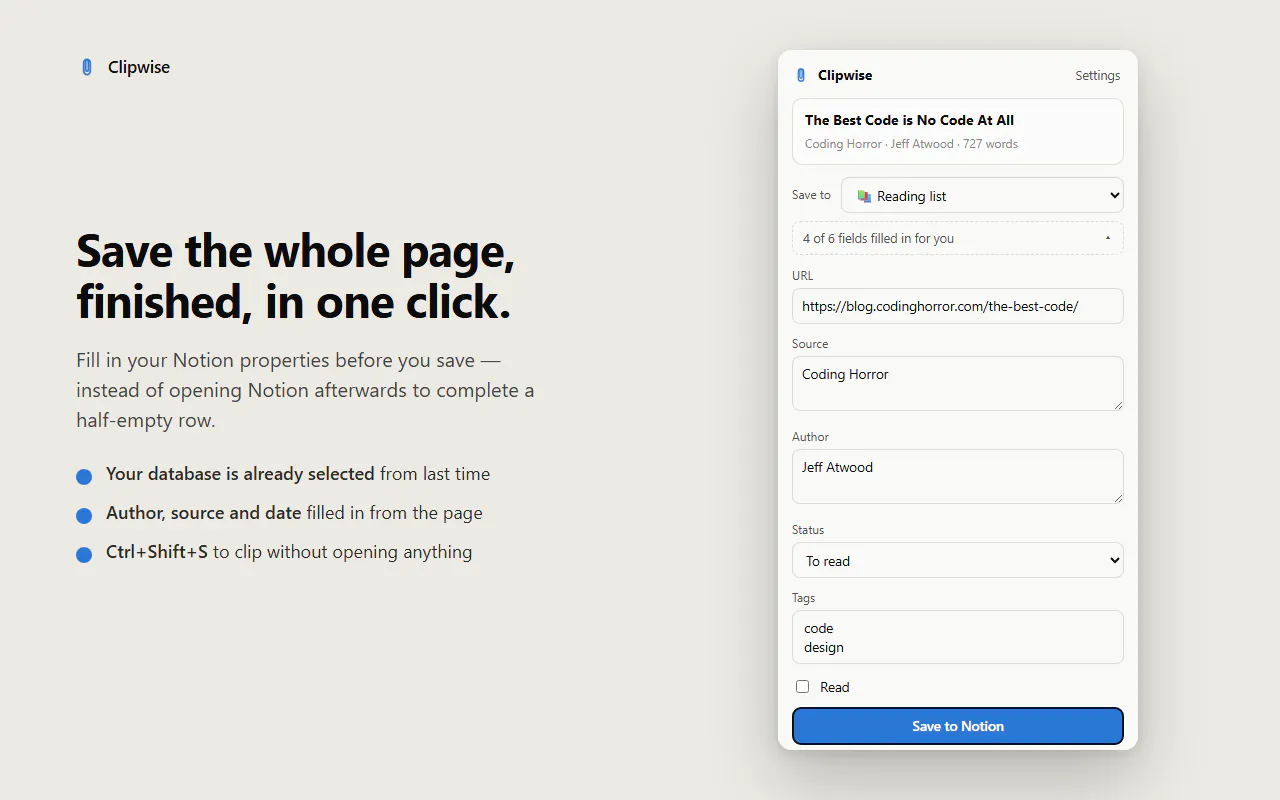
Clipwise saves any web page to your Notion databases — the whole article, not half of it. No account, no login, no paywall. Fill in your database properties before saving, and it remembers your last one. Everything stays on your computer.

Move your AI conversation to another assistant mid-thought, context included. Copy the whole chat as plain text or Markdown. Start with 20 free uses every month.
Coherence X6 turns websites into isolated, customizable Mac apps powered by Chrome and other Chromium browsers. Bring your profiles, logins, bookmarks, and extensions, then control how each app looks, opens, and routes links.

AI Toolbox is the missing layer on top of ChatGPT, Claude, Gemini and Grok: folders and subfolders, full-text search across every conversation (even all four platforms at once), a prompt library with // insert and multi-step chains, bulk export to Markdown/PDF/JSON, bookmarks, and a live context meter. One install covers all four AIs. Local-first: your chats stay in your browser. Trusted by 40,000+ users in 150+ countries, rated 4.5 stars on the Chrome Web Store.

A simple playground to write, run, and test JavaScript snippets, with an in-UI console. Built for quick experiments, debugging, learning, testing ideas, and working with JavaScript without needing a full development environment. This tool is offline by design, providing a robust JavaScript playground directly within Chrome.

deepeye flags AI-generated and manipulated images, video, and audio as you browse. Free on Chrome and live inside WhatsApp, it checks the profile photo, the video call, the voice note, in the moment, with no uploads and no dashboard. Built by deepidv, sharpened with Scam.AI Partnership.
For 30 years, websites set the rules. Now you do. In the Sider Chrome extension, tell Sider Code how a site you rely on should work. It understands the page, writes the code, and makes the change. You can save and control the feature.

Customize any website with a vintage 90s & Y2K retro theme. Enjoy nostalgic web aesthetics, and classic UI designs! Back to 2000 has never been easier! RawY2K is the ultimate retro website modifier that transforms any modern web page into a vintage 90s and Y2K aesthetic experience. Customize your browser with custom cursors, nostalgic Windows 98 UI, and classic GeoCities style themes instantly. Relive the golden age of the internet where the web was raw, fun, and full of chaotic creativity.

You bookmark posts on X and never see them again. Eventually syncs those bookmarks and emails them back a few at a time, on a schedule you set. Connect X, sync, pick your rhythm, start reminders. Pause or change it anytime.

Hitting Claude's limit mid-work is annoying af. Diet Claude gives a live usage meter shows how much of your session you’ve used, how much time is left, and when your limits reset. It helps optimise token usage by context trimming, tightening prompts, suggesting apt models. And when you do run dry, it carries your conversation and context over to another LLM instead of starting from scratch.
Tab Notes turns every new browser tab into a distraction-free notepad. Capture thoughts instantly with rich text, tables, and syntax-highlighted code blocks, or sketch ideas using the built-in shape canvas. Works completely offline with local storage or syncs privately to your personal Google Drive with zero server lock-in. Access notes in full-screen tabs, via a quick toolbar popup over any website, and export totxt ormd anytime.
Meet Calendly Notetaker and Callie AI assistant: two new AI products built to handle the work before, during, and after meetings. Meetings are essential, but the work around them adds up fast. 😅 That's why we're launching an evolved Calendly. One that handles not just scheduling, but all of the work before, during, and after your meetings, so you can focus on what matters.

Mochi lets you place a tiny animated cat companion directly on your browser tabs, like a little friend hanging out while you browse. Pick from 20 local cat styles, drag Mochi anywhere, and keep the same cat in the same spot across tabs. It’s intentionally small and quiet, not a productivity tool, tracker, or notification machine. No accounts, analytics, ads, or remote data. Just a little cat for your tabs :3

Your browser bookmarks, X bookmarks, Instagram saves and YouTube Watch Later, in one private library you can search in plain language. Deepmark reads every page, transcribes videos and reels, describes and OCRs frames, then embeds it all. 'The reel with the one-pan pasta trick' finds the reel even though nothing in it says pasta. A save is searchable in about 90 seconds; search over 10k items returns in under 100ms. Also a hosted MCP server: your AI agent can search your library too.
Flick through an article too fast and Skim Recap hands the skipped passage back in a card beside your cursor. If a term stops you, select the word or phrase and press Feynman: Gemma uses the surrounding paragraph, nearby context, heading, and page title to explain what it means here. Everything runs locally through LiteRT-LM and WebGPU—no account or hosted LLM API.
Every AI is good at different things — but your conversation is trapped in one. ThreadPort transfers the chat you're in right now to another AI with full context. No servers, no account, works in the EU. Free for 10 transfers/month. Chrome & Edge.

Starlink's own app is phone-only, and the old web portal was switched off in 2024 with nothing to replace it. Dishylink brings that back as a native desktop app. It reads your dish and router over your own network. Features include: live stats, alignment in degrees, a 3D satellite view, obstruction time lapse, per-device data usage, power draw with daily and monthly history, and alerts that clear themselves. It's free, open source, no account, no cloud, and works on macOS, Windows and browsers.