
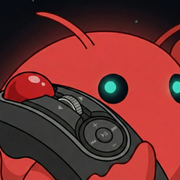
Product Introduction
Definition
ClawMote is a native macOS menu bar application and input remapping utility designed to transform any HID-compliant wireless mouse, handheld trackball, or air mouse into a sophisticated shortcut controller. Developed using Apple’s Swift language, it functions as a lightweight middleware that intercepts hardware signals from external devices and translates them into system-level commands, specifically optimized for voice-to-text workflows and remote computer interaction.
Core Value Proposition
The primary objective of ClawMote is to eliminate keyboard dependency and "desk tethering" for power users. By remapping idle mouse buttons to essential macOS functions—most notably the Fn key required for Wispr Flow—ClawMote enables total workflow freedom. It targets the growing demand for "voice-first" productivity, allowing users to trigger AI dictation, manage OpenClaw actions, and execute complex keyboard shortcuts from across the room without physical proximity to a MacBook or keyboard.
Main Features
Wispr Flow & AI Voice Integration
ClawMote provides specialized mapping for the macOS Fn key (Function key), which is the default trigger for the Wispr Flow dictation tool. By assigning this specific system-level signal to a thumb button on a handheld device, users can initiate high-speed voice input instantly. This feature bridges the gap between hardware and AI software, facilitating a seamless "Talk to Mac" experience that is independent of the laptop's built-in keyboard.
Universal HID Button Remapping
The software includes a robust configuration engine capable of remapping any button recognized by the macOS HID (Human Interface Device) stack. Users can assign buttons to:
- Standard keystrokes (Enter, Escape, Tab).
- System functions (Spotlight, Screenshots, Mission Control).
- Complex modifier combinations (Cmd+C, Cmd+V, Undo).
- Application-specific shortcuts for media control or presentation navigation.
Zero-Driver Plug & Play Architecture
Unlike traditional mouse configuration software that requires bloated kernel extensions or proprietary drivers, ClawMote utilizes native macOS APIs to detect devices. It automatically recognizes 2.4GHz USB receivers and Bluetooth-connected peripherals, including gaming mice, air mice, and specialized ergonomic trackballs like the ELECOM Relacon. This ensures high performance, low latency, and immediate functionality upon installation.
Native macOS Performance and Privacy
Built specifically for the macOS ecosystem (requiring macOS 14+), ClawMote is a lightweight binary that resides in the menu bar. It follows a "set-and-forget" philosophy, consuming minimal CPU and RAM resources. Furthermore, the application operates with a privacy-first model: it requires no user account, involves no data collection or telemetry, and is sold as a one-time perpetual license rather than a recurring subscription.
Problems Solved
Pain Point: Keyboard Dependency in Remote Workflows
Traditional macOS workflows require a keyboard for essential navigation and shortcut execution. This creates a bottleneck for users at standing desks, those using "couch computing" setups, or individuals utilizing voice-command software who are forced to return to their desks to press a single key. ClawMote decentralizes control, moving the "Command Center" from the desk to the user's hand.
Target Audience
- AI Power Users: Individuals utilizing Wispr Flow and OpenClaw who need tactile triggers for voice-input commands.
- Remote Presenters: Educators and executives who require a customized "clicker" that can do more than just advance slides.
- Ergonomic Enthusiasts: Users with standing desks or treadmill desks who want to maintain productivity while moving.
- Accessibility Users: Individuals with limited mobility who benefit from consolidating keyboard shortcuts onto a single, easily manipulated handheld device.
- Couch Computers: Users who connect their Mac to a TV and need a comprehensive way to navigate the UI without a lap desk.
Use Cases
- Handheld Dictation: Mapping the Wispr Flow trigger to a handheld trackball to dictate documents while walking around a room.
- Presentation Mastering: Using an air mouse to toggle laser pointers, switch apps, and trigger Spotlight during a live demo.
- Media & Navigation: Controlling a Mac mini media server from a sofa, using a wireless mouse to switch tabs, close windows, and adjust volume.
- OpenClaw Remote Control: Commanding an OpenClaw-enabled machine from a distance with full shortcut access.
Unique Advantages
Differentiation from Competitors
Most mouse remappers are designed for desktop gaming mice (e.g., Logitech G Hub, Razer Synapse) and are often bloated, resource-heavy, and incompatible with third-party handheld trackballs or air mice. ClawMote is hardware-agnostic and specifically designed for the "handheld" niche. Unlike many utility apps that have moved to a SaaS (Software as a Service) model, ClawMote offers a transparent, one-time $20 purchase price, appealing to users who suffer from "subscription fatigue."
Key Innovation
The specific optimization for "Voice-First" AI workflows is ClawMote's standout innovation. By simplifying the technical barrier to remapping the Fn key—a key that is notoriously difficult to remap on third-party hardware—ClawMote becomes an essential companion app for the modern AI productivity stack (Wispr Flow, OpenClaw, etc.).
Frequently Asked Questions (FAQ)
Does ClawMote work with any wireless mouse?
Yes. ClawMote is designed to work with any HID-compatible wireless device that macOS recognizes. This includes standard wireless mice, gaming mice with multiple side buttons, handheld trackballs (like the ELECOM Relacon), air mice (like SANWA), and presentation remotes. If the device connects via Bluetooth or a 2.4GHz USB dongle and moves the cursor, ClawMote can remap its buttons.
Can I use ClawMote to trigger Wispr Flow?
Absolutely. One of ClawMote's primary use cases is remapping the Fn (Function) key to a mouse button. This allows you to trigger Wispr Flow’s voice-to-text dictation instantly from your handheld device without ever touching your MacBook’s keyboard.
What are the system requirements for ClawMote?
ClawMote requires macOS 14 (Sonoma) or later. It is a lightweight app built in Swift, optimized for both Intel and Apple Silicon (M1/M2/M3) Macs.
Is there a free trial available?
Yes, ClawMote offers a fully functional 7-day free trial. This allows users to test their specific hardware and workflow before committing to the $20 one-time license fee. No credit card is required to start the trial.


