
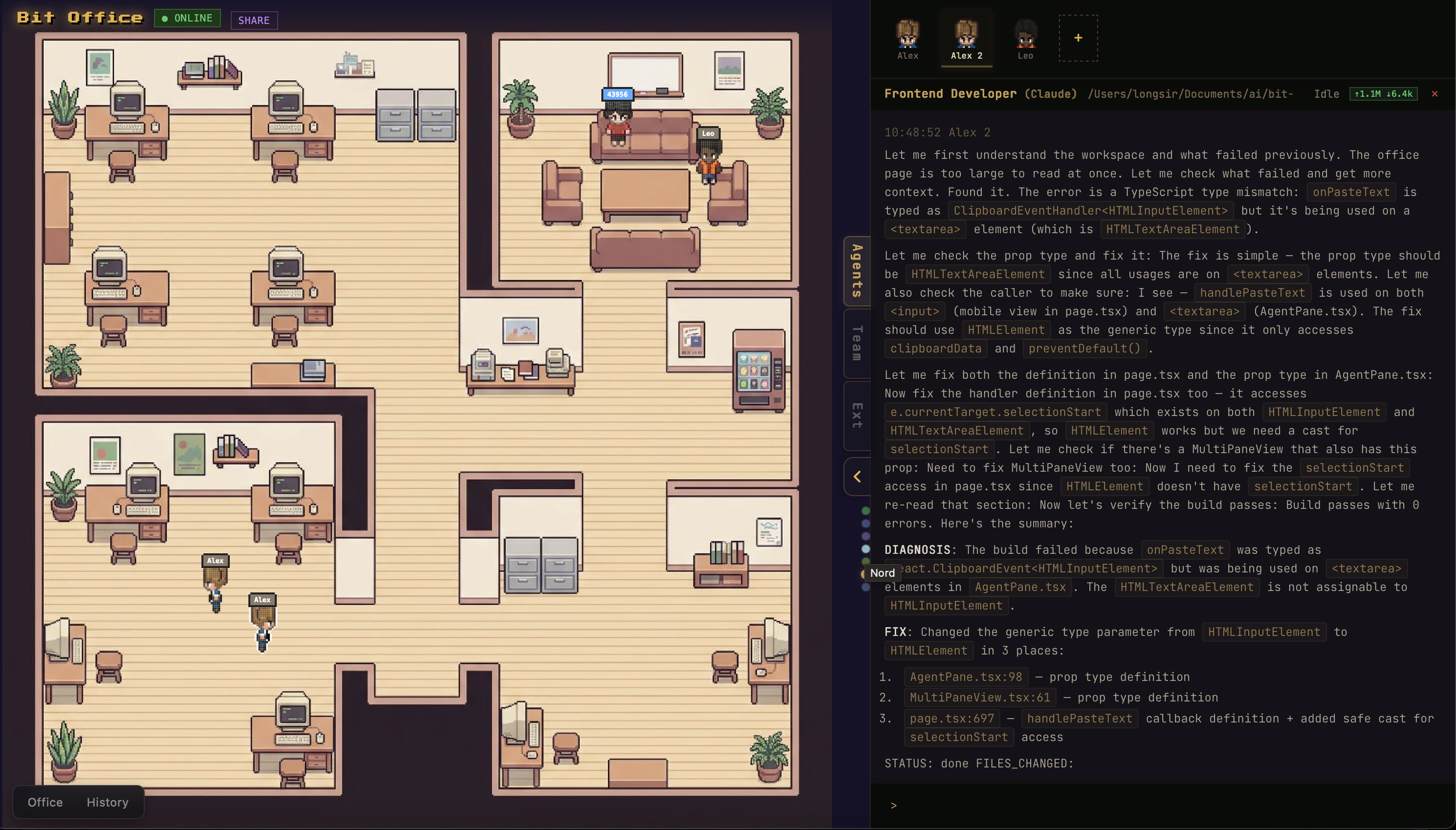
Product Introduction
Definition: Bit Office is an open-source, multi-agent orchestration platform and visual workspace designed to coordinate autonomous AI agents. Technically categorized as an AI Agent Development Tool and LLM (Large Language Model) Orchestration Framework, it utilizes a "Human-in-the-Loop" architecture to manage complex software development lifecycles (SDLC) through a graphical pixel-art interface.
Core Value Proposition: Bit Office solves the "black box" problem of AI automation by providing a visible, controllable environment where different AI models—such as Claude, Gemini, and Aider—collaborate as a structured team. By integrating real-time observability with persistent memory, it enables AI-native prototyping and autonomous coding workflows that improve over time based on user feedback and project ratings.
Main Features
Multi-Agent Team Orchestration: The system implements a hierarchical team structure where a designated "Team Leader" agent manages specialized roles, including Developers and Code Reviewers. This orchestration layer handles intent gathering, scope definition, and task delegation, ensuring that multi-step coding projects are executed with a clear chain of command and validation.
Visual Pixel-Art Workspace (PixiJS): Unlike CLI-only agent frameworks, Bit Office renders agent activities in a live 2D pixel-art office environment powered by PixiJS v8. This provides real-time status visualization, activity logs, and progress tracking, making the autonomous development process transparent and shareable via standard web browsers.
Persistent Memory and Self-Improvement: Every completed task allows for user rating across five dimensions: creativity, visual quality, interaction, completeness, and engagement. These ratings are stored as persistent memory. During the planning phase of subsequent projects, agents retrieve these review patterns to avoid past failures and align with user-specific tech preferences and quality standards.
Multi-Model Integration Pipeline: The platform supports concurrent execution of diverse AI CLIs, including Claude-Code, Codex, Gemini, Aider, and OpenCode. This allows developers to leverage the specific strengths of different models—such as one model’s superior reasoning for architecture and another’s speed for boilerplate generation—within a single, unified workflow.
Cross-Device Synchronization and Remote Control: Built on a tech stack featuring WebSocket, Ably, and Telegram integration, Bit Office supports real-time collaboration. Users can monitor progress on a desktop while managing sessions, providing feedback, or receiving status updates through mobile devices via Telegram bot channels.
Native Desktop Distribution (Tauri & Rust): For users seeking a local-first experience, Bit Office includes a desktop application built with Tauri v2 and Rust. This version bundles the gateway daemon as a sidecar process, eliminating the need for manual terminal configuration and providing a native macOS experience with system tray integration.
Problems Solved
Lack of Observability in AI Agents: Traditional autonomous agents often run in the background with limited visibility into their decision-making process. Bit Office provides a live visual UI and real-time logs, allowing users to catch errors or logic flaws as they happen.
Fragmented AI Workflows: Developers often switch between different AI tools for coding, debugging, and reviewing. Bit Office unifies these processes into a single "Create-Design-Execute-Complete" flow, reducing context-switching and integration overhead.
Static Agent Performance: Most AI agents do not "learn" from user critiques between different sessions. Bit Office’s persistent rating system ensures that the agent team evolves, specifically targeting the user’s quality thresholds and preferred coding styles.
Target Audience: The platform is primarily built for AI-native software engineers, DevOps specialists, rapid prototypers, and researchers exploring multi-agent systems and LLM orchestration. It is also highly effective for educators and presenters who need to visualize autonomous AI workflows for audiences.
Use Cases: Essential for rapid feature spikes, building AI-native prototypes from scratch, conducting multi-model performance experiments, and creating interactive live demos of autonomous software development.
Unique Advantages
Visual Observability vs. CLI Blindness: While tools like AutoGPT or Aider are powerful, they lack the spatial and visual feedback provided by the Bit Office pixel workspace. This visualization increases user trust and makes complex multi-agent interactions easier to parse.
Built-in Feedback Loop: The integration of a structured rating system into the agent’s memory architecture is a significant differentiation from standard chat-based AI interfaces, transforming the AI from a tool into a teammate that adapts to professional standards.
Hybrid Deployment Model: Bit Office offers the flexibility of a lightweight
npxcommand for quick starts, a full web-based PWA for remote access, and a high-performance Tauri-based desktop app for local development environments.
Frequently Asked Questions (FAQ)
How do I install and run Bit Office quickly? The fastest way to launch the platform is by running
npx bit-officein your terminal. This command automatically starts the local gateway daemon, opens the pixel-art UI in your default browser, and detects any installed AI CLIs like Claude or Gemini on your system.Which AI models are compatible with Bit Office? Bit Office supports a wide range of AI models and CLIs, including Claude, Gemini, Aider, Codex, and OpenCode. Because it uses an extensible orchestration engine, it can coordinate multiple different models within a single project team to handle different specialized tasks.
Does Bit Office store my data locally or in the cloud? The core gateway daemon runs locally on your machine, and agent working directories are managed within your specified workspace. While real-time syncing can be enhanced using Ably or Telegram (optional), the project history, persistent memory, and agent logs are primarily handled through your local environment to ensure privacy and control.
What are the system requirements for running the desktop app? The desktop application requires Node.js 18 or higher, pnpm, and the Rust toolchain (for building from source). It is currently optimized for macOS and utilizes Tauri v2 for a lightweight footprint, consuming significantly fewer resources than traditional Electron-based applications.


