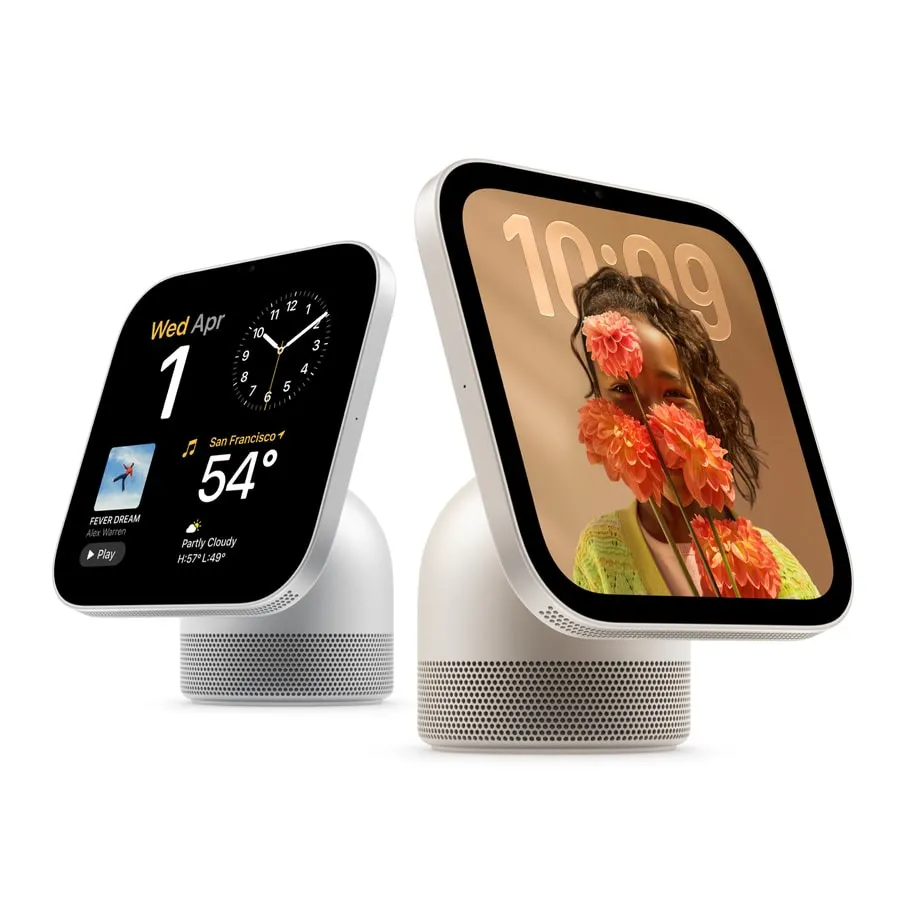
Product Introduction
- Definition: The Apple HomeView is a premium smart display designed to function as a central hub for the connected home. It integrates a 7-inch Liquid Retina touchscreen, a 12MP Ultra Wide camera with Center Stage, a multi-microphone array, and a powerful acoustic system, all powered by the A18 chip with Apple Intelligence.
- Core Value Proposition: Apple HomeView exists to consolidate home management, entertainment, and communication into a single, privacy-focused device. Its primary value is delivering a personalized, multi-user experience deeply integrated within the Apple ecosystem, powered by Siri AI for intelligent assistance and acting as the ultimate dashboard for Apple Home smart home controls.
Main Features
- Siri AI with Apple Intelligence: This is a contextual AI assistant that leverages on-device and Private Cloud Compute processing. It works with personal context from a user's paired iPhone or iPad (like calendar events and messages) and broad world knowledge to answer questions, manage tasks, and control smart home devices through natural conversation. It operates under strict privacy protocols, with usage limits applying during the initial launch phase.
- Multi-User Recognition & Secure Exclaves: The device uses its camera and microphone array with on-device processing to biometrically recognize up to six different users. This is enabled by Secure Exclaves within the A18 chip—dedicated, isolated hardware that processes facial and voice recognition data, preventing the operating system or Apple from accessing this sensitive biometric information. It seamlessly switches profiles to show personalized content like messages, calendars, and music recommendations.
- Apple Home Integration & Smart Home Dashboard: HomeView runs a dedicated version of the Home app, serving as a primary control panel for the Matter standard and Works with Apple Home ecosystem. It allows users to view live feeds from multiple security cameras simultaneously, control lights, locks, and thermostats, create automations, and receive intelligent alerts (like grouped notifications for a family member's arrival). It can also listen for and alert users to the sounds of smoke and carbon monoxide alarms.
- High-Fidelity Audio-Visual System: The device features a 7-inch Liquid Retina display with True Tone technology, adjusting color temperature to ambient light, and a brightness range from 500 nits to 0.3 nits for nighttime use. Its acoustic system includes a down-firing woofer, two force-cancelling passive radiators in the base, and two full-range drivers in the display, supporting Spatial Audio with dynamic head tracking. Computational audio, powered by the A18 chip, continuously optimizes sound output.
- Modular Design & Face Framework: Apple HomeView offers flexible placement with a domed aluminum base and stainless steel hinge for adjustable viewing angles, or an optional wall-mounted version. It supports customizable "faces" (watchOS-like interfaces) that are context-aware, such as a dynamic photo frame, an interactive Flow face, or informational widgets for calendar and weather. The Home Modular face provides a glanceable smart home dashboard.
Problems Solved
- Pain Point: Fragmented smart home experiences across multiple apps and devices, coupled with concerns about data privacy from always-on microphones and cameras in shared family spaces.
- Target Audience: Apple ecosystem households (families or shared residences) seeking a unified home hub; users prioritizing privacy in connected devices; individuals wanting hands-free communication and entertainment in kitchens, living rooms, or entryways.
- Use Cases: Family Communication: Using FaceTime with Center Stage for hands-free video calls or Intercom to announce dinner throughout the house. Home Management: Glancing at the Home Camera face to check multiple security feeds while cooking, or using voice commands to lock doors and adjust thermostats. Personalized Assistance: Different family members asking Siri AI for their own schedule, to set personal timers, or to play individualized music playlists, with the device recognizing who is speaking.
Unique Advantages
Strengths & Limitations (Pros & Cons):
- Pros: Unmatched deep integration with the Apple ecosystem (iPhone, iPad, HomePod, Apple TV). Industry-leading privacy architecture with on-device biometric processing via Secure Exclaves. Superior multi-user experience with seamless, secure profile switching. High-quality build and audio-visual performance typical of Apple hardware.
- Cons: Ecosystem lock-in; full functionality requires other Apple devices and an Apple ID. Siri AI's advanced features initially limited to English with usage caps. Higher price point compared to many competitor smart displays. Limited third-party app support at launch, primarily relying on Apple's own apps and iPhone handoff.
Key Alternatives & Differentiation:
- Amazon Echo Show 15: A larger, wall-mounted Android-based alternative. Differentiation: HomeView offers stronger multi-user privacy, deeper iOS/macOS integration, and a focus on premium materials and audio. The Echo Show has a wider selection of third-party skills and may be more affordable.
- Google Nest Hub Max: Competes directly as a kitchen/display hub with camera. Differentiation: HomeView's Siri AI leverages personal Apple device context, whereas Google Assistant relies more on Google account data. HomeView's Secure Exclave is a distinct hardware privacy advantage. Nest Hub integrates more deeply with Google Photos and YouTube.
- Meta Portal (Discontinued): Was a video communication-focused device. Differentiation: HomeView is a broader home hub with strong smart home and entertainment features, not just communication. It exists within a thriving ecosystem, unlike the discontinued Portal line.
Frequently Asked Questions (FAQ)
- Does Apple HomeView work without an iPhone? Guests can use basic functions like playing music, checking the weather, or controlling smart home devices without an iPhone. However, to unlock the full personalized experience—including personalized Siri AI, personal messages, calendar, and photo access—a user must have a compatible iPhone or iPad, an Apple ID, and be added to the Home home.
- How does Apple HomeView protect my family's privacy? It uses a multi-layered approach: 1) Secure Exclaves: Biometric data (face/voice) for user recognition is processed in a dedicated, isolated hardware compartment on the A18 chip. 2) Profile Separation: Personal data from recognized users is kept separate and only accessed when that specific user is identified. 3) Apple Intelligence & Private Cloud Compute: AI requests are processed with on-device intelligence or via Private Cloud Compute, which does not store or expose user data.
- What smart home devices work with Apple HomeView? It is compatible with thousands of accessories that support the Matter standard or carry the "Works with Apple Home" badge. This includes smart lights (Philips Hue, Nanoleaf), locks (Schlage, Yale), thermostats (Ecobee), security cameras, and plugs. It serves as a central controller for these devices via the Home app.
- Can I watch Netflix or YouTube on Apple HomeView? At launch, video app support appears limited to Apple's own services (Apple TV+, etc.) and AirPlay. To stream from compatible third-party video apps like Netflix, you would likely need to use AirPlay from your iPhone or iPad to cast content to the HomeView display.
- What is the difference between Apple HomeView and a HomePod with an iPad? HomeView is an integrated, purpose-built appliance. It offers always-on, glanceable faces, seamless multi-user biometric switching, a dedicated smart home dashboard interface, and optimized acoustics for its form factor. Using an iPad as a hub requires manual profile switching, lacks the dedicated Home app interface for HomeView, and does not feature the same privacy-centric Secure Exclave hardware for family recognition.