
Linux Tools
30 best Linux tools and apps, curated and ranked by community upvotes on ProductCool. Updated daily as new Linux products launch.
Top Linux Picks

Sherlock is a powerful open-source reconnaissance tool designed to find social media accounts associated with a specific username across over 400 platforms. It simplifies the tedious process of digital footprint investigation, making it an essential utility for security researchers, investigators, and privacy-conscious individuals looking to audit their own online presence.
Fedora Linux 45 is the latest release of the free, open-source operating system for developers, creators, and Linux enthusiasts. Enjoy GNOME 51, updated developer toolchains, stronger security defaults, and improved Wayland support. New installation capabilities include Stratis storage and browser-based remote setup for Atomic Desktops. Whether you're building software, running servers, or customizing your desktop, Fedora 45 gives you a modern Linux foundation.

Hex is a local-first voice dictation tool that lets you speak text directly into any application. It solves the problem of cumbersome copy-paste workflows and privacy concerns by performing all speech recognition on your device. It's designed for writers, developers, and anyone on macOS, Windows, or Linux who wants a fast, private way to dictate text without relying on the cloud.

This repository is a curated collection of practical exercises, labs, and interview questions covering the entire DevOps and SRE landscape. It helps engineers and job candidates prepare for real-world scenarios and technical interviews by practicing with topics like Linux, cloud platforms, CI/CD, containerization, and infrastructure as code. It's designed for DevOps engineers, Site Reliability Engineers, system administrators, and anyone looking to build or validate their skills in modern infrastructure and operations.
Ubuntu 26.10 "Stonking Stingray" brings GNOME 51, expanded hardware support, and a complete switch to Rust-based coreutils. App Center unifies Snap and Debian package details and adds graphics driver management. An optional Myna preview offers local speech-to-text. A non-LTS release for developers and Linux enthusiasts who want newer software between long-term releases.

xtool is a cross-platform development environment that replaces Xcode. It solves the problem of being locked into macOS for iOS development by enabling you to build and deploy iOS applications using Swift Package Manager on Linux, Windows, and macOS. It's for developers who want to create iOS apps from their preferred operating system without needing Apple's proprietary IDE.

Skymir mirrors your Google Drive folders to Linux with two-way sync, double-click Google Docs shortcuts, and a native GTK tray. Local saves upload within seconds; changes made in Drive arrive within about a minute. Deletes go to the trash on both sides, and a sync that would delete more than half your files is refused. $19 one-time, 14-day free trial, no subscription.
Naarchy brings a file shelf, searchable clipboard history, music controls, a focus timer, and your calendar to the top of your Linux desktop. Native Rust and GTK4. Built for Omarchy and Hyprland, with or without a physical notch. Free, MIT licensed, and open source. Clipboard and shelf content stay on your machine. No account. No telemetry.

GhostTrack is a discreet tool designed to track locations and mobile numbers. It addresses the need for monitoring and security in personal and professional contexts, providing users with real-time location data and call information. This tool is ideal for concerned parents, employers managing field staff, or individuals seeking to verify the whereabouts of contacts.

This is an introductory textbook on systems programming, designed to demystify low-level computing concepts. It provides a structured, open-source curriculum for students learning about operating systems, memory management, and hardware interaction. Primarily created for University of Illinois courses, it's a valuable resource for any student or educator in computer science and engineering.
Do you actually know who has access to your servers right now? CtrlOps gives you a security hardening score across 25 checks, a PDF audit report, and fix commands for every issue found. See who can log into every server, revoke access from your whole fleet in one click, and assign any level of roles/access without touching the terminal. Every log file, found and searchable without SSH. Deploy any app from GitHub in minutes. 100% local. Your credentials never leave your machine.

Cool Retro Term is a terminal emulator that replicates the distinctive visual style and imperfections of old cathode ray tube (CRT) monitors. It solves the problem of modern, sterile terminal interfaces by bringing back the aesthetic charm and retro feel of classic computing displays. It's for developers, hobbyists, and anyone who appreciates vintage tech aesthetics and wants to add a dose of nostalgia to their workflow.

📱 Display and control your Android device graphically with scrcpy.

OpenWhispr is a privacy-first, cross-platform dictation app that converts speech to text. It solves the problem of slow typing and privacy concerns by offering fast, local transcription using models like Nvidia Parakeet/Whisper, as well as optional cloud models. It's designed for professionals like clinicians, lawyers, and anyone who needs efficient, secure voice-to-text functionality in applications like Slack, meeting notes, and document creation on macOS, Windows, Linux, and iOS.

Open Science is an AI research workbench that integrates coordinator and specialist agents, Python/R execution, and scientific data connectors into a single desktop workspace. It solves the problem of fragmented research tools by keeping questions, code, execution, and traceable artifacts together in persistent projects for reproducible workflows. It's designed for researchers and scientists on macOS, Windows, and Linux who need a model-agnostic, local-first environment for AI-assisted discovery.

Omarchy is an omakase Linux desktop on Arch, Hyprland, and Quickshell. It ships a complete keyboard-first workstation with system-wide themes, packaged updates, and coding agents that can reshape the setup instead of making you assemble it yourself.

Motrix is a free and open-source download manager that handles HTTP, FTP, BitTorrent, and Magnet links in one application. It solves the problem of needing multiple, often clunky or ad-ridden tools for different download types. It's designed for users who want a powerful, unified, and aesthetically pleasing download experience without cost or bloat.

RustDesk is an open-source remote desktop application that provides a secure and reliable alternative to SaaS solutions like TeamViewer. It solves the problems of data privacy, performance instability, and lack of control by allowing you to host the servers on your own infrastructure. It's designed for individuals and organizations who need full control over their remote access data and want to avoid vendor lock-in and shared public servers.

witr is a CLI and TUI tool that lets you trace any process, port, container, or file back to what started it. It solves the problem of debugging mysterious system activity by visualizing the chain of events in a simulated or live environment. It's for developers and system administrators who need to understand complex system dependencies and troubleshoot issues like stuck processes or unknown listeners.
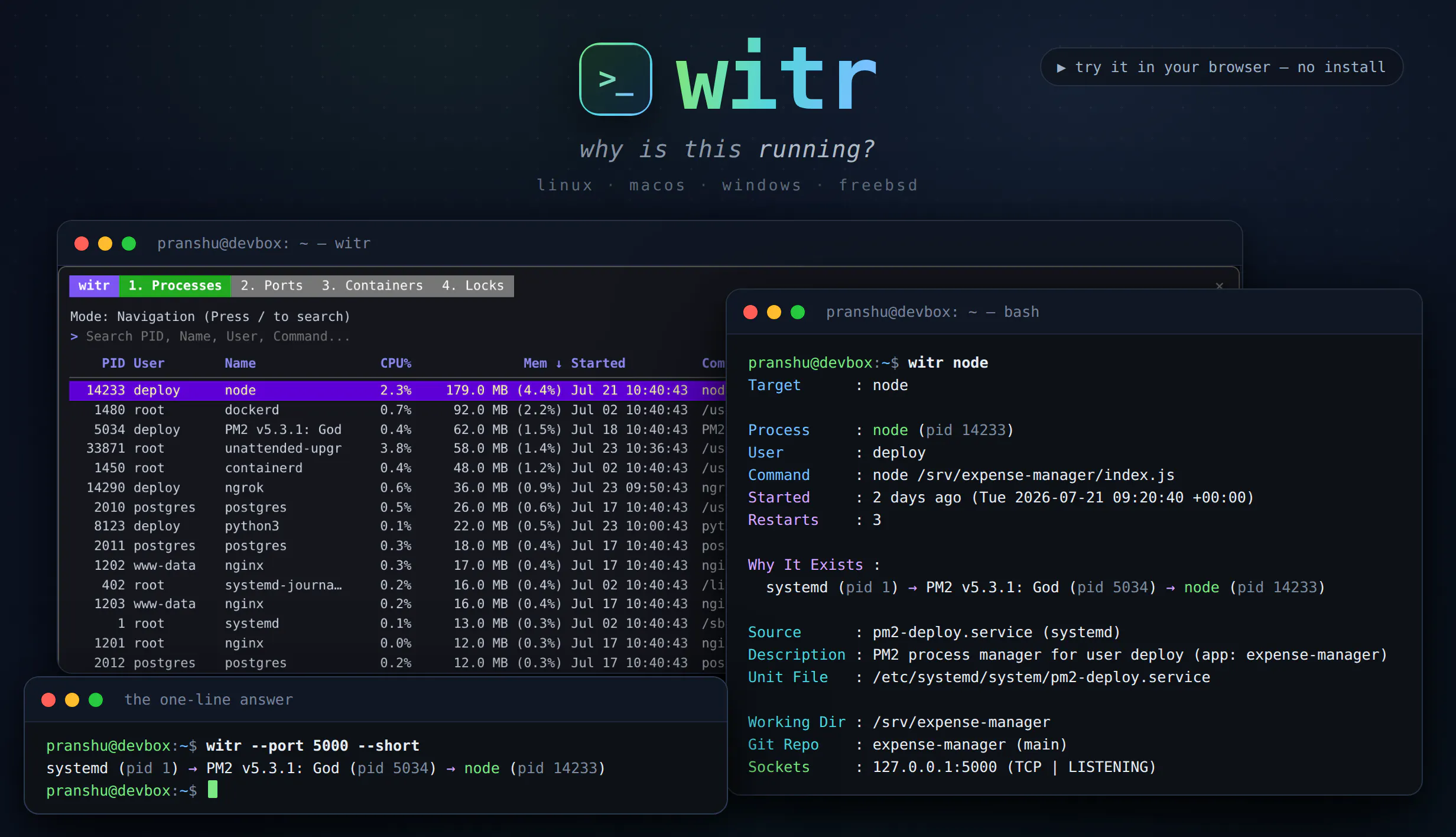
ps, top and lsof tell you what is running. witr tells you why. Point it at a process, PID, port, container or file and it traces the chain that explains it - systemd, supervisor, shell or cron - plus who started it, when, from where, and the warnings worth knowing. Run it bare for an interactive TUI with Processes, Ports, Containers and Locks tabs. Or script it: --short for a one-line chain, --json with real exit codes. One static Go binary for Linux, macOS, Windows and BSD.

ou want a real Linux VM that: Boots in seconds, not minutes Has a desktop you can actually see Runs headless when you need it (same VM, no restart) Stays running even after you close the app Doesn't require a PhD to set up TinyBridge solves this. One command. Full Linux. On demand. Try - brew install tinybridge
Linux Tools FAQ
What are the best Linux tools?
Based on community upvotes on ProductCool, the top Linux tools right now are CtrlOps 1.0, witr, Omarchy. CtrlOps 1.0 leads the category with 257 upvotes, and the full list on this page is curated and ranked by community upvotes.
Are there free Linux tools?
Most Linux tools listed on ProductCool are paid products. Check each product's page for its current pricing and any free trial it may offer.
How do I choose the right Linux tool?
Start from your core use case and shortlist the Linux tools that cover it, then compare them on pricing model (free, freemium or paid), integrations with the tools you already use, and how actively each product is maintained. Community feedback matters too: on ProductCool every Linux tool is ranked by community upvotes, so the top picks above are a solid starting point before you commit.
How often is this list of Linux tools updated?
This list is curated by the ProductCool community and updated daily as new Linux products launch. Rankings are driven by community upvotes, so the order changes as members discover and vote for new tools.