
Data Visualization Tools
58 best Data Visualization tools and apps, curated and ranked by community upvotes on ProductCool. Updated daily as new Data Visualization products launch.

Evidence Core is an open source framework for building business intelligence applications with coding agents. Build your entire business intelligence platform as a repo of files, and deploy it anywhere, for free. Metrics, dashboards, reports and themes are all specified in code which you can validate, preview and serve using the Evidence CLI.

The visual workspace for music teachers and creators. Turn live MIDI and audio into chord, notation and audio-reactive visuals then record video, audio or MIDI natively. Stream to OBS, TouchDesigner and Resolume for live performance.
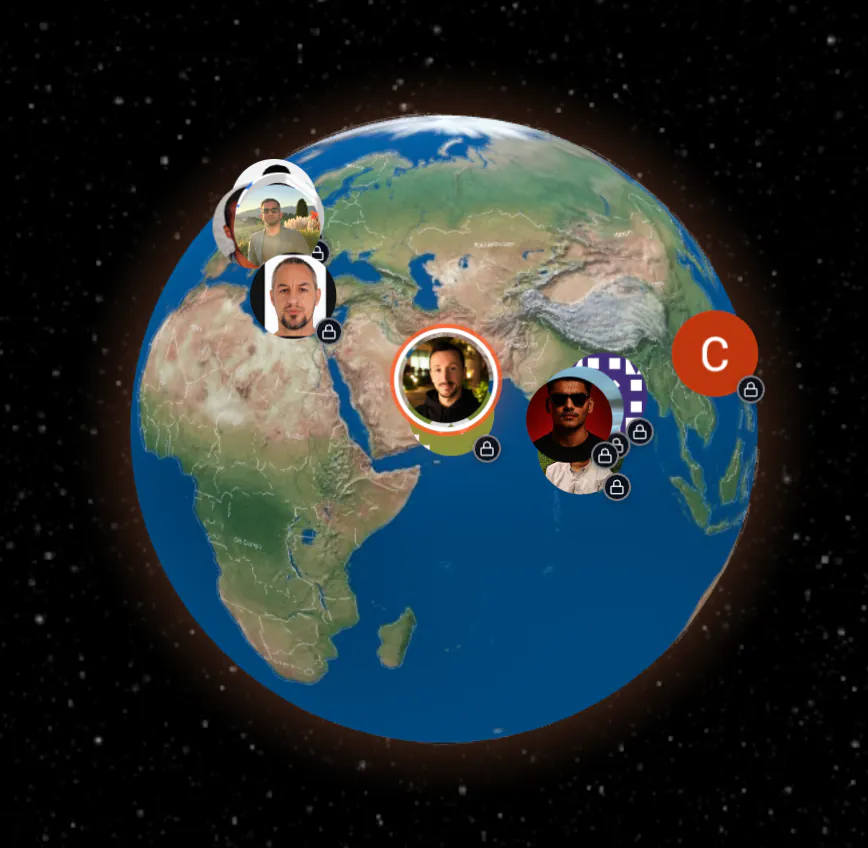
Watch your business come alive—every visitor and payment mapped in real time on a dynamic 3D globe. Dashi transforms static dashboards into live, geographic visualizations, making global trends and customer activity instantly engaging. Spin, zoom, and interact with your data as it happens. Perfect for SaaS teams and founders who want actionable, visual insights instead of boring charts.

A free, browser-only workspace for performance marketers. Upload a campaign CSV or connect Google Sheets to diagnose performance shifts, budget headroom, creative fatigue, experiments, and marketing response(MMM,Regression Model and Cannibalization check)—without sending raw data to a server.
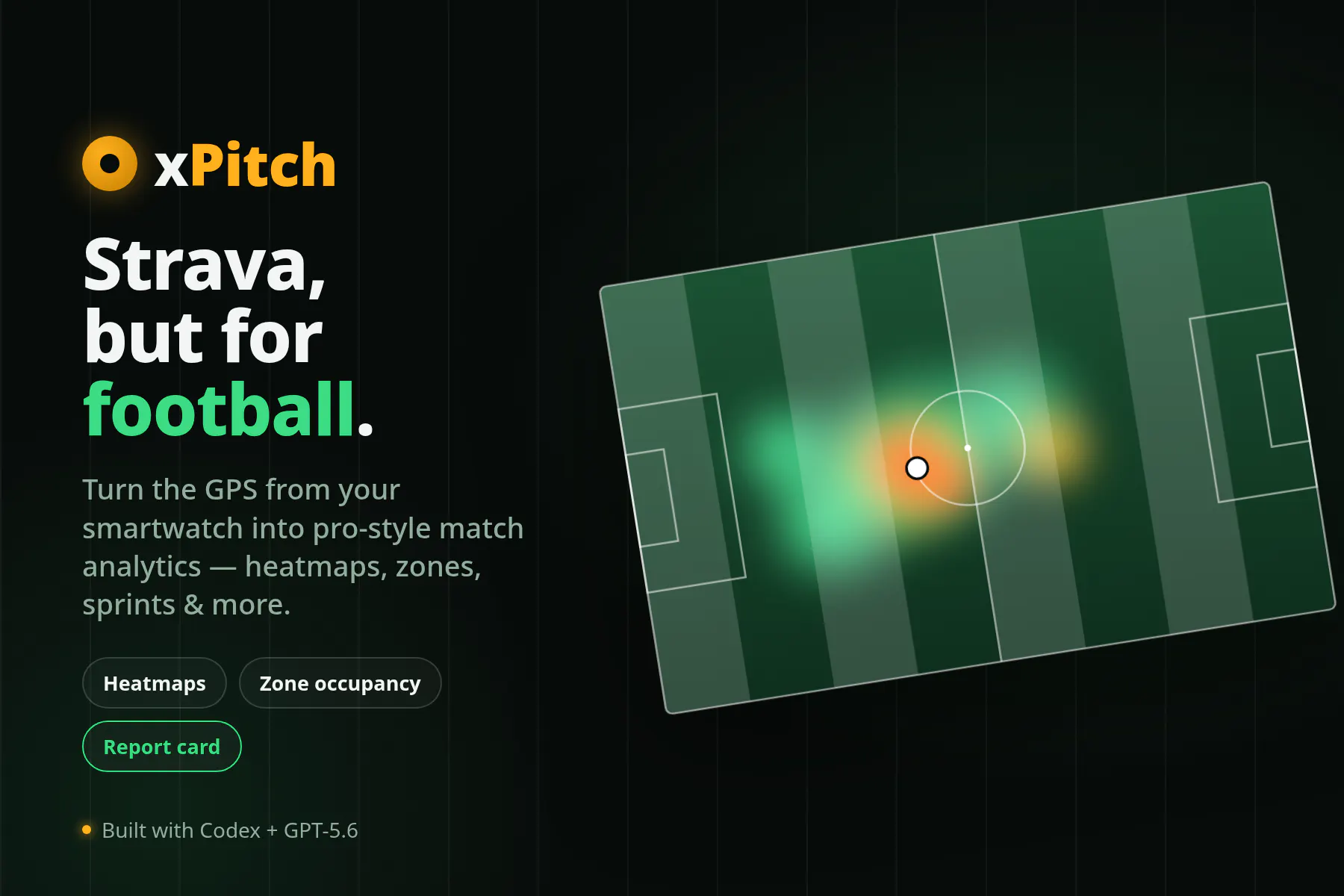
xPitch turns the GPS recording already on your smartwatch into football-specific match analysis. No dedicated tracker or fancy sensor needed. Upload FIT, GPX, or TCX files for heatmaps, movement trails, zones, sprints, heart-rate context, and estimated roles. Map a session to a real pitch, split play from rest, save matches with notes/photos in your account, share them, and export Story-ready graphics.

El Niño is a recurring warming pattern in the tropical Pacific that can influence weather around the world. This iPhone app turns live public NOAA data into a simple answer: is that warming signal building, fading or still uncertain? See what changed, where the warm water sits and how similar events unfolded before. A Home Screen widget keeps the latest complete update nearby. Upfront paid once, with no account or subscription. Independent context, not a forecast or official guidance.

AutoPlot is a Mac native scientific workspace for plotting and exploratory data analysis. Import tabular datasets, create variables, build X&Y plots, histograms, heat maps, correlations, 3D plots, and charts, run fits, then compose figures with vector export. Metal-backed GPU rendering keeps 3D scenes and correlation networks interactive at full dataset size — rotate, zoom, and re-fit without waiting on a redraw. Raw data values never leave your Mac.

Athenic is an AI agent for analyzing data and automating work. Connect your data, chat in plain English, and ship dashboards, reports, and automations. Built for startups to Fortune 500.

Supaboard helps your team turn business data into answers faster. Skip SQL, dashboard digging, and report delays. Ask questions in plain English, analyze data, and generate dashboards in minutes.

HelioPeak is a native iOS, iPadOS and macOS app for PVOutput.org users. Live dashboard, beautiful charts, multi-system support, home screen widgets, Solar Moments notifications, 6 languages, PDF + CSV + JSON exports. Free for one system, a one-time €6.99 unlock for multiple systems. No subscription, ever.

VKO1 is a pad-based visual performance app for iPhone, iPad and Apple Silicon Mac. AutoMix, 53 real-time effects, 25 GPU visualizers, MIDI, Ableton Link.
Paste your data, choose a chart, and export a video-ready animation in seconds. No timelines, no keyframes. Works with Premiere Pro, Final Cut, and CapCut.

Your clients don’t want dashboards. They want answers. Meet Zappy, the AI agent inside ZapDigits that turns marketing data into client-ready reports in seconds. Connect Google Analytics, Search Console, Google Business Profile, and more, then ask questions in plain English. Privacy-first, EU-hosted, no AI training on your data, and no chat storage.

Track events, leverage profile attributes, and seamlessly connect anonymous to identified data the moment a user logs in. Dive deeper into individual, chronological timelines to see the exact pages they browsed and actions they took. Spot live visitors in real-time, explore optimization insights, and easily segment audiences to fuel AB tests and build highly personalized website experiences that convert better.

Beauty Diagram makes your Mermaid and PlantUML diagrams beautiful. Pick from curated themes, animate the flow, and export as SVG, PNG, or GIF. Use the web editor, CLI, or API to drop diagrams straight into docs, PRs, and presentations.

Most AI courses explain concepts. CRIN shows them. Watch raw text become tokens, integers, then vectors — live, in an animated node graph. Every transformation is visible, every step has real data. Built for developers who learn by seeing. Three depth levels per concept — beginner to advanced — so you always learn at your pace. No slides. No passive video. Just AI, showing its work.

Turn CSV or Excel files into clean, presentation ready charts in seconds. Upload your data, customize your visuals, and export to PNG, SVG, or PDF for reports and documents. No coding, no setup, completely free.

Basedash Automations puts your AI data analyst on a schedule. Kick off analyses on a recurring cadence, when your data changes, or on demand — and deliver the results to Slack and email as an AI-written report with an executive summary, key metrics, and charts. Start from 15+ templates for growth, engineering, sales, finance, customer success, and ops — or describe your own analysis in plain English. No SQL. No dashboards to babysit. Your data works for you while you sleep.

Putting pins on a map shouldn't require a GIS degree. Paste your addresses, customize the pins, hit share. Works for store locators, real estate listings, travel blogs, whatever. Free tier included.

Your data never leaves your browser. No login. No server. No database. One button deletes everything. Drop your LinkedIn export and get: a force-directed graph scored by tie strength, company search to find who you know at any employer, and a ranked outreach queue that tells you who to message first. Built on Granovetter's weak-ties theory — validated by a 2022 LinkedIn experiment with 20 million users. One warm intro beats 40 cold applications. Free. Open source. Private by architecture.
Embedful turns analytics into a feature your customers can see and interact with. Build charts, tables, counters, and dashboards in minutes using Google Analytics, Google Sheets, Excel, CSV files or APIs, and share them instantly. Visualizations are interactive by default, and branding can be tailored with your logo and theme colors. They can then be embedded or shared anywhere, making analytics simple and engaging for every user.