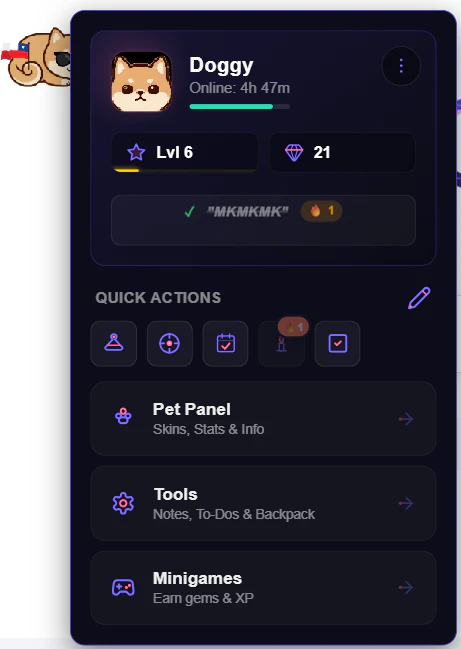
Product Introduction
- Definition: The Pawly Extension is a Chrome browser extension that functions as a sophisticated, interactive virtual pet companion. It falls under the technical categories of browser extensions, virtual pet software, and integrated productivity tools. It is designed as a lightweight, client-side web application.
- Core Value Proposition: This product exists to combine the engagement of a real AI-driven virtual pet with practical browser-based utility, directly addressing the user's need for a personalized, interactive, and productive browsing experience. It serves as a digital companion that reacts to user behavior while offering built-in task management and note-taking features.
Main Features
- Autonomous AI Companion: Unlike static GIF pets, Pawly's core is an autonomous AI engine. It uses a Markov chain-based state machine to make fluid, non-scripted decisions about behaviors like walking, sleeping, or interacting. This creates a dynamic experience where the pet's actions are probabilistic and context-aware.
- Tamagotchi-Style Well-being System: Pawly implements a real-time digital pet simulation with three key metrics: Hunger, Energy, and Mood. These values decrease over time and require active user intervention (feeding, resting, playing) to maintain. The system uses dynamic thresholds to affect the pet's animations and mood indicators, creating a compelling care loop.
- Integrated Productivity Suite ("Backpack"): The extension includes a built-in lightweight task manager, note-taking tool, and clipboard manager. Users can create tasks with deadlines, jot down quick notes, and save URLs via drag-and-drop, all within the extension's panel. The pet can react to task deadlines, creating a unique motivational interaction.
- Dynamic Progression and Economy: Features a unified XP (Experience Points) and Gem system. Users earn XP by caring for the pet, completing daily missions, and playing minigames, which increases the pet's level. Gems, the in-app currency, are earned through gameplay and used to purchase cosmetic accessories (hats, clothing) from the virtual wardrobe. Progress is saved locally.
- Synchronized Multi-Tab Experience: Utilizes Chrome's storage and messaging APIs for real-time tab synchronization. The pet exists in only one active tab at a time, instantly moving to the user's current active tab. Changing the active pet type is propagated across all open tabs instantly, ensuring a seamless, non-cluttered experience.
Problems Solved
- Pain Point: Traditional browser-based virtual pets are often simplistic, non-interactive GIFs or require constant tab focus. Pawly solves this by providing a true autonomous AI pet that lives in the browser background and a centralized productivity hub, eliminating the need to switch between separate apps for notes, tasks, and entertainment.
- Target Audience: The primary audience includes remote workers and students seeking to personalize their digital workspace, productivity enthusiasts looking for lightweight, browser-integrated tools, and casual users interested in a modern, low-commitment virtual pet experience without mobile app installations.
- Use Cases: This extension is essential for users who spend long hours in their browser and want a dynamic desktop companion to reduce screen fatigue. It's used for lightweight project tracking via the task manager, quick information capture through notes, and as a browser-based entertainment tool during short breaks via minigames.
Unique Advantages
- Differentiation: Pawly distinguishes itself from other browser pets by merging genuine AI behavior, a deep Tamagotchi-style care system, and practical productivity tools into a single, lightweight extension. Most competitors offer only a single aspect (e.g., a simple pet animation or a basic note tool). Furthermore, its strictly local data processing (no personal data sent to external servers) is a significant privacy-focused advantage.
- Key Innovation: The key technological innovation is the client-side Markov chain AI engine that drives the pet's behavior without requiring server-side computation or predefined script loops. This allows for fluid, unpredictable, and resource-efficient interaction that adapts to the user's browsing patterns in real-time.
Frequently Asked Questions (FAQ)
- Is the Pawly Extension free, and does it require an account? Yes, Pawly is completely free to install and use. It operates without requiring any user account creation or subscription. All data, including pet progress, XP, gems, and notes, is stored locally in your browser's storage.
- How does the Pawly pet affect browser performance and privacy? Pawly is designed to be lightweight. It automatically pauses its activity when its tab is not in focus to conserve system resources. Regarding privacy, the extension does not collect or transmit personal data to external servers. All user activity and content data (notes, tasks) remain solely on your local device.
- Can I use my Pawly pet and its progress on different computers? Since all data is stored locally in your Chrome browser profile, your pet and progress are tied to that specific browser installation. For now, there is no built-in cross-device sync feature. The pet's progress does not persist if you use a different computer or a different user profile.
- What is the difference between XP and Gems in Pawly? XP (Experience Points) are earned through general pet interaction and are used exclusively to increase your pet's level. Gems are the primary in-game currency earned through specific activities like completing daily missions, playing minigames, and achieving care milestones. Gems are spent in the Wardrobe to purchase cosmetic accessories for your pet.
- How do the minigames and productivity features work together? The minigames ("Catch Items" and "Pet Runner") are accessible directly from the pet's menu and serve as the primary way to earn Gems for cosmetics. The productivity tools (Task Manager, Notes) are housed in the "Backpack" interface. They are complementary: the pet provides engagement and rewards, while the Backpack provides utility, creating a balanced experience within a single extension.