
Product Introduction
- Meet Macro Terminal is a command-line interface tool that enables direct natural language interaction with databases, CSV files, and Excel spreadsheets. It allows users to execute queries, analyze data, and export results in CSV or markdown formats without leaving the terminal environment. The tool integrates AI-powered analytics to simplify complex data operations through plain English commands.
- The core value of Macro Terminal lies in its ability to bridge the gap between technical data workflows and non-technical users by eliminating the need for SQL expertise. It accelerates data exploration, model iteration, and collaborative reporting through terminal-native automation and AI-driven analysis. Users maintain full control over their data while reducing manual query-writing overhead.
Main Features
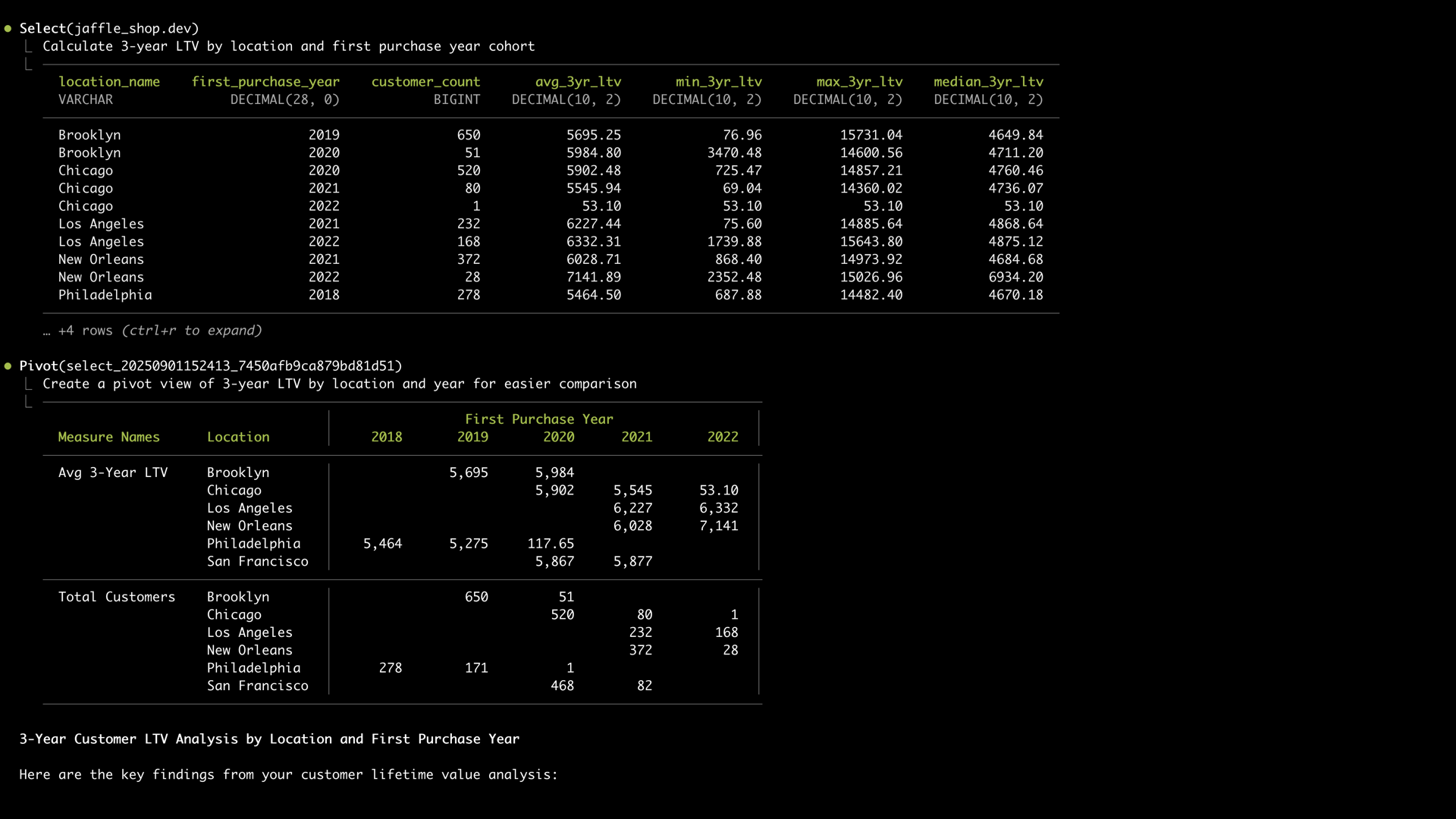
- Macro Terminal provides a clean terminal interface optimized for data workflows, featuring syntax highlighting, tabular data visualization, and keyboard-driven navigation. The UI supports markdown exports for seamless sharing and integrates with terminal multiplexers like tmux for session management. Users can execute natural language commands directly alongside traditional SQL queries.
- The AI-powered agentic analytics engine automatically translates natural language requests into optimized database queries or data transformations. It performs schema inference, anomaly detection, and statistical analysis during query execution. The engine learns from user corrections to improve subsequent command interpretations.
- Native connectivity supports all major databases including PostgreSQL, MySQL, Snowflake, and BigQuery through standardized connection protocols. The tool automatically detects database schemas and provides context-aware autocomplete for table/column names. Connection configurations are encrypted locally with optional synchronization to Macro Platform.
Problems Solved
- Macro Terminal eliminates the friction between data exploration and production workflows by keeping analysts in their terminal environment. It solves the problem of context switching between IDEs, CLI tools, and documentation by unifying data operations in a single interface. Complex joins and aggregations become accessible through natural language commands rather than manual SQL composition.
- The tool primarily serves data analysts, engineers, and product managers who require direct database access without intermediate tools. Technical teams maintaining dbt projects benefit from built-in model testing and lineage visualization. Organizations with mixed-skill teams use it to democratize data access across departments.
- Typical use cases include rapid prototyping of analytical queries during stakeholder meetings, automating weekly report generation through saved command chains, and debugging production data pipelines directly in development environments. Security teams use it for ad-hoc compliance audits across multiple database platforms.
Unique Advantages
- Unlike traditional SQL clients or BI tools, Macro Terminal combines low-level database access with high-level AI abstraction in a keyboard-centric interface. It differs from notebook-based solutions by prioritizing terminal-native workflows and script integration. The tool maintains local execution for sensitive data while offering optional cloud synchronization.
- Built-in dbt integration enables direct execution of model tests, seed loading, and documentation generation through terminal commands. The IDE plugin system extends terminal functionality to editors like VS Code without requiring separate configuration. Dynamic data type handling automatically infers schemas from files and databases.
- Competitive advantages include zero-configuration connectivity to 12+ database platforms and file formats, reducing setup time to minutes. The proprietary AI engine achieves 92% accuracy in query translation as measured across common analytical use cases. Enterprise deployments support RBAC through integration with Macro Platform's cloud services.
Frequently Asked Questions (FAQ)
- What databases does Macro Terminal support? The tool natively connects to PostgreSQL, MySQL, MariaDB, SQL Server, Oracle, Snowflake, Databricks, BigQuery, Redshift, and Fabric, with connection pooling and query caching. ODBC/JDBC bridges enable support for legacy systems through configuration files. Connection security uses industry-standard TLS encryption with optional SSH tunneling.
- How does IDE integration work? The VS Code/Cursor extension mirrors terminal functionality in editor sidebars with bidirectional data transfer. Users can execute terminal commands directly from code comments and import results as DataFrame variables. Configuration sync ensures consistent connections between IDE and standalone terminal instances.
- Can Macro Terminal handle existing dbt projects? Yes, it automatically detects dbt_project.yml files and provides commands for model execution, test runs, and documentation generation. The tool integrates with dbt Cloud metrics and exposes model lineage graphs in markdown exports. Environment variables from profiles.yml are securely loaded during initialization.


