
Product Introduction
LabelSync Pro is a GitHub automation tool that synchronizes standardized labels across all repositories in an organization or user account. It operates through scheduled daily executions or manual triggers, ensuring consistent label management without user intervention. The tool automatically detects and applies missing labels while removing outdated ones, maintaining uniformity across projects. It integrates directly with GitHub repositories using a secure token-based authentication system.
The core value of LabelSync Pro lies in eliminating manual label maintenance and enforcing organizational standards across repositories. It reduces human error by programmatically applying predefined label configurations, ensuring visual and functional consistency. By automating repetitive tasks, it allows developers to focus on code quality rather than administrative overhead. The tool is designed for scalability, supporting both small teams and large enterprises with minimal configuration.
Main Features
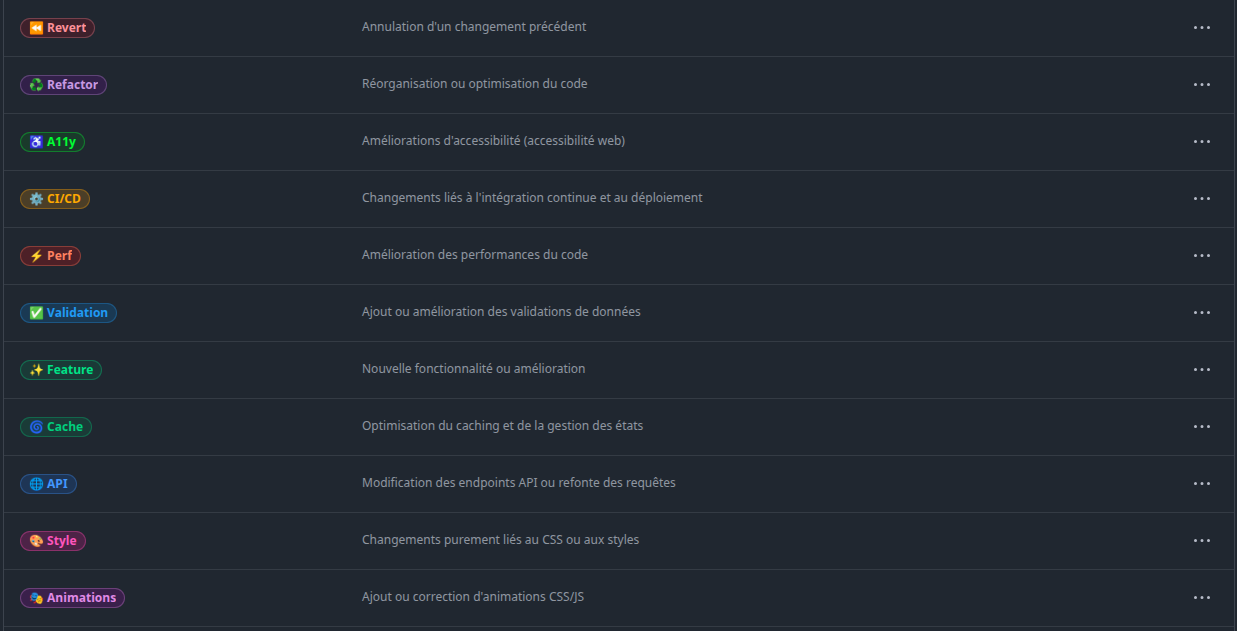
LabelSync Pro automatically applies a predefined set of labels to newly created repositories and updates existing ones daily at 19:15 UTC. The synchronization process includes color standardization, description alignment, and hierarchical label categorization based on JSON configuration files. It uses GitHub Actions for workflow automation, requiring no external servers or additional infrastructure.
The tool performs intelligent label management by comparing existing repository labels against the configured standard set. It calculates delta changes to only add missing labels and remove non-compliant ones, preserving custom labels that don't conflict with the standard configuration. This delta approach minimizes API calls to GitHub, reducing execution time and avoiding rate limits. The system logs all changes through GitHub Actions for auditability.
LabelSync Pro includes granular control mechanisms through its JSON configuration format, allowing users to define label names, colors, descriptions, and optional protection rules. The configuration supports environment-specific presets and conditional logic for label application based on repository naming patterns. All synchronization operations are performed using GitHub's REST API v3 with OAuth token authentication, ensuring compatibility with public and private repositories.
Problems Solved
LabelSync Pro addresses the problem of inconsistent GitHub label usage across multiple repositories within an organization. Manual label management often leads to divergent color schemes, missing categories, and redundant entries that hinder issue tracking. The tool eliminates these inconsistencies by enforcing a centralized label policy across all repositories automatically.
The primary target users are development teams maintaining multiple GitHub repositories, open-source project maintainers, and DevOps engineers responsible for standardizing workflows. It particularly benefits organizations with strict compliance requirements or those undergoing audits needing uniform project metadata. Individual developers managing personal project portfolios also gain efficiency from automated label synchronization.
Typical use cases include onboarding new team members to a standardized workflow system, migrating legacy projects to updated labeling conventions, and maintaining cross-repository consistency during organizational scaling. It solves the specific scenario of repository forks lacking original label updates by automatically reapplying current standards. The tool also prevents label drift in long-running projects through daily synchronization cycles.
Unique Advantages
Unlike basic label synchronization scripts, LabelSync Pro implements intelligent delta detection that preserves valid custom labels while removing only non-compliant ones. Competitors typically overwrite all labels or require manual approval for each change, whereas this tool automates compliant modifications. It uniquely supports repository pattern matching in its configuration, enabling context-aware label application for different project types.
The integration of scheduled synchronization with on-demand execution via GitHub Actions provides flexibility unmatched by static CI/CD solutions. The tool innovates through its optimization engine that skips repositories already compliant with label standards, reducing unnecessary API consumption. Advanced features include atomic label updates that roll back changes if any part of the synchronization fails, ensuring repository integrity.
Competitive advantages include zero-cost operation as a 100% open-source solution with no SaaS subscription requirements. The architecture leverages GitHub's native Actions infrastructure, eliminating hosting costs and maintenance overhead. Security is enhanced through token-based permissions that follow the principle of least privilege, contrasting with alternatives requiring broad repository access. The JSON configuration system allows version-controlled label policies that integrate with existing CI/CD pipelines.
Frequently Asked Questions (FAQ)
How does LabelSync Pro handle existing custom labels in repositories? The tool only removes labels that conflict with the predefined standard set or are explicitly marked as obsolete in the configuration. Custom labels not defined in the central configuration file remain untouched unless they share identical names with standardized labels, ensuring backward compatibility with existing workflows.
Can LabelSync Pro synchronize labels across multiple GitHub organizations? Yes, the tool can manage labels across multiple organizations by configuring different GitHub tokens with appropriate permissions. The workflow file can be modified to specify target organizations or user accounts through environment variables, enabling centralized management of distributed repository networks.
What happens if a repository has modified some standard labels manually? During daily synchronization, LabelSync Pro detects and corrects any deviations from the configured standard, including color changes or description modifications. The system treats the predefined configuration as the source of truth, automatically resetting altered labels to their specified parameters while preserving creation dates and existing associations with issues/PRs.


