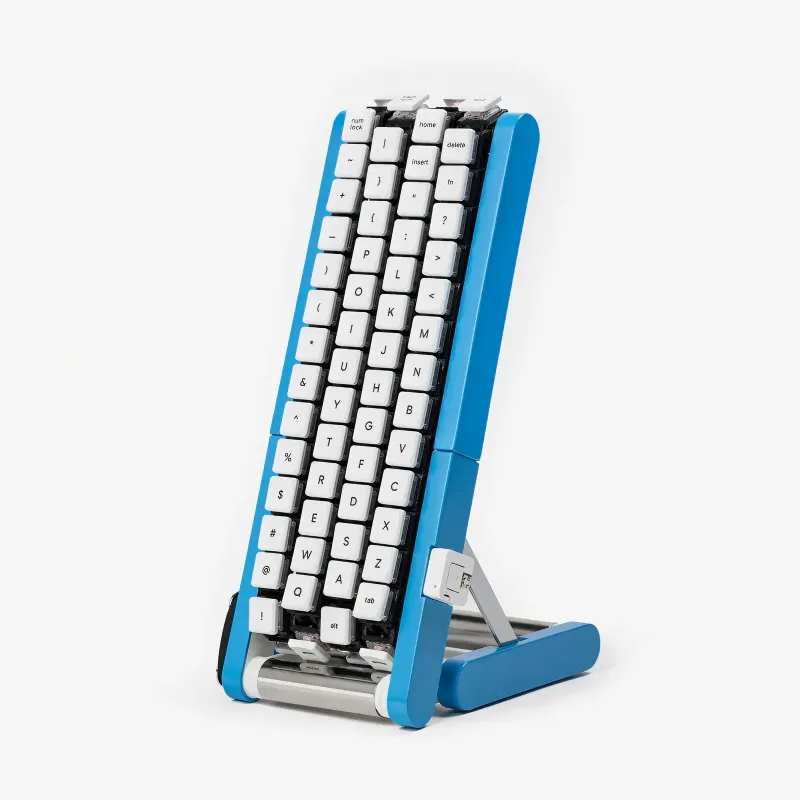
Product Introduction
- Definition: The Gboard Kurukuru Version (Gboard くるくるバージョン) is a DIY, open-source, conveyor belt mechanical keyboard concept developed by Google Japan's Gboard team. It is a physical input device where keys are mounted on moving belts, categorizing it as an experimental ergonomic and alternative input device.
- Core Value Proposition: It exists to fundamentally rethink human-computer interaction by solving the ergonomic inefficiency of traditional static keyboards. Its core proposition is a "user-centric" input experience where the keyboard moves the keys to the user's stationary hand, enabling efficient one-handed typing and reducing physical strain from arm and hand movement.
Main Features
- Conveyor Belt Key Mechanism: The keyboard's primary innovation is its four independent conveyor belts, each equipped with 29 individual key switches. A motorized system rotates these belts, bringing the full set of alphanumeric and symbol keys sequentially within reach of a single hand. This mechanical design eliminates the need for the user to reposition their arm to access distant keys.
- One-Handed Full Character Set Input: Unlike chorded keyboards or layers that require memorization, the Kurukuru Version allows direct input of all letters (uppercase and lowercase) and symbols using just one hand. This is achieved by timing keystrokes as the desired key passes under the user's finger, offering an intuitive, linear input method.
- Open-Source DIY Design (Not a Commercial Product): A critical feature is its non-commercial, maker-centric availability. Google has released the complete build documentation, including STL files for 3D printing the chassis, firmware for the microcontroller (e.g., likely based on QMK or similar), and a detailed assembly guide on its official GitHub repository. This enables the enthusiast and mechanical keyboard community to build, modify, and iterate on the design.
Problems Solved
- Pain Point: It addresses the ergonomic limitation and inefficiency of traditional QWERTY keyboards that require substantial hand and arm travel for one-handed or single-finger typing. This can lead to fatigue, repetitive strain injury (RSI) risk, and context-switching delays when alternating between keyboard and mouse.
- Target Audience: The primary personas are DIY keyboard enthusiasts, ergonomic input device researchers, accessibility technology developers, and power users seeking to minimize hand movement (e.g., gamers needing mouse precision, CAD designers, or users with limited mobility in one arm).
- Use Cases:
- Ergonomic Workstation: Enables continuous typing with one hand while the other hand operates a mouse, drinks coffee, or handles documents, streamlining workflows for data entry, graphic design, and trading.
- Accessibility Solution: Provides a viable full-featured keyboard solution for individuals who can primarily use only one hand.
- Experimental Input Research: Serves as a tangible prototype for academic and commercial R&D into dynamic, adaptive user interfaces.
Unique Advantages
Strengths & Limitations (Pros & Cons):
- Pros:
- Revolutionary Ergonomics: Dramatically reduces arm and wrist movement, potentially lowering RSI risk.
- Space-Efficient: Concentrates a full keyboard's functionality into a compact, single-hand footprint.
- Open Innovation: Being open-source fosters community development, customization, and academic study.
- High Novelty & Engagement: The kinetic, moving-key design offers a unique and engaging user experience.
- Cons:
- Learning Curve: Requires developing new muscle memory for timing-based input versus spatial key memory.
- Speed Limitation: Typing speed is theoretically capped by belt rotation speed and key spacing.
- Noise & Mechanical Complexity: Moving parts introduce potential for wear, maintenance, and audible noise.
- Not Commercially Available: Requires technical skill to source components, 3D print, and assemble.
- Pros:
Key Alternatives & Differentiation:
- Traditional Ergonomic Keyboards (e.g., Kinesis Advantage, Microsoft Sculpt): These use split designs and tenting to improve posture but keep keys static. The Kurukuru differentiates by making the keys mobile, a more radical approach to reducing hand travel.
- Chorded Keyboards (e.g., Tap Strap, Twiddler): These allow one-handed input by pressing key combinations. The Kurukuru is fundamentally different, offering direct, single-key presses without chording, which may be easier to learn but is mechanically more complex.
- Mini Mechanical Keyboards (40% layouts): These reduce hand stretch by placing all keys close together but require heavy use of layers and modifiers. The Kurukuru provides direct access to all characters without layers, trading layer memorization for timing skill.
Frequently Asked Questions (FAQ)
Is the Gboard Kurukuru keyboard for sale? No, the Gboard Kurukuru Version is not a commercial product for sale. It is an open-source concept project. Google has released all necessary files (STL, firmware, guide) on GitHub for users to build it themselves.
How does the Gboard Kurukuru one-handed keyboard work? It works via four motorized conveyor belts, each with 29 keys. The belts rotate, bringing all keys past your stationary fingers. You type by pressing the desired key as it moves into position, allowing one hand to access the entire character set.
What is the purpose of Google's Gboard Kurukuru project? The purpose is experimental research into future input methods. It aims to solve ergonomic issues in traditional typing by inverting the paradigm: instead of the user moving to the keys, the keys move to the user, enabling efficient, user-centric, one-handed input.
Can I build the Gboard Kurukuru keyboard myself? Yes, if you have technical DIY skills. The project is fully open-source. You need to 3D print the parts using the provided STL files, source the mechanical components (belts, motors, key switches), program the microcontroller with the provided firmware, and follow the assembly guide.
Why was the Gboard Kurukuru announced on October 1st (10/1)? According to Google Japan's blog, the date is a playful reference to the classic "101-key" keyboard layout, a standard for full-sized keyboards. The announcement on 10/1 is a nod to this iconic design while introducing its radical reimagination.