
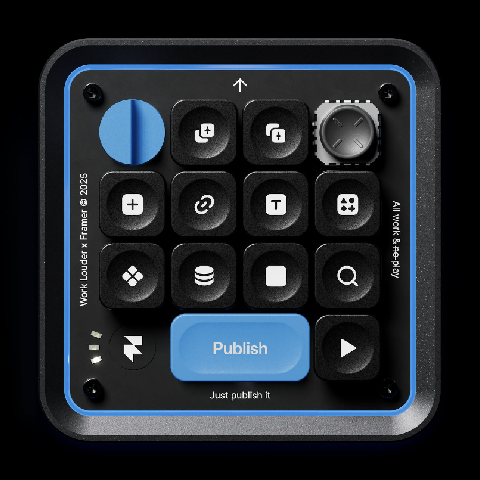
Product Introduction
- The Framer Creator Micro 2 is a compact mechanical keyboard co-developed by Framer and Work Louder, designed to accelerate creative workflows through tactile shortcuts and customizable controls. It integrates 12 mechanical switches, a 2D joystick, and RGB backlighting, optimized for seamless interaction with Framer’s design and prototyping tools. The keyboard supports both wired (USB-C) and wireless (Bluetooth) connectivity, ensuring flexibility across Mac and Windows environments.
- Its core value lies in eliminating menu navigation and shortcut memorization by providing dedicated physical buttons for Framer-specific actions like CMS access, copy-paste effects, and instant publishing. The device prioritizes ergonomic efficiency, enabling users to execute complex tasks with single keystrokes while maintaining full customization for cross-app compatibility.
Main Features
- The keyboard includes 31 custom Framer icon keycaps and 14 solid color caps, allowing users to visually map shortcuts like “Publish in Seconds” or “Insert Media” directly onto the hardware. Each key uses MX-style mechanical switches with PBT/ABS keycaps, ensuring durability and a tactile response tailored for high-frequency use.
- A programmable 2D joystick triggers radial menus for app-specific shortcuts, such as reloading tabs, switching between Framer projects, or adjusting site settings without keyboard shortcuts. The joystick supports custom assignments via Work Louder’s Input configurator, enabling users to adapt it for non-Framer apps like Figma or Photoshop.
- The underglow RGB lighting and sandblasted aluminum base provide both aesthetic customization and durability, while the 1900mAh battery ensures extended wireless use. The keyboard’s modular design allows keycap swaps, layout remapping, and shortcut adjustments without firmware limitations.
Problems Solved
- The Creator Micro 2 addresses the inefficiency of navigating nested software menus or memorizing keyboard shortcuts for design tools like Framer. By replacing software-based actions with tactile buttons, it reduces repetitive strain and accelerates task execution.
- It targets UI/UX designers, web developers, and no-code creators who rely on Framer for rapid prototyping but seek hardware-level optimization. The device is particularly valuable for users managing complex projects requiring frequent CMS updates or multi-app workflows.
- Typical scenarios include publishing Framer sites directly from the keyboard, inserting media assets via radial menus, or toggling between design and developer modes without interrupting creative flow. It also streamlines collaboration by enabling quick access to shared project settings.
Unique Advantages
- Unlike generic macro pads, the Creator Micro 2 is pre-configured with Framer-specific shortcuts and iconography, reducing setup time for Framer-centric workflows. Its MX-style switches differ from competing products using Choc-style stems, offering broader compatibility with third-party keycaps.
- The inclusion of a 2D joystick for radial menus is an industry-first innovation for shortcut keyboards, providing spatial control over app commands. The sandblasted aluminum base and CNC-machined PC casing ensure premium durability compared to plastic alternatives.
- Competitive advantages include native integration with Work Louder’s Input configurator, which simplifies remapping for non-technical users, and cross-platform Bluetooth support for up to three devices. The limited-edition status and Framer co-branding add exclusivity to its functional benefits.
Frequently Asked Questions (FAQ)
- Can I use the CM-2 with apps other than Framer? Yes, the keyboard is fully customizable via Work Louder’s Input configurator, allowing shortcuts to be mapped to any app, including Figma, Photoshop, or coding environments. The joystick and rotary encoder can also be assigned app-specific radial menus.
- Which operating systems does it support? The CM-2 is compatible with macOS and Windows, with Bluetooth pairing for up to three devices and USB-C wired connectivity. The Input configurator provides OS-specific profile settings for seamless switching.
- Are existing Creator Micro keycaps compatible with the CM-2? No, the CM-2 uses MX-style stems instead of Choc-style stems, requiring new keycaps. However, it includes 45 custom Framer keycaps and supports most third-party MX-compatible replacements.


