
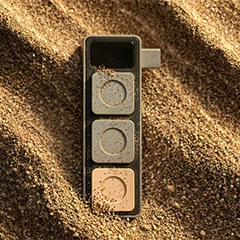
Product Introduction
Definition: Dune is a specialized context-aware external keypad and tactile interface designed exclusively for the macOS ecosystem. Categorized as an adaptive input peripheral, it features three physical keys housed in a premium CNC-machined enclosure, functioning as a real-time hardware shortcut controller that dynamically reconfigures its input commands based on the active foreground application.
Core Value Proposition: Dune exists to eliminate the cognitive friction associated with complex keyboard shortcuts and manual app-switching. By utilizing AI-powered context awareness, the device automates developer workflows, streamlines AI agent interactions, and simplifies virtual meeting management. It targets high-output professionals who require "zero-latency" control over tools like VS Code, GitHub, and various LLM interfaces without the need for manual macro programming or configuration.
Main Features
AI-Powered Context Awareness: Dune employs a background monitoring system that detects the specific macOS application currently in the foreground. Using real-time state detection, the device automatically remaps its three physical keys to the most relevant actions for that software—such as "Commit" in GitHub or "Execute" in an AI code editor—eliminating the need for manual profile switching or user-defined triggers.
Unified Meeting Control Engine: This feature synchronizes with macOS calendar data to facilitate one-click joins for Zoom, Microsoft Teams, and Google Meet. Beyond simple connectivity, it provides hardware-level mic/camera toggles. A critical technical innovation is the "Active Window Snap," which simultaneously unmutes the microphone and brings the meeting application window to the front of the screen, solving the common problem of "hunting for the mute button" during multi-monitor multitasking.
High-Performance Industrial Hardware: Constructed from CNC-machined anodized aluminum, Dune is a bus-powered USB-C device weighing 50g. Its ultra-compact dimensions (40mm x 10mm x 10mm) allow it to sit adjacent to a standard laptop or desktop keyboard. Because it is USB-C powered and lacks an internal battery, it offers reduced latency and high reliability for mission-critical developer environments.
Problems Solved
Pain Point: Shortcut Overload and Context Switching: Developers and AI power users often manage dozens of hotkeys across different IDEs and browser-based tools. Dune solves "shortcut fatigue" by providing a consistent physical location for variable commands, reducing the mental overhead of remembering app-specific keybindings.
Target Audience:
- Software Engineers & Developers: Users deep in VS Code, GitHub, and terminal environments who need streamlined version control and build commands.
- AI Researchers & Prompt Engineers: Individuals running AI agents or interfaces like Claude and Openclaw who require rapid iteration and execution keys.
- Remote Professionals: Managers and consultants who spend significant time in back-to-back meetings on Zoom, Teams, and Google Meet.
- Use Cases:
- DevOps Optimization: Instantly pushing code to a repository or triggering a build script with a single physical press while the IDE is active.
- AI Interaction: Navigating and executing prompts in Claude or Openclaw without moving the mouse to on-screen buttons.
- Meeting Fluidity: Joining a scheduled call directly from the keypad and toggling privacy settings (mic/camera) without exiting a focused work document.
Unique Advantages
Differentiation: Unlike traditional macro pads (e.g., Elgato Stream Deck) which require extensive manual setup and user-defined icons, Dune is built on a "zero-config" philosophy. It utilizes intelligent software to determine what the user needs based on their current task, rather than forcing the user to build their own interface maps.
Key Innovation: The specific innovation lies in the integration of "Intent-Based UI." By combining hardware tactile feedback with real-time application state monitoring, Dune transforms from a static input device into a proactive workflow assistant that anticipates the next logical step in a user's professional pipeline.
Frequently Asked Questions (FAQ)
Is Dune compatible with Windows or Linux? Dune is currently built exclusively for macOS. The software architecture relies on deep integration with macOS-specific APIs to achieve real-time context awareness and calendar synchronization.
Does Dune require manual programming of macros? No. Dune is designed to work out-of-the-box with AI-powered context detection. It identifies supported applications like VS Code, GitHub, and Zoom automatically, though it remains programmable for users who wish to customize specific behaviors.
How does Dune connect to my Mac? The device uses a standard USB-C connection for both data and power. It is a plug-and-play peripheral that does not require an external power brick or batteries, ensuring it is always ready for use.
Which video conferencing platforms does Dune support? Dune provides native one-click controls and hardware toggles for the three major enterprise platforms: Zoom, Microsoft Teams, and Google Meet, integrating directly with your macOS calendar for meeting alerts.
What is the build quality of the Dune keypad? The chassis is manufactured from a single block of CNC-machined anodized aluminum, providing a premium, durable feel that matches the aesthetic of MacBook and Mac Studio hardware.


