
Product Introduction
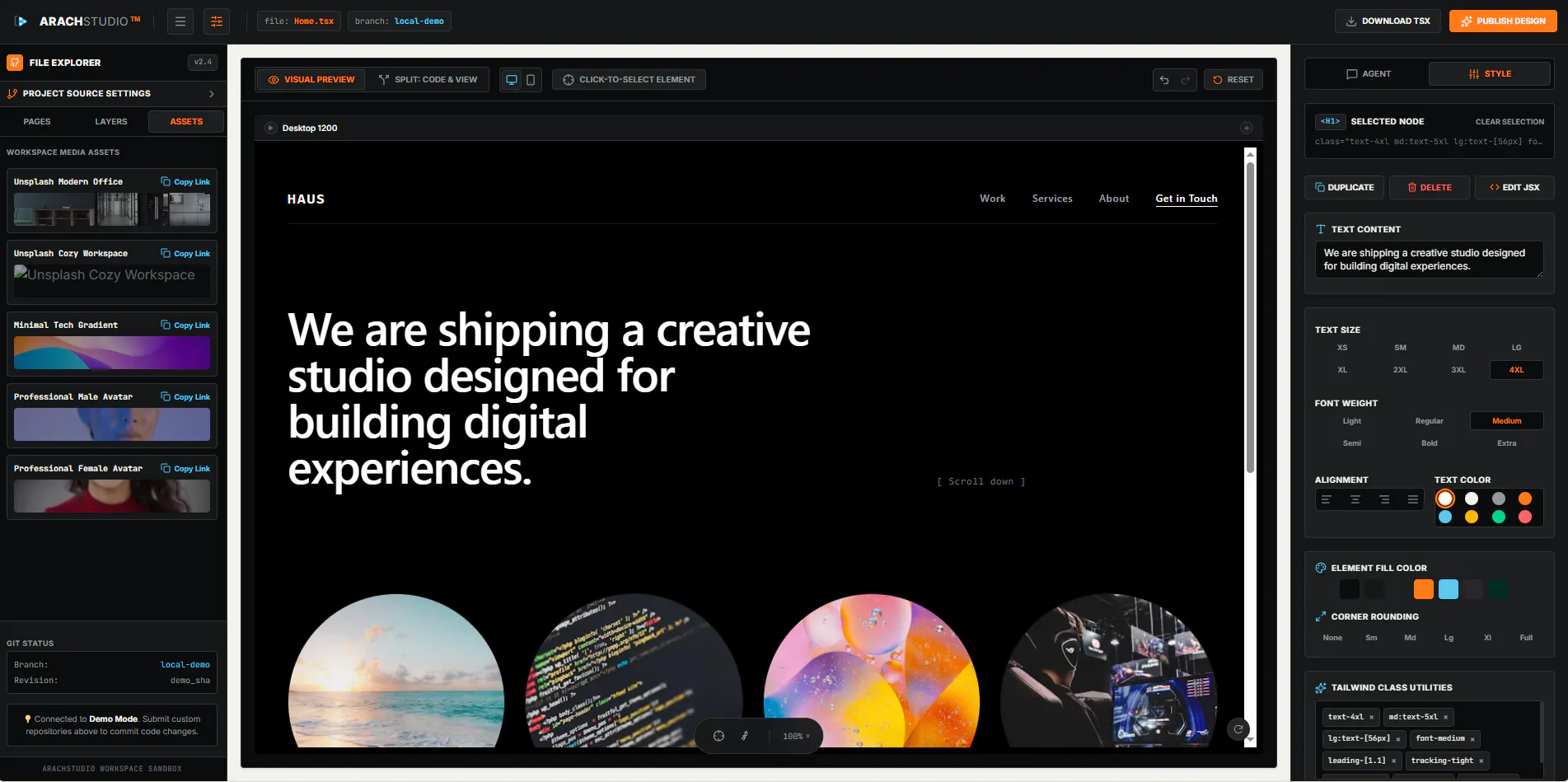
- Definition: ArachStudio is a cloud-based, visual development platform designed for front-end developers and UI/UX designers. It technically functions as a live code editor and visual CSS editor that connects directly to GitHub repositories.
- Core Value Proposition: It exists to bridge the gap between visual design and code implementation, enabling real-time, collaborative editing of live codebases directly from a browser. Its primary value is in accelerating the front-end development workflow and component styling process without local environment setup.
Main Features
- GitHub Integration & Project Scanning: ArachStudio connects to a user's GitHub account via a secure access token. It scans the specified repository and loads the project structure, including HTML, CSS, JavaScript, and component files (like React or Vue components), into its online editor environment. This enables direct editing of live, version-controlled code.
- Real-Time Visual Preview & Live Editing: The platform provides a responsive preview pane that simulates both desktop and mobile views. Users can make visual CSS edits (e.g., adjusting margins, colors, fonts) directly on the preview elements. These changes are instantly reflected in the underlying code editor, creating a true WYSIWYG (What You See Is What You Get) development experience for styling.
- Code Synchronization & Export: All style and code modifications made in the ArachStudio interface are synchronized in real-time with the in-browser code editor. The final, edited product can be exported, ensuring that the visual changes are captured as actual code changes that can be committed back to the source repository, completing the design-to-code handoff.
Problems Solved
- Pain Point: It eliminates the tedious back-and-forth between a design tool, a local development server, and a code editor. It specifically addresses the inefficiency of manually translating visual adjustments into CSS code and refreshing browsers to see changes.
- Target Audience: Primary users are Front-End Developers working with frameworks like React, Vue.js, or static sites, and UI/UX Designers with basic code understanding who want to tweak live prototypes. Secondary users include freelance web developers and agency teams seeking faster client feedback cycles.
- Use Cases: Essential for rapidly prototyping style changes on an existing website, conducting responsive design testing across device breakpoints in real-time, styling individual components in isolation, and allowing non-developer stakeholders to suggest visual edits within the actual code environment.
Unique Advantages
- Differentiation: Unlike traditional design tools (Figma, Adobe XD) that generate code for handoff, ArachStudio edits the actual production code. Compared to browser DevTools, changes are made within a project-aware editor and can be systematically exported, not lost on refresh. It is more integrated and production-focused than generic online code playgrounds.
- Key Innovation: Its core innovation is the bidirectional synchronization between a visual manipulation layer and a live codebase hosted on GitHub. This creates a unified environment for visual development (VisDev) where design intent is directly expressed as code mutations, streamlining the component-driven development process.
Frequently Asked Questions (FAQ)
- How does ArachStudio ensure the security of my GitHub code? ArachStudio uses standard OAuth access tokens provided by GitHub, which allow you to control the specific repository permissions. Your code is processed in a secure session, and you can revoke access at any time from your GitHub account settings.
- Can I use ArachStudio with React, Vue, or other JavaScript frameworks? Yes, ArachStudio is designed to work with modern front-end frameworks. It scans and loads your project structure, allowing you to live-edit the CSS and styling for components built with React, Vue.js, and other similar technologies directly in a visual interface.
- What happens to my edits after I export from ArachStudio? The export function provides you with the modified code files. You can then review the changes, typically CSS updates, in your local environment or the platform's editor, and commit them back to your GitHub repository using your standard Git workflow.
- Is ArachStudio suitable for building a website from scratch? ArachStudio is primarily optimized for editing and styling existing codebases. It is not a full-featured IDE for writing complex application logic from scratch. Its strength lies in accelerating the visual refinement and styling phase of web development projects.


