
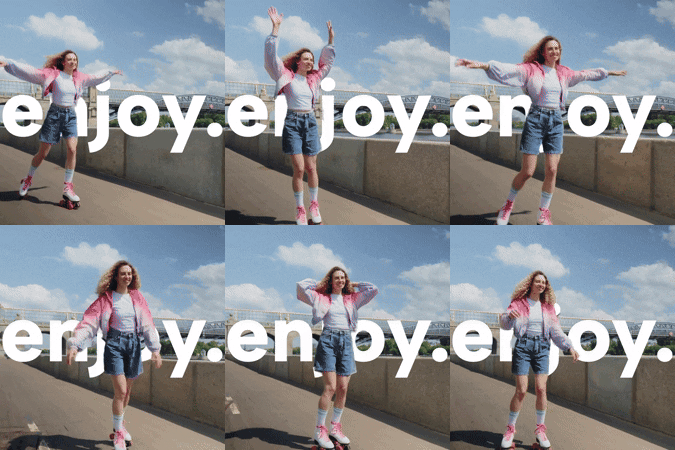
Product Introduction
- textbehindvideo.io is a web-based platform that enables users to layer stylized text behind video content automatically, eliminating the need for manual design or video editing expertise. It generates cinematic visuals by dynamically integrating text into video backgrounds, optimized for social media posts, promotional content, and stories. The tool uses AI-driven positioning and animation to ensure text remains visible and aesthetically aligned with moving subjects. Users can export and apply designs instantly across platforms without additional formatting.
- The core value lies in democratizing professional-grade video text effects for non-designers, reducing production time from hours to minutes. By automating complex design workflows, it empowers brands and creators to maintain visual consistency and engagement across social channels. The platform prioritizes ease of use, enabling rapid iteration and deployment of visually striking content tailored for algorithms on Instagram, TikTok, and YouTube.
Main Features
- Automated Text Layering: The platform uses AI to analyze video motion and depth, automatically positioning text behind subjects without manual masking or keyframing. Users input text, select styling preferences, and the system handles layer integration, animation, and contrast adjustments. Prebuilt templates for vertical stories, square posts, and horizontal promos ensure platform-specific compliance.
- One-Click Social Media Optimization: Exported videos are pre-formatted for dimensions, resolution, and file size requirements of Instagram, TikTok, YouTube, and Facebook. Integrated scheduling tools allow users to publish directly to connected social accounts or download batch-ready files. Metadata and hashtag suggestions are auto-generated based on video content analysis.
- Brand Customization Library: Users upload brand assets (fonts, colors, logos) to create reusable templates that auto-apply to new projects. The AI suggests complementary text styles and animations aligned with brand guidelines, ensuring consistency. Dynamic watermarking and analytics track content performance across campaigns.
Problems Solved
- Eliminates Design Complexity: Traditional tools like After Effects require expertise in layer compositing and motion tracking to place text behind video elements. This platform automates these technical steps, enabling users with no design background to achieve professional results.
- Reduces Content Production Time: Manual text-video integration can take hours per project; the tool reduces this to under five minutes. Social media managers and marketers can rapidly produce high-volume, platform-specific content without outsourcing.
- Ensures Cross-Platform Readability: Text visibility often fails when repurposing videos across platforms due to aspect ratio changes. The AI dynamically adjusts text size, position, and contrast to maintain readability in 9:16 stories, 1:1 posts, and 16:9 promos.
Unique Advantages
- AI Depth Mapping: Unlike basic text overlay tools, the platform analyzes video depth to place text behind subjects using 3D scene reconstruction. This creates a cinematic parallax effect without requiring manual masking or green screens.
- Context-Aware Styling: The AI scans video content to auto-adjust text color, shadow, and outline thickness based on background motion and palette. For example, it avoids placing white text over bright skies or applies motion blur to text during fast-paced scenes.
- No-Code Automation: Competitors like Canva or CapCut require manual text positioning frame-by-frame for behind-video effects. This tool fully automates the process via object tracking and depth-aware rendering, cutting production steps by 90%.
Frequently Asked Questions (FAQ)
- How does textbehindvideo.io ensure text stays behind moving objects? The AI uses motion tracking and depth-sensing algorithms to map video subjects in 3D space, updating text position frame-by-frame. Users can adjust sensitivity settings to prioritize subject detection accuracy for complex scenes.
- Can I edit text styles after the AI generates the video? Yes, all text elements remain editable post-generation. Users can modify fonts, colors, animation speed, and positioning through a timeline editor without re-processing the entire video.
- What video formats and resolutions are supported? The platform accepts MP4, MOV, and AVI files up to 4K resolution. Exports are optimized for social media, including 1080x1920 (Stories), 1080x1080 (posts), and 1920x1080 (YouTube), with H.265 compression for smaller file sizes.
- Does the tool support team collaboration? Enterprise plans include shared workspaces, version control, and role-based access for editing and approval. Brand libraries and templates can be centralized for cross-team consistency.
- Is there a watermark on free-tier exports? No watermarks are applied to any exports, including the free plan. All features except premium templates and team collaboration are available in the free tier.


