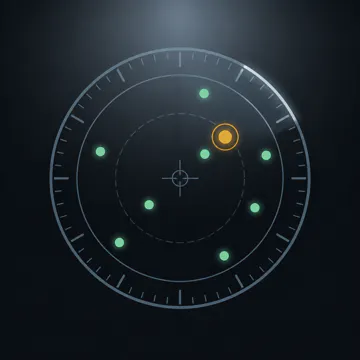
Product Introduction
- Definition: Overflight is a specialized iOS, iPadOS, and tvOS application that functions as a real-time, location-based aircraft identification and visualization tool. Technically, it is a mobile and TV app that processes live ADS-B data through a proprietary visibility model to create a dynamic radar scope of the sky.
- Core Value Proposition: It exists to solve the common curiosity of "what plane is that?" by providing immediate, accurate identification of every visible aircraft overhead. Its primary value is transforming passive sky-gazing into an interactive, educational experience by delivering key flight data—airline, flight number, route, altitude, and bearing—directly to a user's pocket or living room screen.
Main Features
- Live Sky Radar with Visibility Modeling: Overflight's core feature is a real-time radar display that plots only aircraft within a calculated line of sight. It works by polling live ADS-B (Automatic Dependent Surveillance–Broadcast) data from a global network of receivers. Unlike a simple distance-based filter, its proprietary model calculates slant-range visibility, accounting for the user's altitude (via Open-Meteo terrain data) and the aircraft's altitude to determine which planes are truly visible from the user's specific location. The RANGE setting (NEAR, NORMAL, FAR) adjusts the sensitivity of this model.
- Prioritized Aircraft Carousel & Interesting Inbounds: The app intelligently ranks visible aircraft, highlighting the most prominent one first. Users can swipe through a carousel to see details for each. A Pro feature, "Interesting Inbounds," automatically detects and alerts users to military or unusual aircraft on a steady inbound track. The interface turns amber, pauses the carousel, and provides a countdown to overhead, functioning as an advanced traffic spotter.
- Multi-Platform Deployment (iPhone, iPad, Apple TV): Overflight offers a cohesive experience across devices. On iPhone/iPad, it's a handheld identification tool. On Apple TV, it transforms into an always-on ambient display for living rooms or lounges, automatically cycling through aircraft. For precise location and heading on the TV, the app uses a secure, ephemeral QR code handoff from an iPhone, leveraging the phone's superior GPS and compass.
- Spoken Traffic Callouts & Accessibility: Beyond visual display, Overflight offers optional, synthesized ATC-style audio announcements (e.g., "Traffic, two o'clock, twelve miles..."), providing situational awareness without looking at the screen. This, combined with full VoiceOver support, makes aircraft tracking accessible to visually impaired users and enhances hands-free use.
- Privacy-First, Account-Free Operation: The application requires no account or login. User location data is used transiently and only for essential functions: querying nearby ADS-B data, fetching terrain elevation, and facilitating the Apple TV pairing handshake. According to its privacy policy, this pairing data is deleted from servers within minutes.
Problems Solved
- Pain Point: The frustration of unidentified aircraft overhead. Traditional methods involve using separate, often complex, flight tracking websites or apps that show all air traffic regardless of visibility, requiring users to manually correlate what they see in the sky with a cluttered map.
- Target Audience: Aviation enthusiasts, plane spotters, curious travelers, educators, families with children interested in airplanes, FBO (Fixed-Base Operator) lounge visitors, and individuals living under busy flight paths. The Apple TV version also targets users wanting a unique, informative ambient display.
- Use Cases: Identifying a specific plane flying over a backyard; teaching children about airlines and aircraft types during a park visit; monitoring interesting military or cargo traffic in the area; using an Apple TV in a home or office as a dynamic, conversational piece that displays local air traffic; providing an auditory aid for visually impaired individuals to engage with their aerial environment.
Unique Advantages
- Differentiation: Unlike broad flight tracking apps (e.g., Flightradar24, FlightAware), Overflight is not a global map. It is a focused, visibility-filtered "scope" centered on the user. It prioritizes what you can actually see and presents it in an immediate, ranked interface, removing the clutter and manual search required by general trackers.
- Key Innovation: The integration of a terrain-aware visibility model is its key technical innovation. By factoring in both user elevation and aircraft altitude to calculate true line-of-sight, it provides a fundamentally more accurate and relevant representation of "your sky" than any flat, distance-radius filter. The "Interesting Inbounds" alert system and the seamless, privacy-conscious Apple TV multi-platform experience are also significant product differentiators.
Frequently Asked Questions (FAQ)
- How does Overflight know which planes I can see? Overflight uses your device's location and a terrain elevation lookup to calculate your precise altitude. It then compares this to live ADS-B data (altitude and position of aircraft) using a proprietary slant-range visibility model. This model determines the true line-of-sight, filtering out aircraft blocked by the curvature of the earth or terrain, showing only planes theoretically visible from your exact vantage point.
- Is Overflight free, and what does the Pro version include? The Overflight app is free to download with core identification features. Overflight Pro is a subscription or one-time purchase that unlocks: full route information (origin/destination) on all aircraft, spoken traffic callouts, the "Interesting Inbounds" alert system for military/unusual traffic, and removal of the idle timeout for an always-on display.
- Can Overflight show military aircraft? Yes, Overflight can display military and other unusual aircraft when their transponders are broadcasting ADS-B data, which many do. The "Interesting Inbounds" Pro feature is specifically designed to highlight and alert you to such traffic when it is on a steady inbound track to your location.
- How does the Apple TV version get my location? The Apple TV app uses the device's general network-based location to start. For precise positioning and directional heading (which way you're facing), the app generates a QR code on the TV screen. You scan this code with the Overflight app on your iPhone, which securely sends your precise GPS location and compass heading to the Apple TV via a temporary, encrypted handoff. This data is not stored long-term.
- What data sources does Overflight use? It uses multiple specialized sources: live aircraft positions from the global network of volunteer ADS-B receivers; flight route and airline data primarily from AeroDataBox (with adsbdb as a fallback); and terrain elevation data from Open-Meteo to power its visibility calculations.