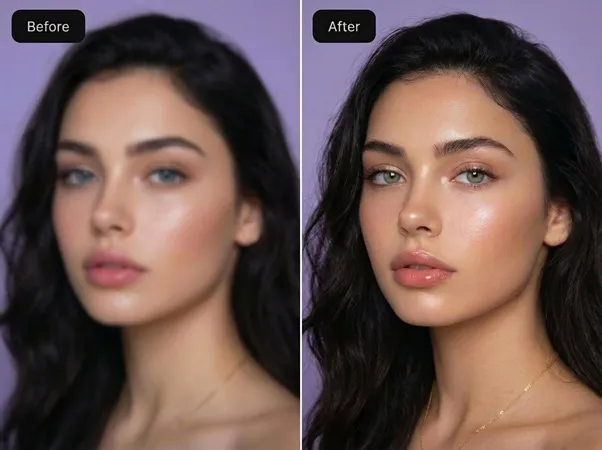
Product Introduction
- Overview: Image Upscaler 4K is a cloud-based, AI-powered image enhancement platform designed to intelligently increase the resolution and quality of digital images. It falls under the categories of computer vision, image processing SaaS, and automated content creation tools.
- Value: The primary value is democratizing professional-grade image upscaling, allowing photographers, e-commerce sellers, archivists, and digital artists to instantly transform low-resolution or blurry source material into crisp, high-definition 4K visuals without requiring expertise in software like Adobe Photoshop or Topaz Gigapixel AI.
Main Features
- Fast Mode with 3-Second Processing: Utilizes a lightweight, optimized neural network to perform a fixed 4x upscale (e.g., 1024x1024 to 4096x4096) in approximately 3 seconds. This model is engineered for batch processing and high-throughput workflows, such as preparing e-commerce product catalogs or social media assets, using a single AI model for generalized detail reconstruction.
- Pro Mode with Five Scene-Specific AI Models: Employs a suite of specialized deep learning models, each trained on distinct datasets: a Portrait Model for facial feature recovery and skin texture; a Product Photo Model for sharpening edges and reducing noise on objects; an Old Print Model for restoring grain, scratches, and faded colors; a Document Model for enhancing text legibility and contrast; and an AI Art Model optimized for stabilizing outputs from generators like Stable Diffusion and Midjourney, preventing artifacts during enlargement.
- Advanced Parameter Controls: In Pro Mode, users gain granular control over the upscaling process with independent sliders for Sharpness (0-100), Noise Reduction (0-100), and Face Enhancement intensity. This allows for precise tuning to match the source image's characteristics, such as aggressively reducing JPEG compression artifacts or gently enhancing details in a vintage photograph.
Problems Solved
- Challenge: The proliferation of low-resolution imagery across digital platforms creates a quality gap, where users have valuable visual content (old family photos, product shots, AI-generated artwork) that is pixelated, blurry, or unsuitable for high-definition displays and print media.
- Audience: This tool serves e-commerce managers needing high-res product photos, photographers and archivists restoring historical images, digital marketers creating web and social media content, and AI artists seeking to finalize their creations for large-format display.
- Scenario: An online retailer can batch-upload hundreds of 800x600 product photos from an old catalog. Using Fast Mode, they can upscale them all to 4K-ready 3200x2400 resolution in minutes, ensuring their online store meets modern visual standards without reshooting products.
Unique Advantages
- Vs Competitors: Unlike many online upscalers that offer a single, generic AI model, Image Upscaler 4K provides a multi-model Pro Mode, giving it a significant edge in output quality for specialized use cases. Its direct competitor comparison feature and transparent credit-based pricing (with a free tier) offer clearer value than opaque subscription models.
- Innovation: The platform's technical edge lies in its specialized model training. By curating separate datasets for portraits, products, documents, and AI art, its neural networks learn domain-specific features (like facial landmarks or text strokes), leading to more accurate and context-aware detail generation than a one-size-fits-all AI, reducing common issues like over-sharpening or "plastic" textures.
Frequently Asked Questions (FAQ)
- What does '4K upscaling' mean? 4K upscaling refers to increasing an image's resolution so its larger dimension reaches at least 3840 pixels (4K UHD width). This tool uses a 4x magnification factor, meaning a 1000x750 image becomes 4000x3000, which exceeds 4K standards. The input must be at least 960x540 to reach true 4K after processing.
- Is there a difference between Fast Mode and Pro Mode? Yes. Fast Mode uses one optimized AI model for speed, perfect for bulk tasks like e-commerce photos. Pro Mode offers five specialized AI models (for portraits, products, etc.) with adjustable sharpness, noise reduction, and face enhancement controls, providing superior quality for complex images like old prints or AI art.
- What file formats and sizes are supported? The platform supports common raster formats including JPEG, PNG, and WebP. The maximum upload size is 10MB per image. For optimal results, always upload the highest resolution source file available, as the AI reconstructs detail from the existing pixel data.