
Product Introduction
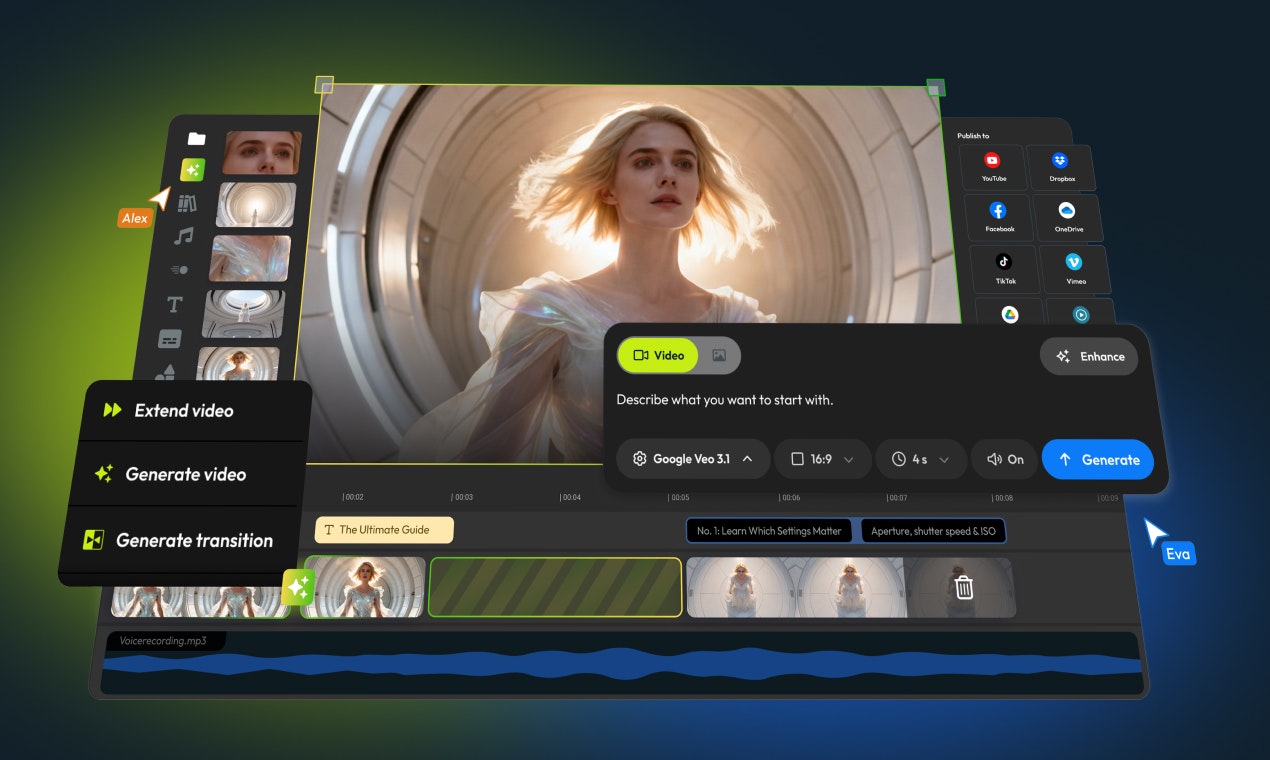
- Definition: Flixier Generate AI Video in Timeline is a cloud-based AI video editing platform (technical category: SaaS video production tool) that integrates generative AI directly into a collaborative editing timeline.
- Core Value Proposition: It eliminates fragmented workflows by enabling users to generate, extend, and polish AI clips within a unified editor—solving the "export-rebuild" cycle plaguing standalone AI video tools. Primary keywords: AI video timeline editing, seamless AI video generation, cloud video collaboration.
Main Features
AI Timeline Generation Engine:
- How it works: Generates video clips from text prompts using integrated models (Kling 3.0, VEO 3.1, Sora2) directly into the editor’s timeline. Users input prompts (e.g., "Stormy Coastline"), select duration/output specs, and drag AI outputs onto tracks for immediate editing.
- Technology: Multi-model API integrations with frame-accurate placement, avoiding file exports.
Contextual AI Extensions & Transitions:
- How it works: Analyzes timeline content to extend shots from the last frame or generate AI transitions between clips (e.g., morphing a "Forest Walk" into a "Vintage Train Interior"). Uses temporal coherence algorithms to maintain visual consistency.
- Technology: Frame-prediction AI trained on spatial-temporal data, rendered via cloud GPUs.
Cross-Model Comparison Hub:
- How it works: Side-by-side testing of prompts across 8+ AI video/image models (e.g., Flux 2 Pro vs. Stable Diffusion 3). Outputs are previewed in-browser before timeline commitment.
- Technology: Unified API gateway with parallel processing for real-time model benchmarking.
Problems Solved
- Pain Point: Disconnected workflows where AI-generated clips require manual re-importing into editors like Premiere Pro or CapCut, wasting time and causing version chaos.
- Target Audience:
- Social Media Creators (rapid TikTok/Reels content)
- Marketers (product demos, ads)
- Online Educators (training modules)
- SaaS/Healthcare Teams (compliance/onboarding videos)
- Use Cases:
- Repurposing a webinar into AI-bridged social snippets.
- Extending a product demo with AI-generated close-ups.
- Localizing employee training videos via AI-translated subtitles.
Unique Advantages
- Differentiation: Unlike VEED or Synthesia (template-bound AI tools), Flixier merges generative AI with nonlinear editing (NLE) capabilities—supporting layer-based compositing, keyframing, and team collaboration around AI assets.
- Key Innovation: "Frame-locked AI" technology contextualizes generations to adjacent timeline content (e.g., extending a drone shot while preserving camera motion), a feature absent in RunwayML/Pika.
Frequently Asked Questions (FAQ)
Can Flixier Generate AI Video replace traditional editors like Premiere Pro?
Flixier integrates generative AI into professional editing workflows but focuses on cloud-based speed and collaboration—ideal for rapid video production, while complex VFX still requires desktop software.How does Flixier ensure AI-generated clips match existing footage?
Its "Extend from Last Frame" tool uses style-transfer algorithms to analyze color grading, motion, and composition from timeline clips, ensuring visual continuity in AI outputs.Is Flixier’s AI video generator suitable for commercial use?
Yes, all AI-generated clips include commercial rights, and the platform complies with GDPR/CCPA for enterprise sectors like healthcare and finance.What file formats support AI timeline editing in Flixier?
AI clips render in MP4/MOV (H.264/HEVC) at up to 4K, compatible with Flixier’s native timeline for trimming, audio syncing, and captioning.How does Flixier’s pricing compare to AI video tools?
Flixier offers usage-based AI credits (starting at $20/month), undercutting enterprise tools like Synthesia while including full editing features—unlimited collaborators and cloud storage.


