Product Introduction
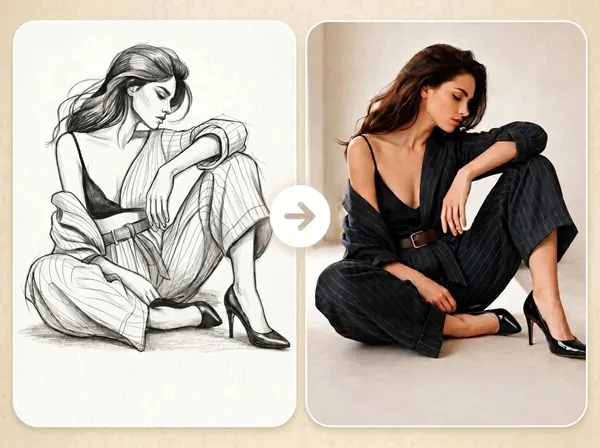
- Overview: Fast Image AI's Sketch to Image Generator is a cloud-based, generative AI tool that uses advanced diffusion models to convert user-uploaded sketches and line art into photorealistic or stylized digital images. It falls under the category of AI-assisted creative and design software.
- Value: The primary benefit is drastically reducing the time and technical skill required to visualize concepts, enabling creators, designers, and hobbyists to iterate on ideas rapidly and produce professional-grade visual assets from simple drawings.
Main Features
- Sketch-Guided Generation: The core AI model is trained to recognize and preserve the fundamental composition, shape, and structure of the uploaded sketch while rendering details. This ensures the output remains faithful to the user's original creative intent, unlike text-to-image generators that start from noise.
- Prompt-Controlled Stylization: Users can augment the sketch with natural language prompts to define specific artistic styles (e.g., 'cyberpunk', 'watercolor'), materials ('polished chrome', 'oak wood'), lighting conditions ('dramatic sunset lighting'), and environmental backgrounds, offering granular creative control over the final render.
- No-Code, Browser-Based Workspace: The tool operates entirely online within a web browser, requiring no software installation, GPU hardware, or prior experience with AI models like Stable Diffusion or DALL-E. The interface is designed for a seamless drag-and-drop upload and one-click generation workflow.
Problems Solved
- Challenge: The 'visualization gap'—the difficulty and time investment required to translate a rough idea or sketch into a polished visual suitable for presentation, client review, or further development.
- Audience: Product designers, concept artists, architects, interior designers, fashion illustrators, game developers, marketers, and content creators who need to prototype visuals quickly without advanced 3D modeling or digital painting skills.
- Scenario: An industrial designer sketches a new product concept on a napkin. Using this tool, they upload a photo of the sketch, add the prompt 'sleek titanium finish, product studio lighting, isolated on white background,' and generates multiple high-fidelity renderings in minutes for a team meeting.
Unique Advantages
- Vs Competitors: Unlike generic AI art generators, Fast Image AI specializes in sketch-to-image conversion, offering superior structure adherence. Its freemium model with generous credits provides more accessible entry than many API-based or credit-limited competitors, and its all-in-one web platform is more streamlined than piecing together separate upscaling or inpainting tools.
- Innovation: The platform's technical edge lies in its fine-tuned model that prioritizes sketch fidelity. It likely employs control networks or specialized conditioning techniques to ensure the AI interprets the sketch as a structural guide rather than mere noise, resulting in more predictable and usable outputs for professional workflows.
Frequently Asked Questions (FAQ)
- What file formats does the Sketch to Image AI accept for uploads? The generator accepts common image formats including JPG, PNG, and WebP. You can upload photos of hand-drawn sketches or digital line art directly from your device.
- Do I own the commercial rights to the AI images I generate? Yes, all subscription plans (Basic, Pro, Pro Max) include a commercial license, granting you full ownership and rights to use, sell, or modify the generated images for commercial projects.
- How does the AI handle color in a black-and-white sketch? The AI uses your text prompt to infer and apply appropriate colors, materials, and textures. For example, if you sketch a car and prompt 'red convertible, glossy paint,' the AI will render it accordingly, intelligently coloring within your drawn lines.